
Best Blue Iris Cameras: Matching the Right Model to Your Routine for 2026
Disclosure: We may earn a commission when you buy through links on this page, at no extra cost to you. As an Amazon Associate I earn from qualifying purchases. Learn more

Pick the best blue iris cameras for your home with clear guidance on ONVIF, night vision, PoE power, resolution and stream settings.
A camera that looks great inside its own phone app can still frustrate you inside Blue Iris if it hides its video stream or locks away its settings. The best blue iris cameras hand the software a clean, standard stream and then stay out of the way, so recording, motion alerts, and playback all behave the way you expect.
There is no single model that suits every home, because a camera watching a front door works a very different shift from one covering a long driveway or a quiet nursery. This guide sorts cameras by the job you need done, explains the specs that change your results, and points you to the comparison table below so you can match features to your routine before you spend.


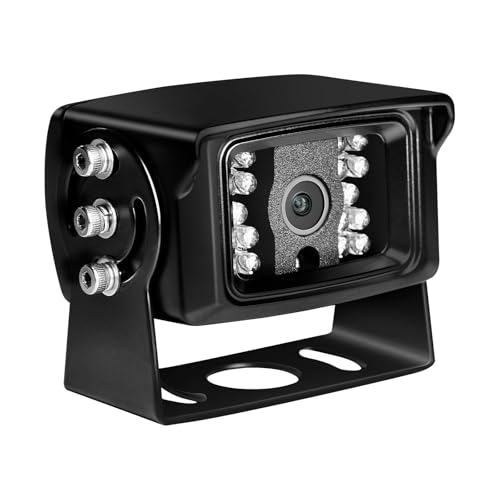
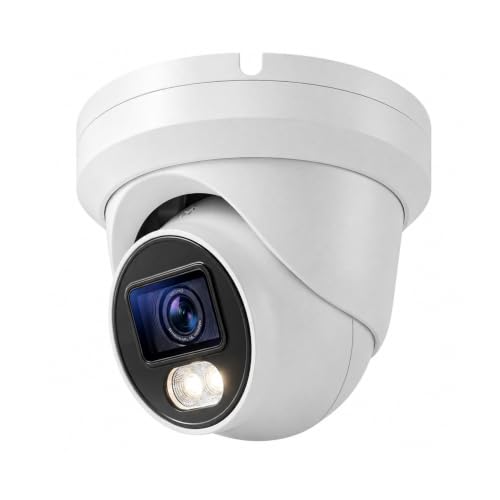

Who Should Buy Which Blue Iris Cameras?
Start with the view you need to protect, then work backward to the camera that fits it. The three setups below cover most homes, and each one calls for a different mix of lens, power, and stream features. If you want a wider look at network models before narrowing down, see our guide to the best ip cameras for blue iris for the broader category.
Homeowners Guarding Doors and Driveways
Your priority is identification, not just a wide picture. Choose a weatherproof camera with a lens wide enough to cover the entry and walkway, strong infrared night vision for unlit porches, and motion detection you can tune so passing cars stop triggering alerts. Optical zoom helps when the spot that matters, like a gate or a parked car, sits well back from the mounting point. Wired power suits this job best, because a door camera that sleeps to save battery can miss the exact seconds you bought it for.
Owners of Large Properties With Many Cameras
Once you pass four or five cameras, the load on your recording computer matters as much as any single camera. Favor PoE models that send both a main stream and a low resolution sub stream, because Blue Iris can watch the sub stream for motion and switch to the full stream only when something moves. Support for the H.265 codec cuts storage use sharply across a big system. Before adding another camera, check it against our guide to the best blue iris compatible cameras so you do not build around a model the software handles poorly.
Renters and Apartment Dwellers
You need coverage without drilling holes or running cable through walls you do not own. Compact indoor WiFi cameras that plug into a nearby outlet fit best, since you can set one on a shelf, aim it at the entry, and take it with you when you move. Confirm the camera exposes a standard stream, because plenty of small app driven cameras only talk to their own cloud service and will never appear in Blue Iris. Keep the view on your own space rather than shared hallways, and check your lease and local rules on recording audio.
Key Features to Compare
The product table above lists headline specs, but a few features decide whether the best blue iris cameras thrive in this software or fight you every week. Work through these before you compare prices.
ONVIF and RTSP Stream Support
This is the gatekeeper spec. Blue Iris connects to cameras through open standards, mainly ONVIF for discovery and settings and RTSP for the video stream itself. Full ONVIF support lets the software find the camera on your network, pull its stream paths automatically, and often control pan, tilt, and zoom from the same screen. Cameras that only work inside a maker app, or that force video through a cloud account, are poor candidates no matter how good the picture looks. Check the product page and manual for both terms before you buy, and be wary of models that bury stream access behind a subscription.
Resolution, Sensor Size, and 4K Video
Megapixels alone do not tell you how useful the footage will be. A larger sensor size gathers more light per pixel, so a well made 4 megapixel camera can beat a cheap 4K video camera once the sun goes down. Higher resolution helps you zoom into recorded footage and read a face or a plate across a yard, but it also raises bitrate, fills drives faster, and makes your recording computer work harder. For most homes, crisp 4 to 5 megapixel footage from a decent sensor is the practical sweet spot, with 4K reserved for wide areas where you truly need the extra detail.
Night Vision and Low Light Performance
Most important events at home seem to happen after dark, so judge a camera by its night picture. Infrared range figures tell you how far the built in lights reach, but image quality inside that range matters more than the last few feet. Cameras with larger sensors and wider apertures hold color longer into the evening, while color night vision models use a small spotlight to keep scenes in color all night. Match the rating to your space: a porch camera needs only modest range, while a camera covering a dark side yard needs every bit it can get.
Field of View, Optical Zoom, and Autofocus
Field of view decides how much of a room or yard fits in one frame. A wide lens near 2.8 mm covers a whole porch from a corner mount, while a narrower lens concentrates detail on a driveway or gate. Optical zoom changes the lens itself, so detail holds up when you tighten the view on a distant spot, and a motorized varifocal lens lets you frame the shot precisely during setup, then leave it fixed. Autofocus matters mostly at setup time, keeping the image sharp after you adjust the zoom instead of leaving you to focus by trial and error on a ladder.
Power and Connection: PoE, WiFi, and Plug In
Power over Ethernet, usually shortened to PoE, sends power and video through one cable, giving outdoor cameras a stable connection that does not fade with distance from your router. It does ask for a PoE switch or injector and a cable run, which is why it suits permanent installs. WiFi cameras trade that stability for easy placement and work well indoors or near the router, though thick walls and crowded networks can cause dropped frames. Battery only models rarely stream continuously and generally pair badly with this software, so treat them as a last resort.
Weatherproof Build for Outdoor Mounting
An outdoor camera lives in rain, dust, and summer heat, so look for a sealed housing with an ingress rating such as IP66 or IP67, which signals real resistance to water jets and dust. Cable entries matter as much as the shell: a pigtail you can tuck into the wall or a junction box keeps connectors dry. In cold climates, check the rated working temperature range, since a camera that shuts down on the coldest nights leaves a gap exactly when pipes freeze and prowlers expect empty homes. Sun shields and downward mounting angles also slow glare and water spots on the lens.
Setting Up a Camera in Blue Iris
Adding a camera is straightforward once the hardware is mounted and on your network. Give the camera a fixed address through your router so Blue Iris never loses track of it after a restart. In the software, add a new camera, enter that address along with the username and password you set on the camera, and let the built in inspector find the ONVIF stream paths for you.
Next, assign both streams: the main stream for recording quality and the sub stream for motion detection and live grid views. Set recording to trigger on motion rather than running flat out, mark the storage folder and how many days of footage to keep, and draw motion zones over the areas you care about so wind blown trees and road traffic stop filling your alert list. Finish by testing an alert on your phone and playing back a clip, because a verified system is one you can trust later.
One boundary is worth knowing before you shop. Blue Iris is surveillance software, so the cameras in this guide are built to watch spaces, not to take portraits or travel photos. If what you actually want is a camera for family pictures and trips, that is a different purchase entirely, and our guides to the best digital cameras and the best starter cameras cover that ground properly.
Common Mistakes to Avoid When Buying Blue Iris Cameras
- Buying a camera that only works in its maker app, which leaves Blue Iris with no stream to record.
- Judging by megapixels alone, which can land you a noisy night picture from a tiny sensor.
- Running every camera at full resolution and frame rate, which overloads the recording computer and fills drives in days.
- Placing a WiFi camera at the far edge of your signal, which causes dropped frames and gaps in recordings.
- Skipping the fixed address step, which means the software loses the camera after the next router restart.
- Mounting a camera too high and too wide, which turns faces into the tops of heads and plates into glare.
How to Make Your Blue Iris Camera Last Longer
Outdoor cameras ask for little, but a few habits keep the picture clear for years. Wipe the lens and the infrared window with a soft lens cloth every few months, since dust, pollen, and spider webs glow brightly under infrared light and wash out night footage. Never use your shirt or a paper towel, which can scratch the coating.
Check the mount and cable once a season. Tighten any arm that wind has worked loose, confirm the drip loop still directs water away from the connector, and look for cracked seals or insects nesting behind the housing. Update the camera firmware when the maker releases a fix, and reboot the camera from the software now and then if the stream grows sluggish. Store any spare camera indoors in a dry, padded bag so its seals stay in good shape.
FAQs
Do cameras for Blue Iris need ONVIF support?
Yes, ONVIF support is the safest sign a camera will work well with Blue Iris. It lets the software discover the camera, read its stream paths, and adjust settings without guesswork. A camera can still work through a manual RTSP address, and many lists of the best iris cameras quietly assume that fallback, but setup takes longer and features such as software controlled zoom may never appear. When two models cost about the same, pick the one with full ONVIF support.
Can Blue Iris record WiFi cameras reliably?
Yes, Blue Iris can record WiFi cameras reliably when the signal is strong and steady. Keep the camera within a room or two of the router or an access point, and reserve continuous recording for cameras on the 5 GHz band where your router supports it, since that band is usually less crowded. One extra tip the spec sheet will not tell you: a camera that drops its connection often leaves a cluster of tiny broken clips, so check the recordings list after the first day and move or boost the signal if you see fragments.
How much storage does a Blue Iris camera system need?
Storage needs depend on resolution, frame rate, and how often motion triggers recording. As a rough guide, one 4 megapixel camera recording on motion with the H.265 codec might use about 10 to 30 gigabytes a day, while continuous recording can multiply that several times over. A drive around 2 to 4 terabytes serves most homes comfortably. Setting a retention limit inside Blue Iris, so old footage deletes itself on schedule, prevents the surprise of a full drive on the day you need a clip.
What resolution do Blue Iris cameras need to read a license plate?
Reading a license plate takes more pixels on the plate itself than a big headline resolution. A 4 megapixel camera can capture a plate clearly within about 15 to 25 feet when the view is fairly narrow, while a wide lens spread across a whole yard spreads those pixels too thin. For a driveway where plates truly matter, choose a varifocal model and zoom the view onto the area where cars stop. Angle matters too, since a straight on view reads far better than a steep side view, and infrared glare off a plate at night can white it out if the camera sits too close.
How many cameras can one Blue Iris computer run?
One Blue Iris computer can run anywhere from a handful of cameras to several dozen, and the limit is your hardware rather than the software. Load grows with total pixels per second across all streams, which is why sub streams matter so much: a modest computer handles many cameras when motion detection runs on the small streams. Add cameras a few at a time and watch processor use in the status screen. If use sits high all day, lower frame rates on overview cameras before shopping for a stronger computer.
The Bottom Line
Choose on compatibility first, picture second, and price third. A camera with honest ONVIF support, a sensor sized for your light, and power that matches your mounting spot will serve you for years inside this software. Use the product table above to compare the models that fit your setup, and remember that the best blue iris cameras are simply the ones matched to the views you need to protect. Prices and availability can change, so check the product page before ordering.


