Best At&t Compatible Routers: Everything to Know Before Your First Purchase for 2026
Disclosure: We may earn a commission when you buy through links on this page, at no extra cost to you. As an Amazon Associate I earn from qualifying purchases. Learn more

Shopping for the best at&t compatible routers for the first time? Learn the terms, compare options, and avoid rookie mistakes with this easy guide.
AT&T internet comes with a gateway that already creates a WiFi network, so many people wonder why they would buy a router of their own at all. The honest answer is control: a stronger signal in far rooms, better handling of many devices, and settings the stock gateway keeps limited. If you are shopping for the best at&t compatible routers for the first time, this guide explains the basics in plain English before you spend anything.
We will cover what compatibility with AT&T actually means, the specs that matter and the ones that are mostly marketing, and the setup steps that trip up beginners. No jargon goes unexplained, and every recommendation ties back to your plan speed, your home size, and your devices. Keep the product table below in mind as a shortlist while you learn what separates a good match from an expensive mismatch.



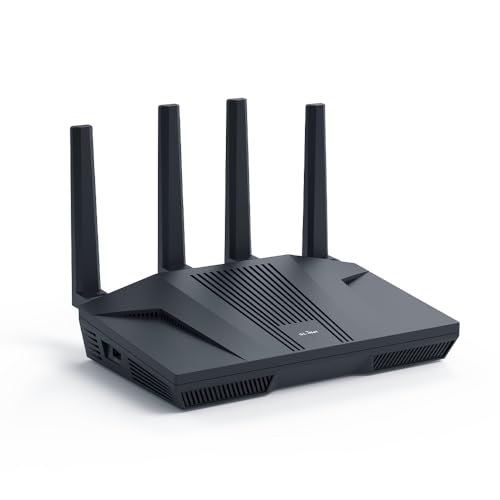
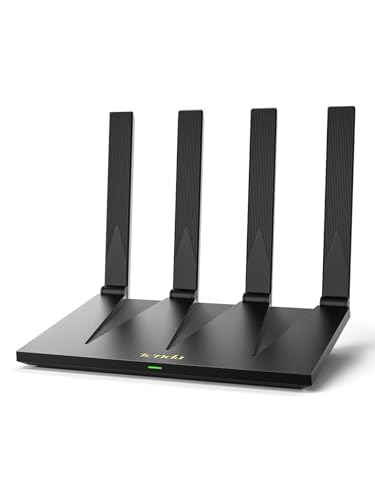
At&t Compatible Routers 101: The Basics
Here is the key fact most listings skip: with AT&T Fiber and most AT&T DSL plans, you cannot fully remove the AT&T gateway, because it authenticates your connection. Your own router connects behind that gateway, usually with a setting called IP Passthrough that hands your router the public connection so it can run your home network properly. So a compatible router is simply a standard router that works well behind the gateway, not a special AT&T only model.
A few terms will help. The gateway is the box AT&T provides, combining a modem and a basic router in one unit. Your router takes over the WiFi and the traffic management once it is connected. Bands are the radio frequencies your WiFi uses, mainly 2.4 GHz, 5 GHz, and on newer gear 6 GHz. Lower bands travel farther through walls, while higher bands carry more speed at shorter range. Readers comparing providers can also see how the same idea works in our guide to the best routers for at&t setups.
Key Specs Explained in Plain English
WiFi Standard (WiFi 6, 6E, 7)
The WiFi standard is the generation of the radio technology inside the router. WiFi 6 is the safe default for most homes: it handles crowds of devices well and costs the least. WiFi 6E adds the 6 GHz band, a wide and quiet set of lanes that helps if your phones and laptops support it and you live in a dense apartment building. WiFi 7 is the newest and fastest, but it earns its higher price mainly in homes with very fast fiber plans and new devices. Match the standard to the devices you own today, not the ones you might own in five years.
Wired Ports (Multi Gig, WAN/LAN)
Ports decide your ceiling for wired speed. The WAN port is where the router connects to the AT&T gateway, and the LAN ports feed devices like TVs, game consoles, and desktop PCs. Standard gigabit ports cap you at about 940 Mbps in real use. If your fiber plan is faster than a gigabit, look for a 2.5 gigabit WAN port so the router does not become the bottleneck. Four LAN ports suit most homes, and you can always add an inexpensive network switch later if you run out.
Security and Parental Controls
Look for WPA3 encryption, which is the current standard for protecting your WiFi password and traffic, though WPA2 still works for older devices. Automatic firmware updates matter more than any single feature, because they patch security holes without you remembering. Parental controls vary widely: basic scheduling and website blocking are often free, while advanced filtering and activity reports may need a subscription after a trial. Decide before you buy whether you will pay yearly for those extras, because a router whose best features sit behind a paywall costs more than its shelf price suggests.
Speed Ratings vs Your Internet Plan
Router boxes advertise numbers like AX3000, which add up the theoretical maximum speeds of every band under ideal conditions. Your real speed is set by your AT&T plan: a router cannot turn a 300 Mbps plan into gigabit service. A sensible rule is to buy a router rated comfortably above your plan, then stop. Someone on a 500 Mbps plan gets nothing extra from a flagship gaming router. Spend instead on coverage and reliability, which you will feel every day, unlike a bigger number on the box.
Setup and App Management
Most modern routers set up through a phone app with step by step prompts, and the whole job usually takes about 15 minutes. A good app lets you see connected devices, pause access for a child's tablet, run a speed test, and share a guest network with a QR code. Check whether key settings also exist in a web browser interface, because app only routers become harder to manage if the maker drops support. For AT&T use, confirm the router plays well behind a gateway, which nearly all do once IP Passthrough is on.
Number of Devices and MU MIMO/OFDMA
Two technologies decide how gracefully a router handles a busy home. MU MIMO lets the router talk to several devices at the same time instead of in rapid turns. OFDMA splits one channel into smaller pieces so many small requests, like smart bulbs and sensors checking in, share efficiently. Together they matter once a home passes roughly 30 connected devices, which is easy to reach with phones, TVs, cameras, and speakers. If your home is smaller and simpler, even a modest router handles the load, and placement will matter more than these features.
Rookie Mistakes to Avoid
- Expecting to remove the AT&T gateway entirely. On fiber plans the gateway must stay in the chain for authentication. Plan for the two box setup from the start.
- Buying far more speed than your plan. An AX5400 router on a 100 Mbps DSL line changes nothing. Put the savings toward coverage instead.
- Skipping IP Passthrough. Without it, both boxes run their own networks, a setup called double NAT that can break gaming voice chat and remote access.
- Hiding the router in a cabinet or basement corner. WiFi hates obstacles. A fancy router in a closet often performs worse than a basic one placed well.
- Keeping the default admin password. Change it during setup, and turn on automatic updates at the same time.
Getting Started: Setup and First Use
Begin by placing the AT&T gateway and your new router near each other with the cables provided. Connect the router's WAN port to a LAN port on the gateway, power both on, and run the router's app setup to name your network and set a strong password. Then sign in to the gateway settings, enable IP Passthrough for your router, and turn off the gateway's own WiFi so the two networks do not compete.
Place the router centrally and elevated, on a shelf rather than the floor, with the antennas upright. Walk your home with a phone and check the signal in the rooms that matter most, then nudge the router a few feet if a dead spot shows up. Update firmware regularly by leaving automatic updates switched on, and reboot the router every few months or whenever speeds feel off. Households weighing a different provider's rules can compare with our guide to the best routers compatible with xfinity, and those focused only on plan matching can read the best routers for at&t internet guide next.
FAQs
Mesh or a single router: which is better?
A single router suits most apartments and smaller one story homes, especially when it can sit near the center. Mesh systems win in larger homes, homes with two or more floors, and buildings with brick or plaster walls that block signal, because extra nodes carry WiFi around obstacles. Mesh costs more and adds a little complexity, so buy it for a coverage problem you actually have, not one you imagine.
How often should I replace my router?
Plan on about four to five years. Routers rarely die outright; they age out as WiFi standards move on, security support ends, and your device count grows. Replace sooner if the maker stops releasing firmware updates, if you upgrade to a much faster plan that your ports cannot feed, or if dead zones appear after a move. A router that still gets updates and covers your home has no urgent reason to go.
Do I need WiFi 7 yet?
For most AT&T households, not yet. WiFi 7 helps when you have a multi gig fiber plan, several WiFi 7 phones and laptops, and heavy local traffic like large file transfers. If your devices are mainly WiFi 6 or older, they cannot use the new features, and a good WiFi 6 or 6E router delivers the same real experience for much less money. Upgrade when your devices do.
Will a new router speed up my internet?
It can fix slow WiFi, but it cannot raise your plan speed. If speed tests near the gateway already match your plan while far rooms crawl, a better router or mesh system will help a lot. If even a wired test at the gateway falls short of your plan, the problem sits with the line or the gateway, and AT&T support is the right call before any purchase. Readers on other networks can check the parallel advice in our guide to the best spectrum compatible routers.
Wrapping Up
Compatibility with AT&T is simpler than it sounds: keep the gateway, add your router behind it with IP Passthrough, and choose specs that match your plan and your floor plan. WiFi 6, solid coverage, and WPA3 security cover nearly every home. Look back at the product table above with those three points in mind, and choosing among the best at&t compatible routers becomes a calm decision instead of a gamble.