
Best Active Studio Monitors Under 200 in 2026: What Your Money Gets You
Disclosure: We may earn a commission when you buy through links on this page, at no extra cost to you. As an Amazon Associate I earn from qualifying purchases. Learn more

Compare active studio monitors under $200 by woofer size, power, inputs and room controls, with clear price tiers and placement tips for home studios.
Active studio monitors are powered speakers built to reveal what is really in a mix, not to flatter it. The best active studio monitors under 200 give home producers a flat, honest sound without a separate amplifier, and the comparison table below shows how options differ in size, power and connections.
At this budget, small differences matter more than long feature lists. A slightly larger woofer, a front bass port or room controls can change how well a pair suits your desk.


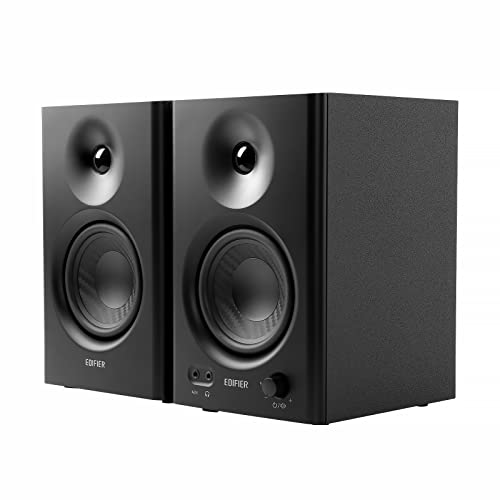


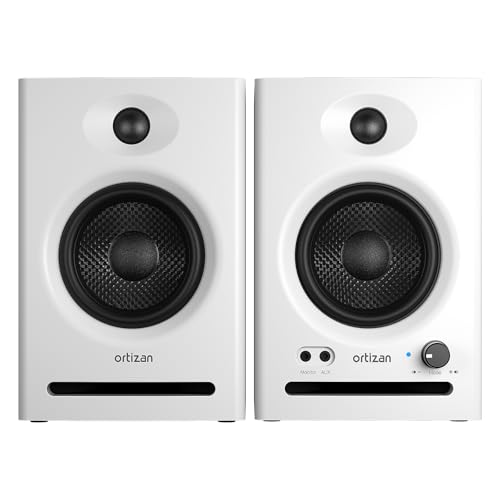

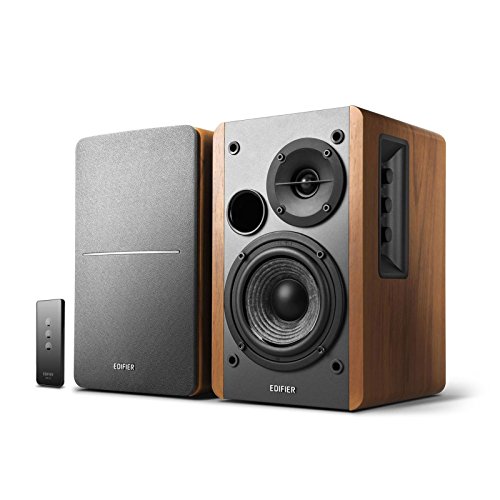


Who Should Buy Active Studio Monitors Under $200?
Start with the work you do most often. Your listening distance and source gear will point you to a different pair than a simple price sort would.
Home Producers Mixing on a Desk
You sit about 3 to 4 feet from your speakers and need detail you can trust at modest volume. Choose a pair with a 4 inch or 5 inch woofer and a clear midrange. Accuracy in the vocal range matters more to you than deep bass, because most mix decisions happen there. A compact cabinet also leaves room for your screen and interface.
Podcasters and Voice Editors Working in Small Rooms
You work mainly with speech, so clarity and low noise matter more than extended low end. Choose a smaller pair with a 3.5 inch or 4 inch woofer and calm, even treble that stays comfortable during long sessions. Quiet amplifiers matter too, because a faint hiss stands out between spoken phrases. For a wider view of the category, see our guide to the best studio monitor speakers under 200.
Beat Makers Who Need to Hear Kick and Bass Lines
You need enough low end to judge kick drums and bass parts without guessing. Choose a 5 inch woofer where your desk allows it, and favour honest, controlled bass over boosted bass that misleads you later. Treat the very lowest notes with care, since no small cabinet at this price reproduces deep sub bass fully.
Key Features to Compare
When you compare the best active studio monitors under 200, work through the same five points in the same order. That habit stops a low price from hiding a weak match for your room. For a flatter, measurement led view of this budget, see our guide to the best studio reference monitors under 200.
Woofer Size and Low Frequency Reach
Woofer size sets how much bass a small monitor can produce and how large the cabinet must be. Models at this price usually offer 3.5 inch, 4 inch or 5 inch woofers, with useful low end reaching about 50 to 80 Hz. Choose the smaller sizes for a tight desk and speech work, and 5 inch drivers if you mix music with real bass content. Bigger is not automatically better in a tiny room, because extra bass excites room problems sooner.
Power Output and Headroom at Your Desk
Power is stated in watts and it decides how cleanly a monitor plays at your normal volume. Pairs in this range often provide about 25 to 50 watts per speaker, which is ample at nearfield distance. What matters is clean headroom, meaning peaks in drums or voices stay clear without strain. If a listing shows one large total figure, check whether it describes the pair or a single speaker before you compare.
Frequency Response and How Flat the Sound Is
A studio monitor should present bass, midrange and treble in balance, so a mix made at home still sounds sensible elsewhere. Look for a published response range with a tolerance figure, such as plus or minus 3 dB, because a range without a tolerance tells you little. Treat perfectly flat claims with caution at this price. A mildly uneven monitor you learn well beats a flattering one that hides harshness.
Tweeter Design, Dispersion and the Sweet Spot
The tweeter handles high frequencies and shapes how wide the sweet spot feels at your chair. Most models here use a dome tweeter of about 0.75 inch to 1 inch, often set in a shaped waveguide that spreads sound evenly across the desk. A wider pattern helps if you move while you work. A narrow pattern can still work, but it asks you to aim both speakers carefully and sit in one consistent position.
Inputs, Volume Control and Room Controls
Connections decide how cleanly your gear links together. Balanced inputs on TRS or XLR cables resist hum over longer runs, while unbalanced RCA inputs suit short desk runs. A front volume knob is handy if your interface lacks one. Room controls that trim bass or treble by a few decibels help a pair adapt to placement near a wall.
What a Pair of Desk Monitors Buys You Below $200
Prices at this level usually describe a pair, but some brands price a single speaker, so confirm the quantity first. To compare like with like, see our guide to the best studio monitors pair under 200. Within a true pair budget, each step up buys a specific gain.
Around $100 to $140 a Pair: Compact Basics for Speech and First Mixes
At this level you get small cabinets, modest power and simple controls, usually with one main input type. That is enough for podcast editing, video work and early mixing, provided you accept limited bass. Put any savings toward sensible placement and cables.
Around $150 to $175 a Pair: More Room to Grow Into
This step usually brings a larger woofer option, stronger amplifiers or a second input type, and the difference shows up as calmer sound at normal volume. Mixes translate a little more reliably because the midrange is less strained. For many home producers this is the practical balance point in the range.
Around $175 to $200 a Pair: The Top of This Budget
Near the cap you may gain balanced inputs, useful room trims and better build, rather than a dramatic leap in bass. Those details matter if you place speakers close to a wall. Spend to this level when a specific control solves a problem you already have, not in hope of a studio grade transformation.
best active studio monitors under 150
Shoppers focused on the best active studio monitors under 150 tier should protect two things first: a woofer of at least 4 inches if music matters, and a return window so you can judge the pair in your own room. At this tighter cap you will usually give up balanced inputs, room trims or some power. Accept those losses before you accept a tiny cabinet with boosted bass, because an honest small monitor teaches mixing faster.
Common Mistakes to Avoid
Most disappointments here come from placement and pricing errors.
- Assuming every listing price covers a pair leaves you with one speaker and a budget already spent.
- Placing rear ported cabinets flush against a wall swells the bass and blurs low notes.
- Choosing the largest woofer for a tiny untreated room creates boomy sound that hides mix problems.
- Running long unbalanced cables past power supplies invites hum and buzz into quiet passages.
- Boosting the bass trim to make mixes feel powerful leads to thin mixes on other systems.
- Ignoring idle hiss when you shop leads to constant distraction at close listening distance.
Care and Maintenance for Active Studio Monitors
Keep dust off woofer cones and tweeter domes with a soft, dry brush, and never press on a dome to clean it. Wipe cabinets with a dry cloth, and keep liquids away from ports and rear panels, where the amplifier and its vents sit. Leave space behind each cabinet so amplifier heat can escape.
Switch the monitors on after your interface and off before it, which avoids loud pops through the drivers. Check cables once in a while for loose plugs or crackle when moved, and replace a damaged cable rather than raising the volume to mask the fault. Store spare cables loosely coiled, since tight bends shorten their life.
FAQ
Can you get accurate sound from active studio monitors under $200?
Yes, you can get usefully accurate sound from active studio monitors under $200, accurate enough to learn mixing and make decisions that hold up elsewhere. One extra check helps: play a reference track and then your mix in mono, because balance errors show up quickly that way. Accuracy here means honest balance, not perfection in the lowest octave.
Should you buy active studio monitors under $200 as a pair or one at a time?
Buy active studio monitors under $200 as a matched pair whenever you can, because stereo work needs both sides to sound the same. A voice test confirms the match: play a spoken recording, sit centred and check that the voice image stays in the middle. Buying a different model later leaves that centre image unstable.
Where should you place active studio monitors in a small room?
Place active studio monitors in a small room so the two speakers and your head form a triangle with roughly equal sides, with tweeters near ear height. Symmetry is the point many rooms miss: keep the left and right distances to the side walls similar, or one side will sound bass heavier than the other.
How long do active studio monitors under $200 usually last?
Active studio monitors under $200 usually last about five to ten years in home use when kept dry, cool and free of dust. The amplifier often ages first, so unusual heat, a new hum or one side dropping out deserves attention rather than louder use. Clear rear vents do more for lifespan than any cleaning product.
Do active studio monitors under $200 need a separate amplifier?
No, active studio monitors under $200 do not need a separate amplifier, because each cabinet already contains its own amplification. They do benefit from a clean source volume control, such as an audio interface knob, set so the monitor volume stays in one steady position. That consistency quietly improves mix decisions.
Final Thoughts
Match woofer size to your room, insist on honest rather than boosted bass, and confirm whether the price covers a pair. Use the product table above to check size, inputs and pair pricing.
Chosen with those points in order, the best active studio monitors under 200 will teach your ears something new every session. Learn one pair well, and your mixes will travel better to other systems.


