
Best AC1900 Routers: Every Type Explained for 2026
Disclosure: We may earn a commission when you buy through links on this page, at no extra cost to you. As an Amazon Associate I earn from qualifying purchases. Learn more

Single routers, mesh kits and WiFi 7 units compared for the best ac1900 routers, with pros, cons, ideal users and price ranges.
Router shelves mix old and new standards, single units and mesh kits, and prices that seem random until you sort them by type. The best ac1900 routers make sense once you see what each type does well, where it falls short, and who it suits.
This guide compares the main types side by side, then walks through the settings and features that separate a calm network from a frustrating one. Start with the comparison table below to spot the type that fits your home, then read on for the trade offs behind each row.

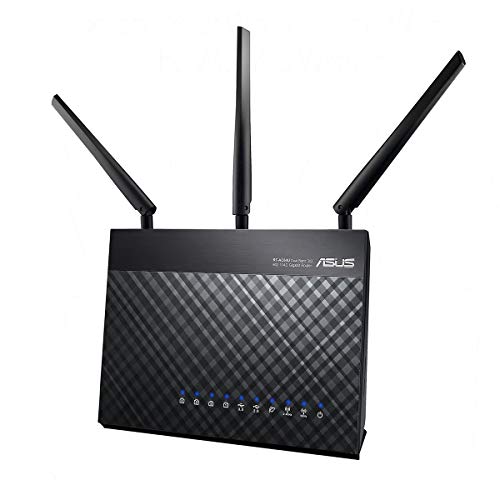


Types of Ac1900 Routers Compared
AC1900 is a WiFi 5 speed class, usually about 600 Mbps on the 2.4 GHz band plus about 1300 Mbps on the 5 GHz band in ideal conditions. Around that class sit three broad choices: a traditional single router, a mesh system built from several nodes, and a newer WiFi 7 unit that steps beyond the class entirely. Prices overlap, so the type decision matters more than the badge.
Single Routers
A single router is one unit that connects to your modem and broadcasts WiFi from one spot, usually with four gigabit wired ports and adjustable antennas. Pros include the lowest cost, simple setup, and full control over settings in one place. The main con is coverage, because signal fades through walls and floors, leaving far rooms slow.
Choose this type for apartments and compact houses where you can place the unit near the center. Expect to pay around $60 to $150 for a solid model in this class, and remember that good placement often beats a pricier unit tucked in a corner.
WiFi 7 Routers
WiFi 7 routers are the newest generation, offering far higher speeds, lower delay, and better handling of many devices than any AC1900 unit. They suit gigabit and faster plans, new phones and laptops that support the standard, and homes that want one purchase to last many years. The cons are price and waste, because older devices gain little from the new features.
Expect prices from around $200 upward, well above the AC1900 class. Pick this type when your plan is fast, your devices are recent, and you dislike replacing network gear often. Otherwise the extra power sits mostly unused while the older class does the same daily work for less.
Mesh WiFi Systems
A mesh system uses two or three matching nodes that work as one network, passing your connection from room to room under a single name. Pros include even coverage in long, large, or multi floor homes and simple expansion by adding a node. Cons include higher cost, fewer wired ports per node, and less manual control than a traditional router offers.
Typical kits cost around $150 to $350 depending on speed class and node count. If dead zones are your real problem rather than raw speed, the best reviewed routers coverage notes show how mesh and single units compare in homes of different shapes.
Single Routers vs WiFi 7 Routers: Which Should You Choose?
On price, the single AC1900 unit wins clearly, often costing a third as much. On speed and future life, WiFi 7 wins, carrying faster plans and newer devices for years longer. On coverage, both are single points of broadcast, so neither fixes a dead zone at the far end of a long house without help.
For settings and control, traditional routers usually expose more manual options, while newer models lean on apps that simplify setup but hide detail. Choose the AC1900 single unit when your plan is modest and your home is compact. Choose WiFi 7 when your plan exceeds about 500 Mbps, your devices support it, and you want the longest useful life from one purchase.
How to Choose the Right Ac1900 Router
Once the type fits your home, compare the details that shape daily use: security support, device handling, and the controls your household will actually open. A short list of your must have features, written before you shop, keeps marketing extras from steering the decision. The four areas below cover what matters most in this class.
Security and Parental Controls
Look for WPA3 support where offered, automatic firmware updates, and a guest network that keeps visitors away from your files and smart devices. Many AC1900 models use WPA2 only, which remains acceptable with a strong password, but update support matters more than any single protocol. A router the maker no longer updates becomes a risk over time.
Parental controls range from simple device pausing to paid subscriptions with filtering and reports. Decide before you buy whether basic free tools suffice, because subscription features can add real cost across the life of the router.
WiFi Standard (WiFi 6, 6E, 7)
AC1900 itself is WiFi 5, so this choice is really about whether to stay in class or step up. WiFi 6 improves busy homes with many devices, WiFi 6E adds the quieter 6 GHz band for supported gear, and WiFi 7 raises the ceiling again. Each step helps only the devices that support it, while older gear connects at its own older standard.
If most of your devices predate WiFi 6, an AC1900 unit still serves them at full ability. The best wlan routers guide explains these generations in more depth if you are weighing a step up.
Number of Devices and MU MIMO
List your connected devices honestly, including bulbs, plugs, cameras, and doorbells, because totals climb faster than most people expect. MU MIMO helps the router serve several devices at once on the 5 GHz band, easing congestion at peak hours. Beamforming, which aims signal toward active devices, also helps busy rooms feel steadier.
Neither feature raises your plan speed, and both matter only when many devices compete at once. A quiet home with ten devices will notice placement far more, while a smart home with sixty devices should weigh these features heavily.
Gaming Features (QoS, Low Latency)
Quality of service tools let you favor a console or PC so game traffic moves first when the network gets busy. That priority lowers delay spikes during downloads and streams elsewhere in the home. Some routers add game focused dashboards, but the core value is the priority rule itself, which many standard models also provide.
Wiring the gaming system remains the strongest single step, since a cable removes wireless interference entirely. If you play on WiFi, keep the machine on the 5 GHz band and within a room or two of the router.
Picking the Right Ac1900 Routers for Different Uses
Best Ac1900 Routers for Gaming: Which Type Works Best
For gaming, the single router type usually works best in this class, because it offers wired ports for the console, clear priority settings, and one short wireless path when a cable cannot reach. A mesh node can add delay as traffic hops between units, unless you wire the node back to the main unit. Judge by latency stability, port count, and priority controls rather than by the speed class printed on the box.
Setup and Care Tips
Place the router centrally and elevated, with clear air around it, and keep it out of closed cabinets. Update firmware regularly, ideally with automatic updates on, and change the default admin password during first setup rather than later. Write your network details on paper kept somewhere private so a reset never locks you out of your own settings.
For cable homes, confirm the router works with your modem and plan before setup day. Readers on cable services may find the notes on the best routers for comcast and the best routers for spectrum useful for those provider specific checks.
Frequently Asked Questions
Do I need WiFi 7 yet?
No, WiFi 7 is optional for most homes today. It pays off with very fast plans and devices built for the standard, but an AC1900 or WiFi 6 router handles streaming, calls, and browsing at the same felt speed on modest plans. Upgrade when your plan, devices, or router age give you a concrete reason.
Mesh or a single router: which is better?
Neither is better in general, because they solve different problems. A single router suits compact homes and costs less, while mesh fixes coverage gaps in larger or awkward layouts. Test your far rooms with your current setup first, and let real dead zones, not floor area alone, drive the decision.
How often should I replace my router?
Most routers serve well for about four to five years. Replace sooner if security updates end, if your plan outgrows the class, or if restarts become a weekly habit. A router that still receives updates and meets your plan speed can stay in service longer without any real penalty.
Will a new router speed up my internet?
A new router speeds things up only when the old one was the bottleneck, through age, weak coverage, or failing hardware. It cannot exceed your plan speed. Test with a cable at the modem to see your true ceiling before spending, because that one test tells you whether the router or the line deserves the money.
Our Verdict
Decide the type first, then compare features inside that type: single units for value and control, mesh for coverage, and WiFi 7 for speed and long life. The best ac1900 routers for your home are the ones whose type matches your layout and plan, not the ones with the longest feature list. Check the product table above once more, confirm your port and coverage needs, and buy with confidence.


