
Best AC Wireless Routers: Checklist for 2026 for Confident Buying
Disclosure: We may earn a commission when you buy through links on this page, at no extra cost to you. As an Amazon Associate I earn from qualifying purchases. Learn more

Run through this clear checklist for the best ac wireless routers covering speed, coverage, security, and value before you buy for your home network.
Most router regret comes from buying the wrong strengths. People pay for headline speed their plan cannot deliver, then discover the signal still dies in the back bedroom. A checklist fixes that by forcing each claim on the box to answer a question about your home. This guide applies that checklist to the best ac wireless routers so you can judge any model in minutes: what standard it uses, how it covers a real floor plan, how it protects your network, and what it costs to own.
Work through the criteria in order, because the early ones rule models out fast. Compatibility with your plan and your home size matter more than any single feature deeper in the list. The comparison table below gives you the raw material, and the evaluation sections that follow show you how to read it.

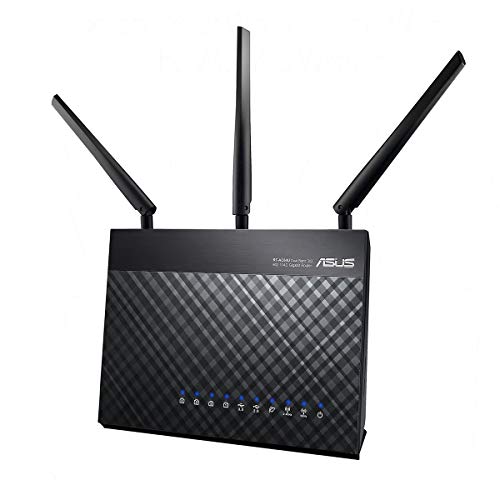

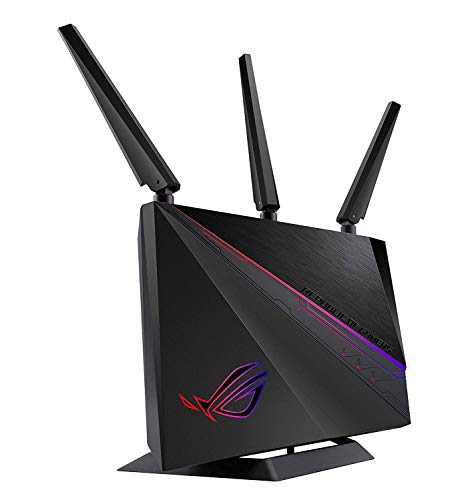


How We Evaluate AC Wireless Routers
WiFi Standard and Band Support
Score this criterion first. AC means WiFi 5, a dual band standard using 2.4 GHz for reach and 5 GHz for speed. A good AC unit is a sensible match for plans up to a few hundred megabits per second and for devices that are a few years old.
A weak sign is a single band unit still on the shelf, which will crowd every device onto the slowest lane. Newer standards, WiFi 6, 6E, and 7, add efficiency and a 6 GHz band on supported gear, so score AC highest when its lower price reflects its age and your devices match its era.
Speed Ratings Versus Your Internet Plan
Judge speed classes against your plan, never against each other in isolation. Labels such as AC1200 or AX3000 add every band together at theoretical maximums, and real devices use one band at a time through real walls. A strong score goes to a router whose class sits comfortably above your plan: modest headroom for a plan around 200 Mbps, and serious headroom, or a newer standard, for gigabit service. A poor score goes to any setup where the router class sits below the plan, because that hardware becomes the ceiling for every device in the house.
Coverage and Home Size
Score coverage against your actual walls, floors, and problem rooms. One router earns top marks in a compact apartment with a central shelf to sit on. The same router fails a long two story home with masonry walls, no matter what the box claims in square feet.
If your scoring shows more than one dead zone, rate mesh capable options higher, since extra nodes solve geometry that raw power cannot. Our guide to the best wireless mesh routers explains how node placement changes results, which is useful background when you score this category.
Gaming Features and Traffic Priority
Score gaming support by how simple and effective its traffic priority is. Good QoS offers clear presets that favor games or calls when the network is busy, plus a device view that shows what is using your bandwidth. That combination keeps match ping steady while someone else streams in the next room.
Weak implementations bury you in manual rules or charge extra to unlock basic controls. Remember that a wired console will always outscore any wireless feature, so treat this category as a tiebreaker. Players can dig deeper in our guide to the best routers ac options, which covers speed classes used by many gaming models.
Security and Parental Controls
Security scoring is strict because the router guards every device you own. Top marks require WPA3 support, or solid WPA2 with a maker that still publishes firmware updates, plus a guest network for visitors and smart gadgets. Automatic updates earn bonus credit because most owners never check manually.
Parental controls score well when bedtime schedules and basic filtering are included free; note any subscription fees in your total cost, not as an afterthought. A router that fails on update support fails overall, however fast it is, because an unpatched router is a standing invitation to trouble.
Wired Ports and Expansion
Count ports like you count outlets. Four gigabit LAN ports score well for a typical mix of TV, console, desktop, and spare. If your plan exceeds a gigabit, only a unit with a 2.5 Gbps WAN port can pass the full speed through, so that single port decides the score for fast plans.
A USB port adds credit if you will share a printer or a drive, and none if you will not. Score what you will plug in during the next three years, not what you own today, since a streaming box or a work computer tends to arrive sooner than expected.
Setup and App Management
A router you cannot manage is a router you will neglect. Score setup by whether a clear app or browser wizard gets a normal person online in about fifteen minutes, with plain language at each step. Day to day management should show connected devices by name, allow a quick reboot, pause a device with one tap, and report update status without digging.
Our broader guide to the best wireless routers uses the same management criteria across newer standards, which makes cross shopping easier. Poor scores go to units whose apps demand accounts full of personal data or hide basic settings behind paywalls.
Three Profiles That Pass Our Checklist
The Overall Profile to Look For
The overall winner profile is balance. Look for a dual band AC unit with a speed class one step above your plan, four gigabit ports, WPA3 or well supported WPA2, and an app your least technical household member could handle. Expect to pay around $80 to $150 for this profile in a single router. It will not top any single chart, but it will pass every category on the checklist without a glaring weakness, which is exactly what most homes need from a device they will ignore for the next five years.
The Value Profile to Look For
The value profile trims the extras and protects the core. It keeps dual band WiFi, gigabit ports, current security, and active firmware support, while giving up USB sharing, elaborate gaming menus, and premium app polish. Prices around $50 to $80 are common here.
This profile suits smaller homes and lighter device counts, where the saved money is real and the missing features would never be opened. The score to watch is update support: a cheap router the maker has abandoned is not value, it is a liability with a power cord.
The Compact Profile to Look For
The compact profile serves small apartments, dorms, and tidy desks where a big box with tall antennas has no home. Expect a smaller footprint, internal or short antennas, and enough power for a few rooms rather than a whole house, usually around $60 to $100. Score it on heat and stability, since tight cases can run warm, and on whether its app still offers guest network and update controls.
Quick Buyer Checklist
- Does the speed class sit comfortably above my internet plan speed?
- Can the router sit near the center of my home, or do I need mesh for dead zones?
- Does it support WPA3, or WPA2 with firmware updates still being published?
- Are there enough gigabit ports for my TV, console, and computer, with one spare?
- Are parental controls and guest network included without a subscription I do not want?
- Can I complete setup and find basic settings in the app without a manual?
- Does the warranty run at least two years, with support I can actually reach?
- Is the total price, including any fees, inside the budget I set before shopping?
Red Flags to Watch For
- Vague speed language. Boxes that shout a giant combined number but hide band details are marketing first and information second.
- No recent firmware. If the support page shows updates that stopped years ago, security scoring fails no matter how low the price drops.
- Single band hardware. A 2.4 GHz only unit belongs to an earlier era and will bottleneck modern phones and TVs at once.
- Missing guest network. Without one, visitors and cheap smart devices share the same network as your work laptop and storage.
- Suspicious review patterns. Waves of short glowing comments posted together tell you little, so weigh detailed owner reports about stability instead. General shopping context in our guide to the best wireless internet routers can help you sanity check claims across categories.
Routers for Specific Needs
Best AC Wireless Routers under 50
Shoppers hunting best ac wireless routers under 50 dollars should score three things above all: dual band support, gigabit ports, and firmware that is still updated. At this level you give up app polish, USB ports, and strong multi device handling, and that trade is fine for a small home with a modest plan. Check the maker support page before ordering, because at this price the difference between a smart buy and a dead end is almost entirely whether updates still exist.
Tips to Get the Most From Your AC Wireless Router
- Place it centrally and elevated. Open air on a shelf near the middle of the home improves every score that placement touches.
- Update firmware regularly. Turn on automatic updates during setup so security fixes never depend on your memory.
- Change default admin passwords. Set new admin and WiFi passwords before connecting the rest of the house.
- Split bands by distance. Keep fast nearby devices on 5 GHz and let distant gadgets use 2.4 GHz for its longer reach.
FAQs
Mesh or a single router: which is better?
A single router is better for compact homes where it can sit centrally, because it is cheaper and simpler to score, set up, and maintain. Mesh is better when your checklist shows dead zones in several rooms or across floors, because extra nodes fix coverage geometry. Decide from your floor plan, not from fashion. If only one room struggles, try moving the router before buying anything else.
How often should I replace my router?
Replace a router after about four to six years, or sooner when firmware updates stop, your plan outgrows its speed class, or dropouts survive a factory reset and better placement. Because the router guards the whole network, the end of security support is the hardest deadline of all. A planned replacement on your schedule beats an emergency purchase on the day the old unit fails during a work call.
Will a new router speed up my internet?
A new router speeds things up only when the old one was the bottleneck. If your wired test at the modem already matches your plan, expect better coverage and stability in weak rooms rather than a higher top speed. If the wired test itself falls short, call the provider before spending on hardware. This single test, done first, prevents the most common wasted purchase in home networking.
Do I need WiFi 7 yet?
No. WiFi 7 rewards very fast plans and brand new devices that support it, and most homes own few or none of those yet. A well scored AC router matched to a modest plan will stream, call, and browse without drama. Revisit the question when you next replace phones or laptops, or when your plan jumps to multi gig speeds, and let your checklist, not the launch calendar, make the call.
Wrapping Up
Score the standard, the coverage, and the security before you admire any extra feature, and weak options will eliminate themselves. That discipline is the whole value of a checklist: it turns a wall of similar boxes into a short list that fits your plan, your walls, and your budget. Compare your finalists in the product table above, and you will land on the best ac wireless routers for your home with reasons you can explain, not just a price you paid.


