WISESWAN
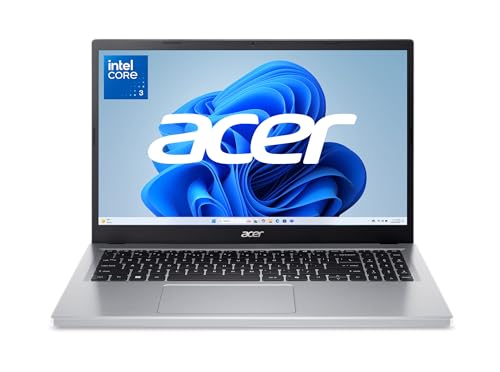
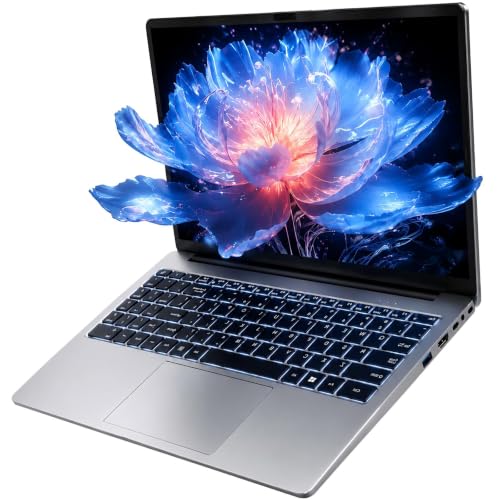
Windows 11 Laptop with i3 Processor 15.6" Work Laptop for College Students | Backlit Keyboard WiFi 6 (2 cores, 4 Threads, up to 3.4GHz) 12GB RAM 256GB SSD TF Card Expandable to 2TB
Disclosure: We may earn a commission when you buy through links on this page, at no extra cost to you. As an Amazon Associate I earn from qualifying purchases. Learn more
Highlights
- 【Efficient Performance】 Powered by Intel Core i3 processor (2 cores, 4 threads, up to 3.4GHz) with 12GB RAM and 256GB SSD. Handles multitasking, office software, online classes, and HD video streaming smoothly. Integrated Intel UHD Graphics 620
- Backlit Keyboard & Complete Package】Comes with a cool backlit keyboard. Comes with awebcam, dual stereo speakers (8Ω/1.0W each), DC charger, and user manual – ready for late-night studying, online classes, video conferencing, and daily productivity
- 【Vibrant Display】 15.6-inch Full HD (1920x1080) anti-glare screen with 16:9 aspect ratio delivers crisp images and vivid colors – perfect for studying, watching lectures, or entertainment. Thin-bezel design maximizes viewing area
- 【Fast Connectivity & Expansion】 Equipped with WiFi 6 (802.11ax) and Bluetooth 5.2 for stable, high-speed wireless. Features 3 x USB 3.0, HDMI 2.1, Type-C (supports PD3.0 fast charging), and a TF card slot expandable up to 2TB – easily connect external monitors, mice, drives, or expand storage for all your files
- 【Long Battery Life & Portable】 Built-in 11.55V 5000mAh/57.75Wh high-capacity battery delivers approximately 7 hours of mixed-use battery life – enough for a full day of classes and assignments. Lightweight at just 1.63kg (3.6 lbs) and 19.5mm thin, plus a compact packing size – easily slips into a backpack for campus, library, or coffee shop
Why You'll Love It
- 12GB RAM supports everyday multitasking across office software, online classes, and other study tasks
- Full HD anti glare display provides a spacious viewing area for lectures, documents, and entertainment
- Backlit keyboard helps you keep working when your study space has limited lighting
- WiFi 6 and Bluetooth 5.2 provide modern wireless connectivity for compatible devices and networks
- Three USB 3.0 ports, HDMI 2.1, and Type C simplify connecting accessories and external displays
- Expandable storage through the TF card slot lets you add capacity for files as your needs grow
Pros
- +12GB RAM for everyday multitasking
- +Full HD anti glare display
- +Backlit keyboard for evening study
- +Multiple ports for accessories
- +Expandable storage up to 2TB
Cons
- -Two core processor
- -256GB SSD included storage
- -Integrated graphics for graphics focused tasks
Detailed Review
The WISESWAN 15.6 inch laptop is a Windows 11 work laptop aimed at students and everyday users who need a practical computer for assignments, office documents, online classes, and video streaming. Its combination of 12GB RAM, a 256GB SSD, and a Full HD display covers the main elements of a study focused setup. Rather than concentrating on a single specialized task, it brings familiar productivity functions, wireless connectivity, and a selection of physical ports into one portable package.
Its Intel Core i3 processor has two cores, four threads, and a maximum listed speed of 3.4GHz, paired with 12GB RAM and integrated Intel UHD Graphics 620. The seller identifies office software, multitasking, online learning, and HD streaming as intended uses. That makes the configuration worth considering for a student managing documents, class materials, and online lessons. However, the processor has only two cores, so shoppers planning demanding computing work should compare processor configurations carefully rather than assume this machine suits every workload.
The 15.6 inch Full HD screen has a resolution of 1920x1080, a 16:9 aspect ratio, an anti glare finish, and a thin bezel design. That combination provides room for reading documents, following lectures, and watching videos, while the anti glare surface is a useful consideration when choosing a screen for regular study. A backlit keyboard adds flexibility for working in dimmer surroundings. The package also includes a webcam and dual stereo speakers, supporting video calls and online classes without making those functions separate purchasing decisions.
Connectivity and storage are important parts of the design. WiFi 6 and Bluetooth 5.2 provide wireless options, while three USB 3.0 ports, HDMI 2.1, and a Type C port support connections to compatible accessories and displays. The Type C port supports PD3.0 fast charging. The included 256GB SSD provides onboard storage, and the TF card slot supports expansion up to 2TB, giving users another way to accommodate growing file collections. These options are particularly relevant when study materials and personal files need to stay accessible on the same computer.
Portability is reasonable on paper, with a listed weight of 3.6 pounds, a thickness of 19.5mm, and a battery rated at 57.75Wh. The seller estimates approximately seven hours of mixed use, although actual results can vary with how the laptop is used. The main tradeoffs are the two core processor and the initial storage capacity, which may not suit every workload or file collection. Verdict: This laptop is worth considering for students and everyday users who prioritize a Full HD screen, a backlit keyboard, useful connectivity, and expandable storage. Shoppers focused on demanding computing or graphics work should compare alternatives with configurations better suited to those needs.
Who Should Buy It
A great fit if you:
- Need a computer for college assignments, office documents, online lessons, and everyday study activities.
- Prefer a 15.6 inch Full HD screen for reading course materials and watching recorded lectures.
- Want a backlit keyboard for completing work in a study area with limited lighting.
- Use compatible external accessories and appreciate having several USB ports, HDMI, and Type C connectivity.
- Want the option to expand storage as your collection of documents, media, and other files grows.
Consider something else if you:
- Regularly handle demanding computing workloads and would benefit from a laptop with a more capable processor configuration.
- Prioritize graphics focused work and would be better served by a laptop designed for more demanding visual applications.
Before You Buy
Confirm on the listing:
- Check the laptop's physical dimensions against your backpack, desk, or preferred study space, especially if portability is a priority.
- Confirm that your existing monitor, charging accessories, storage devices, and other peripherals are compatible with its listed ports and connection standards.
- Review what comes in the package. The listed items include a DC charger, webcam, dual stereo speakers, and user manual, alongside the laptop.
- Consider whether the included 256GB SSD suits your files and whether your intended TF card expansion is compatible with the laptop.
How to compare your options: Start with your workload, then consider screen size, memory, onboard storage, battery expectations, and connectivity together. This configuration offers 12GB RAM, a 15.6 inch Full HD display, and several physical ports, but its two core processor deserves particular attention if your work extends beyond everyday productivity. Compare the initial storage and expansion options against the amount of material you expect to keep locally. Finally, consider the seller's approximately seven hour mixed use estimate alongside your daily routine rather than treating it as a guaranteed result.
Getting the Most From It
Start by reading the included user manual and following its guidance for initial setup, charging, and everyday care. Complete the Windows 11 setup, organize your study files, and configure the applications you use for documents, classes, and video calls. Keeping coursework organized makes it easier to manage different subjects and ongoing assignments.
Make use of the 12GB RAM by arranging your regular study activities around the applications you actually need. The laptop is intended for office software, online classes, multitasking, and HD streaming, so prioritize those activities if they match your routine. For particularly demanding tasks, consider whether the two core processor meets your requirements before making them part of your regular workflow.
Choose storage deliberately. Keep frequently used documents on the 256GB SSD and consider the TF card slot when you need additional room. Before expanding storage, confirm that the card you choose is compatible with the laptop and its stated expansion capability.
Use WiFi 6 with a compatible network and Bluetooth 5.2 with compatible accessories. Connect external displays through HDMI 2.1 or use the available USB and Type C ports when suitable for your devices. Monitor battery use throughout your normal routine, and treat the approximate seven hour mixed use figure as an estimate rather than a promise for every workload.
FAQ
What comes with the WISESWAN laptop?
The listed package includes a DC charger, webcam, dual stereo speakers, and user manual. The laptop also has a backlit keyboard and integrated Intel UHD Graphics 620.
Is this laptop suitable for college and online classes?
Yes, it is intended for office software, assignments, online classes, multitasking, and HD video streaming. Its 12GB RAM and Full HD display support that general study focused role.
Can I expand its storage?
Yes, the laptop has a TF card slot with stated expansion support up to 2TB. Confirm card compatibility before purchasing additional storage.
Can I connect an external monitor?
Yes, it includes HDMI 2.1, three USB 3.0 ports, and Type C. Check that your monitor and any required connections are compatible before choosing a connection method.
How long does the battery last?
The seller estimates approximately seven hours of mixed use from the 57.75Wh battery. Your actual runtime can vary depending on your activities, so consider that estimate in relation to your typical study day.
Product Details
| Brand | WISESWAN |
| ASIN | B0H4ZYB1K9 |
| Availability | Unavailable |