TP-Link
TP-Link USB WiFi 6 Adapter for Desktop PC,AX1800 Dual Band WiFi Antenna | USB Wireless Network Adapter with 2.4/5GHz, High Gain 5dBi Antenna, WPA3, MU-MIMO Supports Windows 11/10 (Archer TX20U Plus)
Disclosure: We may earn a commission when you buy through links on this page, at no extra cost to you. As an Amazon Associate I earn from qualifying purchases. Learn more
Highlights
- 𝐏𝐥𝐞𝐚𝐬𝐞 𝐮𝐬𝐞 𝐔𝐒𝐁 𝟑.𝟎 𝐩𝐨𝐫𝐭 𝐭𝐨 𝐞𝐧𝐬𝐮𝐫𝐞 𝐨𝐩𝐭𝐢𝐦𝐚𝐥 𝐩𝐞𝐫𝐟𝐨𝐫𝐦𝐚𝐧𝐜𝐞.
- 𝐋𝐢𝐠𝐡𝐭𝐧𝐢𝐧𝐠-𝐅𝐚𝐬𝐭 𝐖𝐢𝐅𝐢 𝟔 𝐀𝐝𝐚𝐩𝐭𝐞𝐫 -Experience faster speeds with less network congestion compared to previous generation Wi-Fi 5. AX1800 wireless speeds to meet all your gaming, downloading, and streaming needs
- 𝐃𝐮𝐚𝐥 𝐁𝐚𝐧𝐝 𝐖𝐢𝐅𝐢 𝐀𝐝𝐚𝐩𝐭𝐞𝐫 - 2.4GHz and 5GHz bands for flexible connectivity (up to 1201 Mbps on 5GHz and up to 574 Mbps on 2.4GHz)
- 𝐎𝐧𝐥𝐲 𝐖𝐢𝐧𝐝𝐨𝐰𝐬 𝟏𝟏/𝟏𝟎 𝐂𝐨𝐦𝐩𝐚𝐭𝐢𝐛𝐥𝐞 - The Archer TX20U Plus is only compatible with Windows 11 and 10 on desktops and laptops. Not compatible with Linux or Mac.** For best performance: keep firmware updated by checking the Tether App.
- 𝐔𝐩𝐠𝐫𝐚𝐝𝐞 𝐘𝐨𝐮𝐫 𝐂𝐨𝐦𝐩𝐮𝐭𝐞𝐫'𝐬 𝐖𝐢-𝐅𝐢 - All USB WiFi adapters are designed to add or upgrade your computer’s Wi-Fi. Actual speeds cannot exceed the connecting router’s maximum speed. For optimal performance, pair the Archer TX20U Plus with a WiFi 6 or above router.
- 𝐃𝐮𝐚𝐥 𝐇𝐢𝐠𝐡-𝐆𝐚𝐢𝐧 𝐀𝐧𝐭𝐞𝐧𝐧𝐚𝐬 𝐰𝐢𝐭𝐡 𝐁𝐞𝐚𝐦𝐟𝐨𝐫𝐦𝐢𝐧𝐠: Improved range, signal quality, and transmission performance- making it your ideal WiFi adapter
- 𝐍𝐞𝐱𝐭 𝐆𝐞𝐧𝐞𝐫𝐚𝐭𝐢𝐨𝐧 𝐒𝐞𝐜𝐮𝐫𝐢𝐭𝐲 - This WiFi Adapter supports WPA3 encryption, the latest security protocol to provide enhanced protection in personal password safety
- 𝐀𝐝𝐣𝐮𝐬𝐭𝐚𝐛𝐥𝐞, 𝐌𝐮𝐥𝐭𝐢-𝐃𝐢𝐫𝐞𝐜𝐭𝐢𝐨𝐧𝐚𝐥 𝐀𝐧𝐭𝐞𝐧𝐧𝐚 𝐟𝐨𝐫 𝐃𝐞𝐬𝐤𝐭𝐨𝐩 𝐏𝐂: Enable flexible deployment for the best reception with adjustable antennas and flexible desktop PC design.
- 𝐑𝐞𝐝𝐮𝐜𝐞𝐝 𝐋𝐚𝐭𝐞𝐧𝐜𝐲 𝐚𝐧𝐝 𝐂𝐨𝐧𝐠𝐞𝐬𝐭𝐢𝐨𝐧 - Supports MU-MIMO and OFDMA to reduce congestion and to increase throughput, ensuring seamless experience
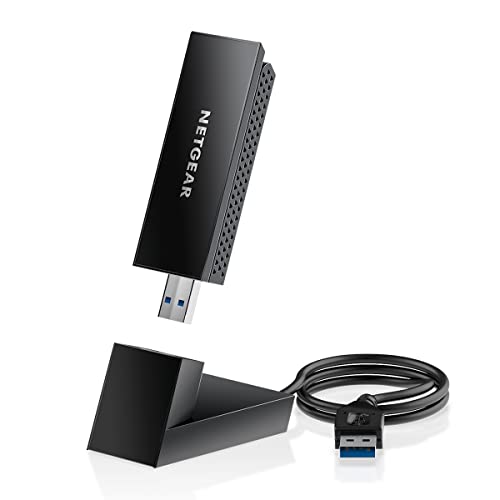
- 𝐅𝐥𝐞𝐱𝐢𝐛𝐥𝐞 𝐃𝐞𝐬𝐢𝐠𝐧 - The wifi adapter is equipped with a 1 meter USB 3.0 cable to allow flexibility in the placement of the device.
Why You'll Love It
- Adds WiFi 6 connectivity to compatible Windows computers through a USB connection
- Offers both 2.4GHz and 5GHz bands for flexible wireless network connections
- Adjustable high gain antennas and beamforming help improve signal reception and quality
- A 1 meter USB 3.0 cable allows more flexibility when positioning the adapter
- WPA3 support adds a newer wireless security option for compatible network connections
- MU-MIMO and OFDMA support help manage congestion and improve network throughput
Pros
- +Dual band WiFi 6 connectivity
- +Adjustable high gain antennas
- +Flexible USB cable placement
- +WPA3 security support
- +MU-MIMO and OFDMA support
Cons
- -Windows 10 and 11 only
- -Requires a USB 3.0 port for optimal performance
- -Maximum speeds depend on the connected router
Detailed Review
The TP-Link Archer TX20U Plus USB WiFi adapter is designed for desktop and laptop owners who want to add or upgrade wireless connectivity without relying on a built in WiFi solution. Its WiFi 6 support, dual band operation, and adjustable antennas make it worth considering for everyday browsing, streaming, downloads, and gaming. Rather than requiring a compatible computer to have WiFi built in, this adapter provides a USB based option for connecting to a wireless network.
Its AX1800 designation covers two frequency bands, with advertised maximum speeds of up to 1201 Mbps on 5GHz and 574 Mbps on 2.4GHz. These figures describe the adapter's stated wireless capabilities, not a guarantee of the speeds a computer will achieve. Your router's maximum speed remains a limiting factor, and TP-Link recommends pairing the adapter with a WiFi 6 or newer router for optimal performance. Having both bands available gives you flexibility when choosing a connection for your existing network.
The antenna arrangement is another important part of the design. The adapter features dual high gain antennas, including a stated 5dBi antenna specification, with adjustable positioning and beamforming intended to improve reception, signal quality, and transmission performance. A 1 meter USB 3.0 cable lets you position the device with more flexibility than a design that must sit directly in the computer's USB port. TP-Link recommends a USB 3.0 port for optimal performance, so port choice is worth considering before purchase.
Wireless features also extend beyond the headline speed. WPA3 support provides a newer encryption option when connecting to a compatible network, while MU-MIMO and OFDMA are included to help reduce congestion and increase throughput. These features make the adapter relevant to buyers who want a more capable wireless connection, although the results still depend on the surrounding network and the equipment communicating with it. Keeping firmware updated is another seller recommendation, with the Tether App mentioned as a place to check for updates.
The main trade off is compatibility. The Archer TX20U Plus supports Windows 10 and Windows 11 on desktops and laptops, but it is not compatible with Linux or Mac. Its advertised maximum speeds also cannot override the capabilities of the connected router, so upgrading the adapter alone may not deliver the full stated rates on an older network.
Verdict: This USB WiFi adapter is a sensible choice for Windows users who want dual band WiFi 6, adjustable antennas, and flexible USB placement in one device. Look elsewhere if you use Linux or macOS, or if you need an adapter that works beyond the stated Windows compatibility.
Specifications
- Brand: TP-Link
- Model: Archer TX20U Plus
- Wireless standard: WiFi 6
- Wireless class: AX1800
- Frequency bands: 2.4GHz and 5GHz
- Maximum stated speed on 5GHz: Up to 1201 Mbps
- Maximum stated speed on 2.4GHz: Up to 574 Mbps
- Antenna specification: 5dBi high gain antenna, with dual high gain antennas listed
- USB connection: USB 3.0
- Cable length: 1 meter
- Wireless security: WPA3
- Additional wireless features: MU-MIMO, OFDMA, and beamforming
- Operating system compatibility: Windows 10 and Windows 11
- Device compatibility: Desktop PCs and laptops
- Excluded operating systems: Linux and Mac
Who Should Buy It
A great fit if you:
- Own a Windows desktop that needs wireless connectivity or an upgrade to its existing WiFi capabilities.
- Want access to both 2.4GHz and 5GHz bands rather than relying on a single wireless band.
- Prefer adjustable antennas and a separate USB cable for more flexible placement around your computer.
- Use a WiFi 6 router and want an adapter designed to support that wireless generation.
Consider something else if you:
- Run Linux or macOS and need a wireless adapter specifically compatible with your operating system.
- Need a wireless solution that does not depend on an available USB port, making an alternative connection type more suitable.
Before You Buy
Confirm on the listing:
- Check that your computer runs Windows 10 or Windows 11, since Linux and Mac are excluded from compatibility.
- Confirm that you have an available USB 3.0 port, which TP-Link recommends for optimal performance.
- Measure the intended placement area and check whether the 1 meter USB cable gives you enough flexibility for your setup.
- Check the package contents and any setup instructions on the listing so you know what is included and how to get started.
How to compare your options: Start with operating system compatibility, then compare wireless standards, supported frequency bands, antenna design, and connection type. The Archer TX20U Plus combines WiFi 6, dual band operation, adjustable antennas, and a USB 3.0 cable. Compare its advertised band speeds with your router's capabilities rather than assuming the adapter alone determines your connection speed. Security support and congestion management features are also worth weighing if they match your network priorities.
Getting the Most From It
Start by confirming that your computer runs a supported Windows version and connect the adapter through a USB 3.0 port for the performance TP-Link recommends. Follow any supplied setup instructions to establish the wireless connection, and check that your computer is connecting to the intended network.
Use the adjustable antennas and the included 1 meter USB cable to explore a placement that suits your desktop arrangement. The directional flexibility is intended to help with reception, signal quality, and transmission performance, so consider positioning rather than leaving the adapter wherever the cable first reaches.
Choose between the available 2.4GHz and 5GHz bands according to your network setup and needs. Remember that the router's capabilities affect the maximum speed available to the adapter, and a WiFi 6 or newer router is the recommended pairing for optimal performance.
Keep firmware updates on your maintenance checklist. TP-Link recommends checking the Tether App for updates, so consult the product instructions for the appropriate update process and any other recommended care steps.
FAQ
Will the Archer TX20U Plus work with Windows 11?
Yes, it supports Windows 11 and Windows 10 on desktop PCs and laptops. Linux and Mac are not compatible.
What wireless speeds does this adapter support?
It advertises up to 1201 Mbps on 5GHz and 574 Mbps on 2.4GHz. Actual speeds cannot exceed the connected router's maximum speed.
Does it support WiFi 6 and WPA3?
Yes, it supports WiFi 6 and WPA3 encryption. MU-MIMO, OFDMA, and beamforming are also included.
What comes with the adapter?
The listed design includes a 1 meter USB 3.0 cable and adjustable antennas. Check the listing's package contents for confirmation of everything included in the box.
How should I position and maintain it?
Use the cable and adjustable antennas to find a suitable placement, and use a USB 3.0 port for optimal performance. TP-Link also recommends checking the Tether App for firmware updates.
Product Details
| Brand | TP-Link |
| ASIN | B0B5YPK9L1 |