TP-Link
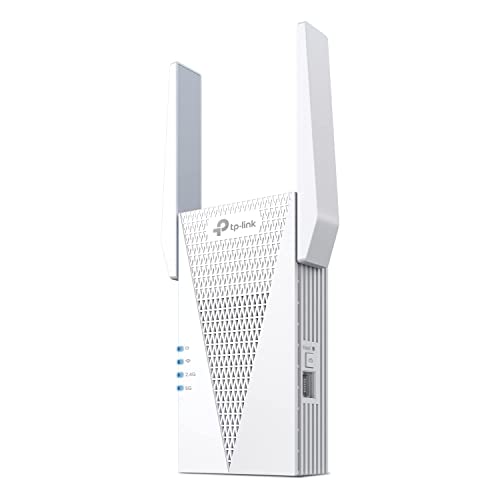
TP-Link AX3000 WiFi 6 Dual-Band Range Extender PCMag Editor's Choice
Disclosure: We may earn a commission when you buy through links on this page, at no extra cost to you. As an Amazon Associate I earn from qualifying purchases. Learn more
Highlights
- 𝐃𝐮𝐚𝐥-𝐁𝐚𝐧𝐝 𝐖𝐢𝐅𝐢 𝟔 𝐄𝐱𝐭𝐞𝐧𝐝𝐞𝐫 𝐰𝐢𝐭𝐡 𝟑 𝐆𝐛𝐩𝐬 𝐓𝐨𝐭𝐚𝐥 𝐁𝐚𝐧𝐝𝐰𝐢𝐝𝐭𝐡 - Extend your WiFi coverage with speeds up to 2404 Mbps (5 GHz band) and up to 574 Mbps (2.4 GHz band) for reliable 4K streaming and more. Performance varies by conditions, distance to devices, and obstacles such as walls.
- 𝐌𝐚𝐱𝐢𝐦𝐢𝐳𝐞𝐝 𝐂𝐨𝐯𝐞𝐫𝐚𝐠𝐞 𝐮𝐩 𝐭𝐨 𝟐𝟒𝟎𝟎 𝐒𝐪. 𝐅𝐭. - Two high-gain directional antennas with Beamforming technology enhance signal strength, reliability, and range, providing whole-home Wi-Fi coverage and eliminating dead zones for up to 64 devices.
- 𝐎𝐮𝐫 𝐂𝐲𝐛𝐞𝐫𝐬𝐞𝐜𝐮𝐫𝐢𝐭𝐲 𝐂𝐨𝐦𝐦𝐢𝐭𝐦𝐞𝐧𝐭 - TP-Link is a signatory of the U.S. Cybersecurity and Infrastructure Security Agency’s (CISA) Secure-by-Design pledge. This device is designed, built, and maintained, with advanced security as a core requirement.
- 𝐄𝐚𝐬𝐲𝐌𝐞𝐬𝐡-𝐂𝐨𝐦𝐩𝐚𝐭𝐢𝐛𝐥𝐞 - Easily expand your network for seamless, whole-home mesh connectivity by connecting the RE715X to any EasyMesh-compatible router.* Not compatible with mesh WiFi systems like Deco.
- 𝐃𝐨𝐞𝐬 𝐍𝐨𝐭 𝐈𝐧𝐜𝐫𝐞𝐚𝐬𝐞 𝐒𝐩𝐞𝐞𝐝𝐬 - Please note that all Wireless Extenders are designed to improve WiFi coverage and not increase speeds. Actual speeds will be 50% or less from current speeds. However, improving signal reliability can boost overall performance.
- 𝐖𝐢𝐅𝐢 𝐄𝐱𝐭𝐞𝐧𝐝𝐞𝐫 𝐰𝐢𝐭𝐡 𝐆𝐢𝐠𝐚𝐛𝐢𝐭 𝐄𝐭𝐡𝐞𝐫𝐧𝐞𝐭 𝐏𝐨𝐫𝐭 - Experience wired speed and reliability anywhere in your home by connecting your favorite device to the gigabit ethernet port.
- 𝐒𝐦𝐚𝐫𝐭 𝐀𝐝𝐚𝐩𝐭𝐢𝐯𝐞 𝐑𝐨𝐚𝐦𝐢𝐧𝐠 - Seamlessly move throughout your home with automatic connections to the strongest signal, ensuring uninterrupted coverage and optimal performance.
- 𝐀𝐜𝐜𝐞𝐬𝐬 𝐏𝐨𝐢𝐧𝐭 (𝐀𝐏) 𝐌𝐨𝐝𝐞 - Easily turn any wired connection into a powerful Wi-Fi hotspot using the Gigabit ethernet port and AP mode.
- 𝐄𝐚𝐬𝐲 𝐒𝐞𝐭 𝐔𝐩 𝐢𝐧 𝐌𝐢𝐧𝐮𝐭𝐞𝐬 - Set up your WiFi in a few steps with the TP-Link Tether app (Android, iOS). Find the best spot for your WiFi connection with the intelligent signal indicator, and check the App for the latest firmware to ensure peak performance.
- 𝐔𝐧𝐢𝐯𝐞𝐫𝐬𝐚𝐥 𝐂𝐨𝐦𝐩𝐚𝐭𝐢𝐛𝐢𝐥𝐢𝐭𝐲 - The AX3000 range extender is compatible with almost all WiFi-enabled devices and routers or access points. It even supports new AX phones, laptops and other devices.
Why You'll Love It
- Extends WiFi coverage with dual band speeds for streaming and connected devices
- Directional antennas and Beamforming help strengthen signal reliability across covered areas
- Gigabit Ethernet port adds a wired connection option for compatible devices
- EasyMesh compatibility supports expanded connectivity with compatible routers
- TP Link Tether app helps guide setup and signal placement
Pros
- +WiFi 6 dual band support
- +Gigabit Ethernet connection
- +EasyMesh compatibility
- +Simple app guided setup
Cons
- -Does not increase internet speeds
- -Compatibility depends on existing network setup
Detailed Review
TP Link RE715X AX3000 WiFi 6 Extender is a WiFi extender built for shoppers who need broader wireless coverage and want dual band WiFi 6 support for connected devices. It is designed to help address weak signal areas by extending an existing network rather than increasing the speed of the internet connection itself, making it a fit for homes where coverage is the main concern.
The main feature is dual band performance with up to 2404 Mbps on the 5 GHz band and up to 574 Mbps on the 2.4 GHz band. This gives the extender the ability to support activities such as 4K streaming when conditions allow, while the actual performance depends on distance, obstacles, and the devices connected. The two high gain directional antennas and Beamforming technology are intended to improve signal strength, reliability, and range across connected areas.
TP Link RE715X also includes features that make it more flexible in a home network. It supports EasyMesh connectivity when paired with an EasyMesh compatible router, helping create a more consistent network experience across a space. The Gigabit Ethernet port provides a wired connection option for a favorite device, and Access Point mode can turn a wired connection into a WiFi hotspot. Smart Adaptive Roaming helps devices connect to the strongest signal as you move around the home.
Setup is focused on simplicity through the TP Link Tether app, which works with Android and iOS devices. The app includes an intelligent signal indicator to help find a suitable connection spot and can be used to check for the latest firmware. Like other wireless extenders, this device is focused on coverage improvement, not adding more internet speed, and the listing notes that actual speeds may be 50% or less from current speeds depending on conditions.
Verdict: TP Link RE715X is a strong choice for shoppers who want to expand WiFi coverage with WiFi 6 support, dual band operation, and wired connection flexibility. Buyers who need faster internet service rather than improved coverage should look for a solution aimed at increasing connection speed instead.
Specifications
- WiFi bands: 5 GHz and 2.4 GHz
- 5 GHz speed: Up to 2404 Mbps
- 2.4 GHz speed: Up to 574 Mbps
- Total bandwidth: Up to 3 Gbps
- Coverage: Up to 2400 sq. ft.
- Device support: Up to 64 devices
- Ethernet port: Gigabit Ethernet port
Who Should Buy It
A great fit if you:
- Need to improve wireless coverage in areas where your current signal is unreliable.
- Want a WiFi extender that supports newer WiFi 6 phones, laptops, and devices.
- Prefer using an app guided setup process to help position your network equipment.
- Need both wireless extension and a wired connection option for a device.
Consider something else if you:
- Need a solution focused on increasing internet speed instead of extending coverage.
- Prefer a different network approach than a WiFi extender for your home setup.
Before You Buy
Confirm on the listing:
- Check whether your router supports the EasyMesh compatibility you want to use.
- Confirm that your connected devices and network setup match your coverage needs.
- Check what is included with the package if you need specific accessories.
- Review your available placement options to match your home's signal needs.
How to compare your options: Focus on the coverage features, wireless bands, compatibility, and connection choices that matter for your network. This model stands out for dual band WiFi 6 support, Beamforming technology, a Gigabit Ethernet port, and EasyMesh compatibility with suitable routers.
Getting the Most From It
Use the TP Link Tether app during setup to help find a suitable signal location with the intelligent signal indicator. If firmware updates are available through the app, checking for them can help keep the device current.
Place the extender where it can maintain a connection with your existing network while reaching the areas that need improved coverage. The best placement depends on your home layout, connected devices, and obstacles that may affect the signal.
Use the Gigabit Ethernet port when a wired connection is the better choice for a compatible device. If using Access Point mode, follow the setup guidance for your network arrangement.
Keep the device maintained according to the included instructions if provided, and review app settings when you want to manage your connection experience.
FAQ
Does this WiFi extender increase internet speeds?
No, it is designed to improve WiFi coverage rather than increase internet speeds. The listing notes that actual speeds may be 50% or less from current speeds depending on conditions.
Will this work with my existing router?
Yes, it is compatible with almost all WiFi enabled devices and routers or access points. It also supports EasyMesh when connected to an EasyMesh compatible router.
Can I connect a device with Ethernet?
Yes, the extender includes a Gigabit Ethernet port for a wired connection option. It can also use Access Point mode to turn a wired connection into a WiFi hotspot.
How do I set it up?
Use the TP Link Tether app on Android or iOS devices for setup assistance. The app includes an intelligent signal indicator to help locate a suitable connection spot.
Is it compatible with mesh WiFi systems like Deco?
No, the listing states it is not compatible with mesh WiFi systems like Deco. Check your existing network equipment before choosing this extender.
Product Details
| Brand | TP-Link |
| ASIN | B0B8BVY12V |