REOLINK
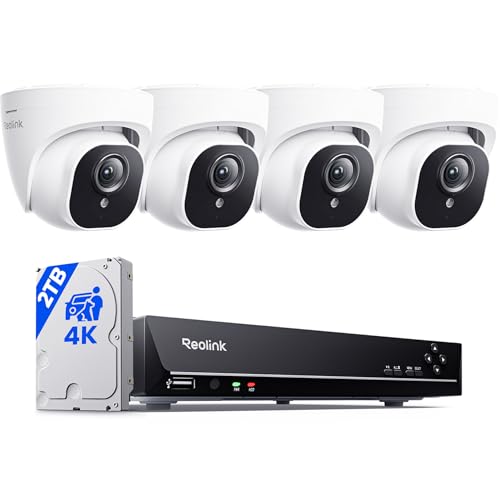
REOLINK 8CH 4K/8MP Home Security Camera System with 2TB HDD RLK8-800D4
Disclosure: We may earn a commission when you buy through links on this page, at no extra cost to you. As an Amazon Associate I earn from qualifying purchases. Learn more
Highlights
- 4K Ultra HD – Reolink 4K Ultra HD (8MP) PoE camera delivers almost 4 times the clarity of 1080p. Our complete camera system provides users vivid resolution, even when you digitally zoom in. Any flaw or distortion you’ve encountered before has been eliminated, ensuring you the highest quality view of your surroundings.
- Person/Vehicle/Animal Detection – Smart PoE IP cameras can identify people and vehicles in terms of their shapes, minimizing unwanted alerts such as animals or shadows. Cameras can also be configured to specify the type of detection when sending alerts to you. Know what happened simply by glancing at the lock screen.
- Plug and Play PoE System – A simple PoE connection makes it easier to install your home security camera system. With a single network cable, stretching up to 330ft, users can enjoy smooth security coverage of their entire house. Please complete the initial system configuration, network connection, and Reolink App setup to make the most of features such as remote access.
- Continuous 24/7 Recording – With a pre-installed 2TB HDD, users are provided reliable 24/7 recording. You can also install an external hard drive (up to 8TB) for backup storage. Expandable to 16TB totally.
- Compatible with All Reolink PoE IP Cameras – The 4K CCTV security camera system can be expanded up to an 8-camera kit with any Reolink PoE IP cameras o WiFi Camera without any compatibility issue. Please verify compatibility with your camera model before purchase.
- Technical Support – If you have any questions about installation, setup, remote viewing, or product features, our professional technical support team is available to help ensure your system is configured correctly.
Why You'll Love It
- 4K 8MP video gives you clearer detail when viewing or digitally zooming footage
- Person, vehicle, and animal detection helps reduce alerts caused by shadows or other activity
- PoE connectivity uses one network cable for each camera and supports runs up to 330ft
- A preinstalled 2TB HDD supports continuous 24 hour recording for ongoing coverage
- Storage can expand with an external hard drive up to 8TB, for 16TB total
- The system can expand to eight cameras using compatible Reolink PoE IP cameras
Pros
- +4K 8MP video
- +Person and vehicle detection
- +24 hour recording
- +Expandable storage
- +Expandable camera system
Cons
- -Initial system configuration required
- -Compatibility should be checked before expansion
- -External storage requires an added drive
Detailed Review
REOLINK RLK8 800D4 is a 4K security camera system built for buyers who want detailed video, continuous recording, and a setup that can grow to cover more areas. Four 8MP PoE cameras are part of the listed system, while the recorder includes a preinstalled 2TB HDD. That combination makes this a sensible fit for someone who wants ongoing surveillance rather than a camera intended mainly for occasional viewing.
The standout feature is 4K Ultra HD resolution from the 8MP PoE cameras. The practical benefit is more visible detail in the recorded view, including when you digitally zoom into footage. For a shopper deciding between image detail and a simpler camera setup, the higher resolution is the main reason to consider this system.
Detection features add another useful layer. The cameras can identify people and vehicles by their shapes, and they can distinguish those categories from animals or shadows when generating alerts. You can configure the type of detection used for alerts, making it easier to focus notifications on activity that matters to you instead of treating every movement as equally important.
Installation centers on PoE connectivity, with a single network cable supporting each camera and cable runs up to 330ft. The system still requires initial configuration, a network connection, and Reolink App setup if you want remote access. For recording, the included 2TB HDD supports continuous 24 hour coverage, while an external hard drive can add up to 8TB of additional storage, for 16TB total. The system can also expand to eight cameras, although compatibility should be checked for the specific camera model you plan to add.
The main trade off is that this is a fuller security system rather than a completely hands off setup. Initial configuration and app setup are part of getting the system ready, and expanding the system or storage may require additional compatible equipment. Verdict: Buy it if you want detailed 4K video, continuous recording, detection based alerts, and room to expand. Consider a simpler camera arrangement if you do not need a multi camera recording system or its configuration process.
Who Should Buy It
A great fit if you:
- Want detailed video that remains useful when you need to digitally zoom into recorded footage
- Prefer continuous recording instead of relying only on alerts when activity occurs
- Need coverage that can grow as you decide to add more compatible cameras
- Want alerts that can focus on people and vehicles rather than every detected movement
Consider something else if you:
- Prefer a simpler setup with fewer configuration steps and less emphasis on centralized recording
- Need a system designed around equipment that is not compatible with this camera ecosystem
Before You Buy
Confirm on the listing:
- Check whether the included cameras and their cable reach suit the areas you want to cover
- Verify compatibility before buying additional cameras, especially if you plan to expand beyond the included setup
- Check what is included in the box beyond the stated cameras, recorder, and preinstalled storage
- Confirm that the network connection and Reolink App setup fit how you want to access the system remotely
How to compare your options: Focus on video resolution, recording approach, detection features, storage capacity, connection method, and expansion options. This system combines 4K 8MP video, person and vehicle detection, continuous 24 hour recording, a 2TB HDD, expandable storage, and support for up to eight compatible cameras. If those are the priorities for your installation, its feature set is aligned with a more comprehensive surveillance setup.
Getting the Most From It
- Complete the initial system configuration before relying on the cameras for everyday coverage, then finish the network and Reolink App setup if remote access is important to you.
- Use the detection settings to select the types of alerts you want, particularly if you want notifications focused on people or vehicles.
- Plan camera placement around the areas you want covered, keeping the stated cable reach in mind when organizing the system.
- If you add cameras or storage, confirm compatibility first so the new equipment works with the system.
- For routine care, follow the product instructions for cleaning and maintenance, and review the recording setup periodically to make sure it matches your needs.
FAQ
Does this system record continuously?
Yes, it supports 24 hour recording through the preinstalled 2TB HDD. That gives the system ongoing recording rather than an alerts only approach.
Can I add more cameras later?
Yes, the system can expand to eight cameras with compatible Reolink PoE IP cameras. Check the specific camera model for compatibility before adding it.
Can I add more storage?
Yes, an external hard drive up to 8TB can be added for backup storage, allowing 16TB total storage.
Does it send person and vehicle alerts?
Yes, the cameras can identify people and vehicles by their shapes and let you configure the type of detection used for alerts. The detection system is also designed to reduce unwanted alerts from animals or shadows.
What setup is needed for remote access?
Remote access requires initial system configuration, a network connection, and Reolink App setup. The listing does not state every item included for installation, so check the listing before purchase if the box contents matter to your setup.
Product Details
| Brand | REOLINK |
| ASIN | B0811V48LG |