Logitech
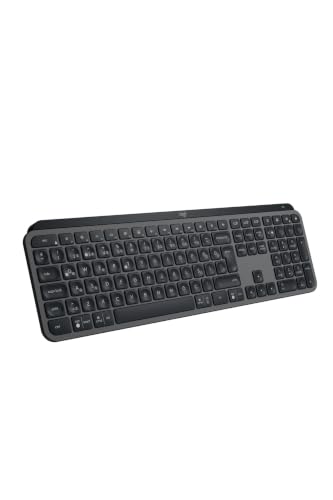
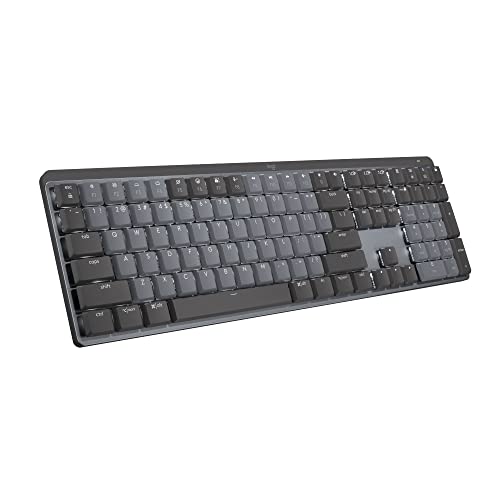
Logitech MX Mechanical Wireless Illuminated Keyboard Tactile - Graphite | Low-profile full-size, 3 device Bluetooth pairing, Smart backlight auto-adjusts, USB-C rechargeable, Up to 15 day battery
Disclosure: We may earn a commission when you buy through links on this page, at no extra cost to you. As an Amazon Associate I earn from qualifying purchases. Learn more
Highlights
- Tactile Quiet mechanical key switches with a satisfying tactile bump you feel - for precise feedback, reactive key reset, and less noise so your typing doesn't disturb those around you
- Low-profile keys, more comfort: A keyboard layout designed for effortless precision, with a full-size form factor and low-profile mechanical switches for better ergonomics
- Smart illumination: Backlit keys light up the moment your hands approach the cordless keyboard and automatically adjust to suit changing lighting conditions
- Faster workflow, more customization: Customize Fn keys, assign backlighting effects, enable Flow cross-computer, multi-device control, and more in the improved Logi Options+ (1)
- Multi-device, multi-OS: Pair MX Mechanical Bluetooth wireless keyboard with up to 3 devices on nearly any operating system via Bluetooth Low Energy or included Logi Bolt receiver(2)
- USB-C quick charging: MX Mechanical keyboard stays powered up to 15 days on a full charge or up to 10 months with the backlighting turned off (3)
- Plastic parts in MX Mechanical include certified post consumer recycled plastic (Graphite: 45%(5))
- In case of wireless keyboard or combo (keyboard and mouse), the USB receiver is usually provided either inside the mouse (under the battery cover) or attached within the product packaging
Why You'll Love It
- Tactile Quiet switches provide noticeable feedback while keeping typing noise lower
- Low-profile mechanical keys combine a full-size layout with a more compact key profile
- Automatic backlighting responds to nearby hands and adjusts to changing room lighting
- Connect up to three devices and switch between different operating systems
- USB-C charging supports up to 15 days of use, or up to 10 months with backlighting off
- Logi Options+ lets you customize function keys, lighting effects, and cross-computer controls
Pros
- +Tactile Quiet mechanical switches
- +Full-size low-profile layout
- +Automatic adaptive backlighting
- +Three-device wireless pairing
- +USB-C rechargeable battery
Cons
- -Full-size layout requires more desk space
- -Backlighting reduces the stated battery runtime
Detailed Review
The Logitech MX Mechanical is a full-size mechanical keyboard designed for people who want tactile typing feedback, wireless convenience, and a customizable workspace. Its defining combination is low-profile mechanical keys and Tactile Quiet switches, giving buyers a mechanical keyboard layout without relying on a traditional high-profile design. It is particularly appealing for desk-based work involving regular typing, multiple connected devices, or changing lighting conditions. The full-size arrangement also makes it a practical choice for shoppers who prefer a complete keyboard layout rather than a smaller format.
The Tactile Quiet switches are an important part of the experience. Each key provides a tactile bump that gives the typist physical feedback during a keystroke, while the switch design is intended to produce less noise than louder mechanical alternatives. That combination makes sense for shared workspaces or situations where audible typing is a consideration. The low-profile keys complement the switches by keeping the overall key design relatively flat. Buyers who enjoy tactile feedback but prefer a lower-profile keyboard arrangement will find this pairing particularly relevant.
Backlighting is another useful feature, especially for a workspace where lighting conditions change throughout the day. The illumination activates when your hands approach the keyboard and automatically adjusts to the surrounding light. This reduces the need to manage the lighting manually whenever you begin typing or move between different environments. Through Logi Options+, users can also customize backlighting effects and function keys, as well as enable Flow for cross-computer control. These options give the keyboard a more adaptable role in a personalized workstation.
Wireless connectivity supports pairing with up to three devices through Bluetooth Low Energy or the included Logi Bolt receiver. This is useful for someone who regularly works across multiple computers or operating systems and wants one keyboard for those devices. Power comes from a rechargeable USB-C connection. Logitech lists up to 15 days of battery life on a full charge, extending to up to 10 months when backlighting is turned off. The graphite version also uses certified post-consumer recycled plastic for 45% of its plastic parts.
The main trade-off is the combination of a full-size layout and illuminated mechanical keys. The complete layout needs an appropriate amount of desk space, while keeping the backlighting enabled means working with the shorter stated battery runtime rather than the extended figure available with illumination disabled. Shoppers who want a compact keyboard or prioritize maximum time between charges may prefer a different design. Verdict: This mechanical keyboard is a strong fit for people who want tactile feedback, a low-profile full-size arrangement, adaptive lighting, and connectivity for multiple devices. Choose it if those features support your daily workflow, but consider a smaller or simpler keyboard if desk space and minimal charging are your main priorities.
Who Should Buy It
A great fit if you:
- Spend substantial time typing and prefer physical feedback from mechanical switches instead of a less tactile key response.
- Want a full-size keyboard but prefer the design of low-profile mechanical keys over a higher-profile arrangement.
- Regularly work across several computers and want one keyboard that can pair with up to three devices.
- Use your keyboard in changing lighting conditions and appreciate illumination that responds automatically to your surroundings.
- Enjoy adjusting function keys and lighting behavior to suit your preferred computer workflow.
Consider something else if you:
- Have limited desk space and would be better served by a compact keyboard with fewer keys.
- Prefer a straightforward keyboard without mechanical switches, customizable software features, or illuminated keys.
Before You Buy
Confirm on the listing:
- Check the keyboard's exact dimensions and compare them with your available desk space, particularly because this is a full-size layout.
- Verify that your computers support the intended connection method, whether Bluetooth Low Energy or the Logi Bolt receiver.
- Check that the graphite version and the included receiver match the product configuration you intend to purchase. The seller notes that receiver placement can vary with wireless keyboard and combo packaging.
- Consider whether you intend to keep backlighting enabled or disabled, since the stated battery runtime differs considerably between those settings.
How to compare your options: Start with the switch design, because tactile feedback and typing noise are important preferences that influence whether this keyboard suits your workspace. Next, compare layout, wireless device capacity, and lighting controls. Its full-size arrangement, three-device pairing, and automatic illumination make it feature-rich for a multi-computer desk. Finally, consider the battery figures in relation to how you intend to use the backlighting. Comparing these practical details will help you decide whether the additional customization and mechanical features are worthwhile for your routine.
Getting the Most From It
Start by choosing the wireless connection method that suits your computer. The keyboard supports Bluetooth Low Energy and the Logi Bolt receiver, so consider which option is appropriate for each device you plan to connect. If you intend to use several computers, take advantage of its support for pairing with up to three devices.
Explore Logi Options+ after connecting the keyboard. Customize the Fn keys to match the tasks you perform regularly, and adjust the backlighting effects to suit your preferences. If your workflow involves more than one computer, consider enabling Flow for cross-computer control.
Pay attention to the automatic illumination feature. The keyboard activates its backlighting when your hands approach and adjusts to changing lighting conditions. You can also consider your preferred balance between illumination and battery runtime when choosing your settings.
For charging, use the USB-C connection and keep the two stated battery figures in mind when planning your routine. If you prefer longer periods between charges, turning off backlighting supports the listed extended runtime. Follow the manufacturer's care guidance when cleaning or maintaining the keyboard.
FAQ
How many devices can the Logitech MX Mechanical connect to?
It can pair with up to three devices. Supported connection methods include Bluetooth Low Energy and the Logi Bolt receiver, making it suitable for a multi-computer setup.
Does the MX Mechanical have backlit keys?
Yes. Its smart backlighting activates when your hands approach and automatically adjusts to changing lighting conditions. You can also customize lighting effects through Logi Options+.
How long does the battery last?
It provides up to 15 days on a full charge. With backlighting turned off, the stated battery life increases to up to 10 months. Charging uses USB-C.
Is this a quiet mechanical keyboard?
It uses Tactile Quiet mechanical switches designed to provide a noticeable tactile bump with less typing noise. This makes it worth considering if you want physical key feedback without choosing a louder switch design.
What comes with the wireless keyboard?
The listed connection options include an included Logi Bolt receiver. The seller notes that receiver placement can vary, so check the packaging details on the specific product listing before purchasing.
Product Details
| Brand | Logitech |
| ASIN | B09LK1P1RD |