HP
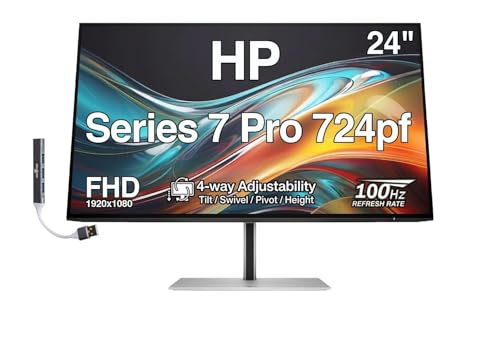
HP Series 7 Pro 724pf 23.8" FHD IPS Black Monitor, 100Hz, 99% sRGB | 1500:1 contrast, 85% P3, factory-calibrated; 150mm 4-way stand; DP out, 4 USB-A, HDMI, DP 1.2, w/DKZ USB Hub
Disclosure: We may earn a commission when you buy through links on this page, at no extra cost to you. As an Amazon Associate I earn from qualifying purchases. Learn more
Highlights
- 【EXPAND YOUR WORKSPACE】: Connect a compatible second monitor through DisplayPort daisy chaining for more room to work across spreadsheets, documents, and applications. DisplayPort 1.2 input and output, HDMI 1.4, and four USB-A ports support your workspace setup. USB hub functionality requires a USB-B upstream connection.
- 【FACTORY-CALIBRATED COLOR】: See your work on a 23.8-inch Full HD IPS display with 99% sRGB and 85% Display P3 color gamuts. Factory color calibration and a 1500:1 contrast ratio deliver vibrant visuals for office work and everyday creative projects.
- 【ADJUST YOUR SCREEN TO FIT YOUR WORKDAY】: Find a comfortable view with 150mm height adjustment, -5° to +20° tilt, ±45° swivel, and ±90° pivot. Switch between landscape and portrait orientations to suit your tasks and workspace.
- 【SMOOTH VIEWING FOR YOUR WORKDAY】: Enjoy smoother scrolling and video playback with a refresh rate of up to 100Hz. Built-in HP Eye Ease reduces blue light output while maintaining color accuracy for comfortable viewing throughout the workday.
- 【DESIGNED FOR A PRODUCTIVE DESK】: The slim profile and four-sided micro-edge design create a streamlined look for your home office or workspace. A VESA mount adapter is included for use with compatible monitor arms and mounts.
Why You'll Love It
- Daisy chain a second monitor via DisplayPort to spread work across two screens
- Factory calibrated 99% sRGB and 85% P3 color for accurate visuals out of the box
- Adjust height, tilt, swivel, and pivot to find a comfortable viewing angle all day
- Smooth 100Hz refresh rate reduces motion blur during scrolling and video playback
- Four USB-A ports on the monitor create a handy hub for peripherals like a mouse and keyboard
- Slim micro-edge bezel and included VESA adapter make it easy to mount or place on a clean desk
Pros
- +Factory calibrated color accuracy
- +Full ergonomic stand with 150mm height adjust
- +100Hz refresh rate for smoother motion
- +Four USB-A ports (hub requires USB-B cable)
- +DP daisy chain support for multi monitor setups
Cons
- -USB hub requires a separate USB-B upstream cable to your PC
- -Only one HDMI input limits simultaneous video sources
- -DisplayPort 1.2 (no 1.4 features like HDR or higher bandwidth)
Detailed Review
The HP Series 7 Pro 724pf is a 23.8 inch Full HD IPS monitor built for office productivity and light creative work. It solves the problem of cramped screen space by letting you daisy chain a second monitor through DisplayPort, while factory calibrated colors mean you can trust what you see without extra adjustment. This monitor suits anyone who spends long hours on spreadsheets, documents, or color aware tasks and wants a stand that adapts to their posture.
Color performance is a standout. The 724pf ships with 99% sRGB and 85% Display P3 coverage, and HP calibrates it at the factory so you don’t have to fiddle with settings. Combined with a 1500:1 contrast ratio, blacks look deeper than typical IPS panels, which helps reading text and viewing photos. The 100Hz refresh rate makes scrolling through long documents and web pages noticeably smoother than a standard 60Hz monitor, and HP Eye Ease reduces blue light while keeping colors accurate.
The stand is unusually versatile for this class. You get 150mm of height adjustment, tilt from -5 to +20 degrees, swivel of ±45 degrees, and a full 90 degree pivot for portrait mode. That means you can set the screen exactly where it suits your desk and neck. The four sided micro edge bezel keeps the frame thin, and a VESA mount adapter is included if you prefer a monitor arm. Connectivity includes HDMI 1.4, DisplayPort 1.2 (with both input and output for daisy chaining), and four USB-A ports. Those USB ports only activate when you connect the included USB B cable to your computer, so plan for that extra cable run.
The trade offs are straightforward. The 1080p resolution is perfectly fine for 23.8 inches but won’t show fine detail like a 4K monitor would. There is only one HDMI input, so if you want to switch between a desktop and a laptop you may need to use the DisplayPort for one and change cables. And because the USB hub relies on a USB B upstream connection, it doesn’t work as a simple KVM switch without extra gear. The stand also needs decent desk depth when fully adjusted.
Verdict: The HP 724pf is a strong choice for office workers and designers who want accurate colors, an adjustable stand, and the ability to connect a second monitor without extra adapters. Skip it if you need 4K resolution, multiple HDMI sources, or a USB C hub that charges a laptop.
Specifications
- Screen Size: 23.8 inches
- Resolution: Full HD (1920 x 1080)
- Panel Type: IPS
- Refresh Rate: 100 Hz
- Color Gamut: 99% sRGB, 85% Display P3
- Contrast Ratio: 1500:1
- Factory Calibrated: Yes
- Stand Adjustments: Height 150mm, Tilt -5° to +20°, Swivel ±45°, Pivot ±90°
- Ports: HDMI 1.4, DisplayPort 1.2 (in & out), 4 x USB-A (hub requires USB-B upstream)
- VESA Mount: Adapter included
Who Should Buy It
A great fit if you:
- Work with color sensitive documents or images and want accurate out of the box color without a calibration tool.
- Need an adjustable stand that lets you change height, tilt, swivel, and rotate to portrait for coding or reading.
- Plan to run two monitors and prefer a single cable daisy chain from your PC to the second screen.
- Use multiple USB peripherals like a keyboard, mouse, and webcam and want them plugged directly into the monitor.
Consider something else if you:
- Need 4K resolution for editing high resolution photos or video, as this monitor is only 1080p.
- Require a USB C port that can charge your laptop and carry video, since this monitor uses HDMI and DisplayPort only.
- Want a built in speaker or headphone output, because the listing does not mention any audio features.
Before You Buy
Confirm on the listing:
- Check whether the monitor includes a USB B cable for the hub function. The listing says the hub requires a USB B upstream connection but does not state the cable is included.
- Measure your desk depth and height. The stand with 150mm lift may need extra clearance under a shelf or against a wall.
- Verify your computer’s video output. If you plan to use the full 100Hz refresh rate, make sure your graphics card supports it over HDMI or DisplayPort.
- See if the VESA adapter fits your monitor arm pattern. The listing says an adapter is included, but confirm it matches 75x75 or 100x100 (common sizes).
How to compare your options: When shopping for a 24 inch office monitor, prioritize panel type (IPS for better viewing angles), connectivity (USB hub, daisy chaining, number of inputs), and stand adjustability. The HP 724pf excels on all three compared to basic fixed stand models. If you need higher resolution or USB C, look for those specific specs in other models.
Getting the Most From It
Setup. Connect the monitor to your PC using either HDMI or DisplayPort. To use the USB hub, run a USB B cable from the monitor’s upstream port to your computer before plugging in peripherals. For dual monitors, connect the first monitor’s DisplayPort output to the second monitor’s DisplayPort input using a DP cable.
Color calibration. The monitor ships with factory calibration, but if you want to switch between color modes (sRGB, P3, or native), use the on screen display menu. Reset to factory settings if colors appear off after adjustment.
Eye comfort. Enable HP Eye Ease in the OSD to reduce blue light without losing accuracy. The feature works best when combined with proper room lighting and a comfortable viewing distance.
Stand orientation. To pivot to portrait, raise the monitor to full height first, then rotate gently. The stand has a stop at 90 degrees. Use landscape for most office tasks and portrait for coding or reading long documents.
Care. Clean the screen with a soft, dry microfiber cloth. Avoid liquid cleaners directly on the panel. If the monitor arm is used, periodically check that the VESA adapter screws remain tight.
FAQ
Does this monitor have built in speakers?
The product data does not list speakers or audio output, so you should assume it requires external speakers or headphones connected to your computer.
Can I connect two computers to this monitor at once?
Only one video source can display at a time. The monitor has one HDMI and one DisplayPort input, so you can plug in two computers but must manually switch using the OSD menu.
What cables come in the box?
The listing says an included VESA mount adapter, but it does not specify which cables are included. Check the product description on the purchase page or unboxing photos to confirm whether HDMI, DisplayPort, or USB B cables are provided.
Does the USB hub work without the USB B cable?
No. The four USB A ports function only when the monitor is connected to your computer via a USB B upstream cable. Without it they are not powered or active.
Can I mount this monitor on an arm?
Yes. An VESA mount adapter is included, allowing you to attach the monitor to a compatible monitor arm or wall mount that matches the adapter pattern.
Product Details
| Brand | HP |
| ASIN | B0GRK1QRKQ |