GIGABYTE
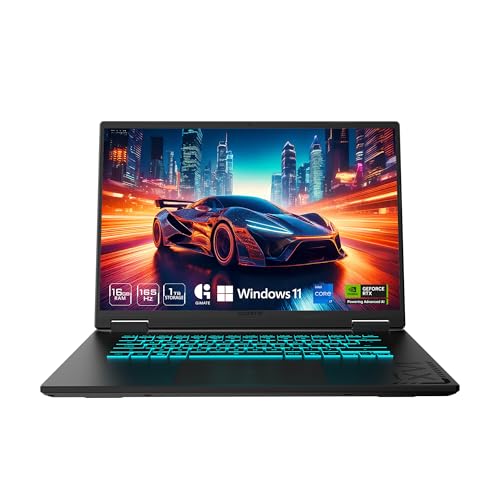
GIGABYTE Gaming A16 - Intel i7-13620H GeForce RTX 5070 16" Laptop
Disclosure: We may earn a commission when you buy through links on this page, at no extra cost to you. As an Amazon Associate I earn from qualifying purchases. Learn more
Highlights
- GIGABYTE GiMATE as Your Smart AI Mate – Introducing GiMATE, your smart AI Mate that transforms how you interact with technology. GiMATE creates an intelligent interface that truly understands your needs. Control is now more intuitive, more intelligent, and more personal.
- Intel Core i7-13620H Processor – With the Intel Core i7-13620H processor, you can stream, record gameplay, and run multiple applications without compromise. GIGABYTE GAMING A16 offers fast multimedia processing and the smoothest gaming experience.
- NVIDIA GeForce RTX 5070 Laptop GPU – Powered by NVIDIA Blackwell, GeForce RTX 5070 Laptop GPUs bring game-changing capabilities to gamers and creators. Equipped with a massive level of AI horsepower, the RTX 50 Series enables new experiences and next-level graphics fidelity. Multiply performance with NVIDIA DLSS 4, generate images at unprecedented speed, and unleash your creativity with NVIDIA Studio. All in the thinnest and longest lasting RTX laptops, optimized by Max-Q.
- Game and Create with Windows 11 Home – With Windows 11 Home, GIGABYTE GAMING A16 brings it all together in one place and gives you everything you need to stay ahead – game, create, and boost your productivity with confidence.
- 180-degree Hinge with 19.45mm Slim Chassis – GIGABYTE GAMING A16 features a laid-flat 180-degree hinge design to adapt to various scenarios, all with a 19.45 millimeters (0.76 inches) slim chassis.
Why You'll Love It
- Run demanding creative software and stream gameplay smoothly with the Intel Core i7-13620H processor
- Produce high fidelity visuals and accelerate generation tasks using the NVIDIA GeForce RTX 5070 GPU
- Boost gaming frame rates efficiently through supported NVIDIA DLSS 4 technology
- Share screens easily during collaboration sessions thanks to the 180-degree lay-flat display hinge
- Carry your setup in standard bags with the slim 19.45 millimeter profile
- Streamline daily system control and personal interactions using the built-in GiMATE AI interface
Pros
- +Slim 19.45mm chassis thickness
- +180-degree lay-flat screen hinge
- +Intel Core i7-13620H processing power
- +NVIDIA Blackwell architecture graphics
- +Preloaded with Windows 11 Home
Cons
- -Thin chassis limits internal hardware expandability
- -Requires managing battery habits under load
Detailed Review
A high-performance 16-inch gaming laptop needs to balance raw processing speed with everyday transportability, and the GIGABYTE Gaming A16 is built for users who split their hours between competitive play and resource-heavy digital creation. With a modern component lineup tucked into an understated frame, it provides the horsepower necessary for modern workflows without requiring a bulky desk footprint.
Core processing duties are handled by the Intel Core i7-13620H processor, giving you the ability to stream live sessions, capture high-resolution gameplay footage, and juggle background productivity applications without slowdowns. On the graphics side, the machine features the NVIDIA GeForce RTX 5070 Laptop GPU built on NVIDIA Blackwell architecture. This dedicated hardware supplies massive AI capability to run NVIDIA DLSS 4 for high visual fidelity and fast image rendering, while NVIDIA Studio optimization assists animators, video editors, and designers working across intensive creative platforms.
Physical usability centers on an accommodating 180-degree lay-flat hinge, letting you position the display angle to match your workspace, collaborative team discussions, or external monitor setups. Despite the large 16-inch display footprint and serious graphical hardware, the chassis measures just 19.45 millimeters (0.76 inches) thin. NVIDIA Max-Q optimizations are incorporated to help balance thinness and energy efficiency across your computing sessions, while the integrated GiMATE AI tool serves as an intuitive interface to assist with your everyday interactions and personalized settings under Windows 11 Home.
Because this model packs high-performance parts into a slim 19.45mm enclosure, users should expect trade-offs inherent to compact high-output designs. Slim profiles typically mean components are tightly arranged inside, leaving less physical room for extensive manual hardware modifications later. Power-hungry tasks like continuous image rendering or high-end gaming will naturally draw more energy, making proximity to a wall outlet sensible during peak computing sessions.
Verdict: The GIGABYTE Gaming A16 is a solid choice for digital creators, streamers, and gamers who need modern Blackwell-generation graphical capability and a practical 180-degree hinge in a portable footprint. Those who require an ultra-light low-power machine or prefer thick desktop-replacement enclosures with extensive internal expansion should look elsewhere.
Who Should Buy It
A great fit if you:
- Need dedicated graphical power for rapid image generation, video production, or design work utilizing NVIDIA Studio tools.
- Stream and record heavy gameplay simultaneously and require the multi-tasking capability of an Intel Core i7 processor.
- Collaborate frequently across shared desks or conference tables and benefit from a screen hinge that opens a full 180 degrees flat.
- Want a full 16-inch workspace housed within a relatively slim 19.45-millimeter chassis for easy transport.
Consider something else if you:
- Prefer an ultra-compact lightweight notebook built strictly for light web browsing and low battery consumption.
- Want a thick, heavy-duty desktop replacement chassis designed specifically for deep user hardware modifications.
Before You Buy
Confirm on the listing:
- Check the exact installed system memory (RAM) and solid-state storage capacity configured for this specific model variant.
- Confirm the full selection of physical input and output ports, including external display connections and USB port counts.
- Verify the display panel technical parameters, such as screen refresh rate, resolution, and color accuracy ratings.
- Review the included power supply wattage, charging accessories, and included cord length in the retail box.
How to compare your options: When weighing laptops in this segment, prioritize the processor family, graphics architecture, and overall chassis dimensions. The GIGABYTE Gaming A16 pairs an Intel Core i7-13620H with an RTX 5070 GPU in a sub-20mm profile, giving you a balance of recent generation computing features alongside a flexible 180-degree hinge.
Getting the Most From It
When you first unpack the laptop, run the initial Windows 11 Home setup on a flat, solid surface and let all operating system updates install fully before installing heavy programs. Take time to configure the pre-installed GiMATE software to learn its layout and establish your preferred personal interaction settings.
To support steady airflow during intense gaming or rendering workloads, keep the underside vents clear of blankets, pillows, or soft bedding. If you use the 180-degree hinge to lay the screen flat across a shared work table, grasp the display gently by the center edge to apply even pressure across both hinge pivot points.
For exterior cleaning, wipe the chassis and display panel with a soft, clean microfiber cloth as directed by the manufacturer instructions, avoiding abrasive household sprays or rough paper towels. Keep the graphics drivers up to date through the official software to take advantage of NVIDIA DLSS 4 and Studio platform optimizations.
FAQ
Which operating system comes pre-installed on this computer?
It comes preloaded with Windows 11 Home, allowing you to run games, creative applications, and daily productivity programs right away.
How thick is the chassis on this laptop?
The laptop features a slim enclosure measuring 19.45 millimeters, or approximately 0.76 inches, thick.
Does the screen bend fully flat?
Yes, it is built with a 180-degree hinge mechanism that allows the display panel to lay flat across a surface.
What graphics processor powers this machine?
It features an NVIDIA GeForce RTX 5070 Laptop GPU built on NVIDIA Blackwell architecture, supporting Max-Q optimization, NVIDIA Studio, and DLSS 4.
What is GiMATE?
GiMATE is GIGABYTE's built-in smart AI interface designed to offer personalized, intuitive control and management on the laptop.
Product Details
| Brand | GIGABYTE |
| ASIN | B0FDM3M1WF |