Corsair
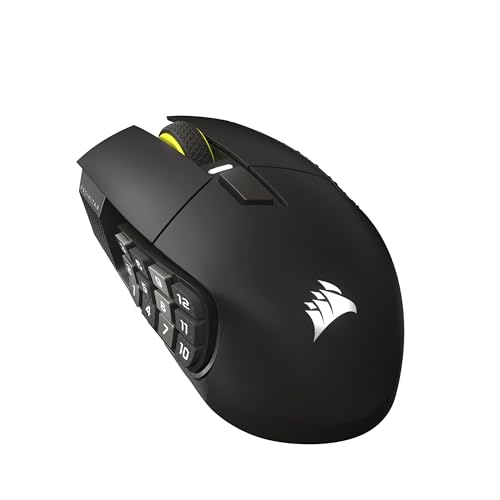
Corsair Scimitar Elite Wireless SE MMO MOBA PC Gaming Mouse – Black
Disclosure: We may earn a commission when you buy through links on this page, at no extra cost to you. As an Amazon Associate I earn from qualifying purchases. Learn more
Highlights
- Phenomenally Precise 33k DPI MARKSMAN S: Hit headshots, scan the entire map, ping teammates all with amazing accuracy thanks to the MARKSMAN S 33k DPI optical sensor. With improved DPI detection, IPS tracking, and lower power consumption over the previous version, it’s definitely a worthy upgrade
- 16 Programmable Buttons: All the powers in the world, right at your fingertips. Have a button ready for every power, consumable, action, and attack with 16 programmable buttons
- Elgato Stream Deck Integration: Native Elgato Stream Deck integration allows you to directly map Stream Deck functions to the SCIMITAR ELITE WIRELESS SE from the Stream Deck App, so your most important functions are just a button away
- Elgato Virtual Stream Deck Integration: This mouse can also utilize Elgato’s Virtual Stream Deck integration to give your 16 buttons more functionality than ever. Map buttons to their own Virtual Stream Deck to build out profiles for productivity, gaming, streaming, and more
- Fast, Low-Latency Wireless Freedom: Ditch the cords and the lag. SLIPSTREAM WIRELESS offers a low-latency connection on PC or Mac with 1,000Hz polling. Alternatively connect via Bluetooth or USB to charge while you play
Why You'll Love It
- Execute complex game commands quickly with 16 fully programmable buttons at your fingertips
- Track targets accurately across wide displays using a 33k DPI MARKSMAN S optical sensor
- Switch between low-latency 1,000Hz SLIPSTREAM wireless, Bluetooth, or wired USB connections easily
- Trigger stream functions and actions directly through native Elgato Stream Deck app integration
- Recharge your battery over a standard USB cable while continuing your gaming session
- Build custom multi-application command layouts with Elgato Virtual Stream Deck support
Pros
- +Versatile 16 programmable button layout
- +High-accuracy 33,000 DPI optical sensor
- +Fast 1,000Hz SLIPSTREAM wireless connection
- +Three flexible connection options
- +Direct Elgato Stream Deck integration
Cons
- -Denser button layout takes practice
- -Many features depend on companion software
Detailed Review
Complex ability rotations and detailed desktop controls demand a dedicated PC gaming mouse built specifically for deep macro management. Corsair Scimitar Elite Wireless SE puts an extensive array of controls directly under your thumb, making it an appealing option for MMO players, MOBA competitors, and live broadcasters who need immediate inputs without hunting across a keyboard. Rather than sticking to basic navigational clicks, it centers your setup around rapid command execution.
Input flexibility is the primary draw here, driven by 16 programmable buttons. In games that require balancing attacks, consumables, and tactical pings, having that number of assignments close at hand keeps your movement keys free. The integration with Elgato Stream Deck software expands this utility beyond gaming, enabling direct mapping of streaming functions right from the Stream Deck app. You can also build out Virtual Stream Deck profiles to assign productivity shortcuts, media toggles, and broadcast commands across separate layouts.
Tracking accuracy relies on the MARKSMAN S 33k DPI optical sensor. It offers improved DPI detection and IPS tracking compared to its previous iteration, along with lower power consumption. With tracking reaching up to 33,000 DPI, you have the sensitivity headroom to quickly sweep across multiple monitors or dial down for fine aiming adjustments when precision counts.
For connectivity, the mouse supports three distinct options across PC and Mac systems. The primary SLIPSTREAM WIRELESS mode provides a low-latency link operating at a 1,000Hz polling rate. When you want to pair with alternative hardware or save dongle space, you can switch to Bluetooth. For uninterrupted play, plugging in via USB lets you charge the internal battery while continuing your matches.
With 16 buttons packed into a single handheld device, the learning curve is real. Navigating a cluster of controls by feel requires muscle memory, and users who prefer minimal designs may find the dense layout overwhelming during frantic gameplay. Software configuration is also necessary to map out commands and fully unlock the Elgato features.
Verdict: This PC gaming mouse is an outstanding pick for MMO and MOBA enthusiasts, as well as streamers looking for direct hardware control over their broadcast tools. Shoppers who want a lightweight, basic pointer with simple two-button navigation should look toward a traditional minimal design instead.
Who Should Buy It
A great fit if you:
- Play MMO or MOBA titles that require assigning numerous abilities, consumables, and pings across 16 programmable inputs.
- Broadcast content and want direct Elgato Stream Deck integration to control your stream without reaching for a separate deck.
- Require a high-precision optical sensor with up to 33,000 DPI for fast tracking across high-resolution displays.
- Prefer flexible connectivity that lets you switch between 1,000Hz SLIPSTREAM wireless, Bluetooth, and wired USB charging.
Consider something else if you:
- Prefer a lightweight, simple mouse with only standard left and right buttons to avoid accidental key presses.
- Want an analog, plug-and-play pointer that never requires software configuration or profile mapping.
Before You Buy
Confirm on the listing:
- Check whether a USB charging cable and wireless receiver are included in the retail packaging.
- Confirm the exact physical dimensions and total weight to verify it matches your grip style.
- Check the specific system and OS version requirements for running the Elgato Stream Deck app on your PC or Mac.
- Verify the expected battery life across both SLIPSTREAM wireless and Bluetooth modes.
How to compare your options: Focus on button count, sensor resolution, and connection flexibility when evaluating MMO pointers. A model offering 16 programmable buttons gives you significantly more keybind potential than typical six-button office or shooter mice. Sensor capability matters for responsiveness, where a 33,000 DPI ceiling and 1,000Hz polling rate ensure snappy tracking. Finally, having both low-latency wireless and Bluetooth ensures compatibility across multiple setups without being tied permanently to a cable.
Getting the Most From It
Start by installing the Elgato Stream Deck app on your PC or Mac to configure your primary button assignments. Take time to build distinct profiles for each game genre or work task, using the Virtual Stream Deck tools to group related macros together.
When gaming competitively, connect using SLIPSTREAM WIRELESS to take full advantage of the responsive 1,000Hz polling rate. Reserve the Bluetooth mode for general computing or secondary devices to preserve battery life and keep ports open.
Keep your USB cable nearby on your desk so you can plug in and charge while playing whenever power runs low. To maintain proper sensor tracking, periodically wipe the optical sensor area and exterior shell with a clean, dry microfiber cloth as directed by the manufacturer instructions.
FAQ
Can I use this mouse on both Windows and macOS?
Yes, it supports connections on both PC and Mac via the low-latency SLIPSTREAM WIRELESS mode, Bluetooth, or a USB cable.
How do the Elgato Stream Deck features work on the mouse?
The mouse features native integration with the Stream Deck app, allowing you to assign standard Stream Deck actions or Virtual Stream Deck profiles directly to the 16 programmable buttons.
Can I charge the mouse while playing?
Yes, connecting the mouse through a USB cable charges the battery while allowing you to keep playing uninterrupted.
What is the maximum sensor sensitivity?
The MARKSMAN S optical sensor provides sensitivity up to 33,000 DPI with improved DPI detection and IPS tracking over the previous version.
Does the mouse offer a Bluetooth connection?
Yes, in addition to low-latency SLIPSTREAM WIRELESS and wired USB, you can connect wirelessly using Bluetooth.
Product Details
| Brand | Corsair |
| ASIN | B0F6NGCDFN |