Alienware
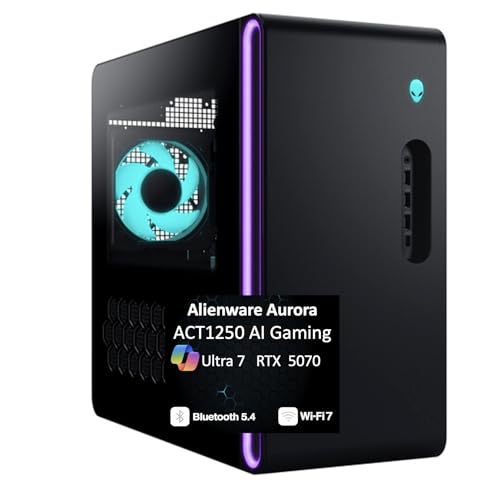
Alienware Aurora Gaming Desktop, RTX 5070, Intel Core Ultra 7 265F | 1TB SSD, 32GB DDR5, Wi‑Fi 7, Bluetooth, Killer 2.5Gb Ethernet, Windows 11 Home, Wired Keyboard, ACT1250
Disclosure: We may earn a commission when you buy through links on this page, at no extra cost to you. As an Amazon Associate I earn from qualifying purchases. Learn more
Highlights
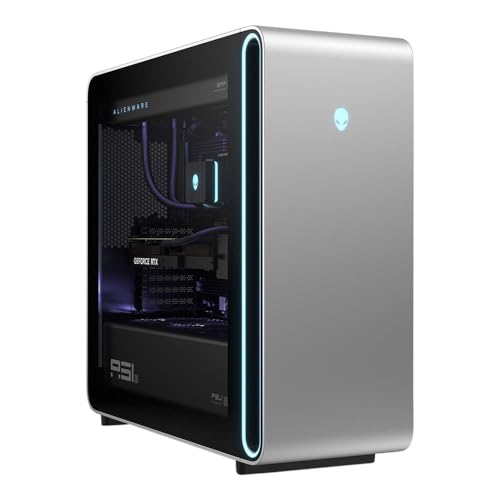
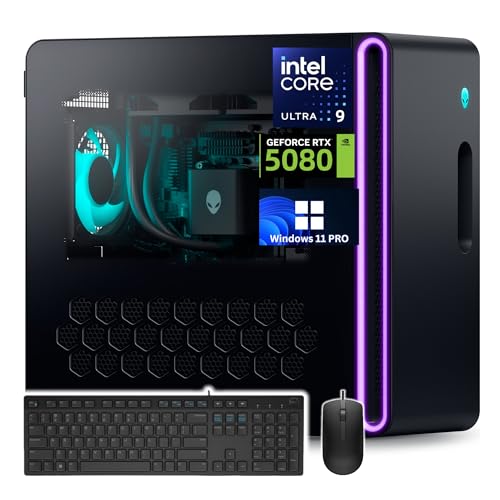
- Legend perfected: Modern design with a matte basalt black finish in an optimized chassis with customizable AlienFX lighting zones, including the striking stadium lighting.
- Game changing graphics: Step into the future of gaming and creation with the NVIDIA GeForce RTX 5070 graphics, powered by NVIDIA Blackwell architecture.
- Marathon gaming unlocked: This high-performance technology ensures clean energy is consistently available, unleashing the top-level power of Intel Core Ultra 7 265F processor as you game, livestream, and multi-task for hours on end.
- Total command: Alienware Command Center software allows you to create and edit AlienFX lighting across the ecosystem, choose and monitor your performance mode across distinct power states, and create custom gaming profiles for your whole library.
- Dell Services: 1 Year Onsite Service provides support when and where you need it. Dell will come to your home, office, or location of choice, if an issue covered by Limited Hardware Warranty cannot be resolved remotely.
Why You'll Love It
- NVIDIA GeForce RTX 5070 graphics with Blackwell architecture supports a gaming focused desktop setup
- Intel Core Ultra 7 265F processor is designed for gaming, livestreaming, and multitasking
- 32GB DDR5 memory and a 1TB SSD provide a defined starting point for memory and storage needs
- Customizable AlienFX lighting lets you personalize the matte basalt black chassis and stadium lighting
- Alienware Command Center brings lighting controls, performance modes, and custom game profiles together
Pros
- +NVIDIA GeForce RTX 5070 graphics
- +Intel Core Ultra 7 processor
- +32GB DDR5 memory
- +Customizable AlienFX lighting
- +Wi-Fi 7 and Killer Ethernet connectivity
Cons
- -Wired keyboard may not suit cable free desk setups
Detailed Review
The Alienware Aurora RTX 5070 gaming desktop is aimed at players who want a dedicated gaming system with a current generation graphics card, a capable sounding processor configuration, and customizable lighting in one package. Its NVIDIA GeForce RTX 5070 graphics, powered by NVIDIA Blackwell architecture, are the main attraction for shoppers prioritizing graphics hardware. An Intel Core Ultra 7 265F processor, 32GB DDR5 memory, and a 1TB SSD round out the core configuration, giving buyers specific components to evaluate against their gaming library, creative activities, and everyday multitasking needs.
The processor and graphics combination is intended to support gaming, livestreaming, and multitasking. That makes this Aurora worth considering if your desktop needs to serve more than one purpose, such as running games while you stream or switching between entertainment and creative work. The hardware names alone do not guarantee a particular frame rate or application result, so shoppers should compare the configuration with the requirements of the games and programs they actually use. The 32GB of DDR5 memory and 1TB SSD also give you concrete capacities to consider when deciding whether this system fits your workload and storage habits.
Appearance and control are another part of the package. The chassis uses a matte basalt black finish and includes customizable AlienFX lighting zones, including stadium lighting. Alienware Command Center lets you adjust the lighting, select and monitor performance modes across distinct power states, and create custom gaming profiles for your game library. These controls give the system a personalization element beyond its component list. If you prefer to tailor the look of your setup or keep game profiles and performance mode choices in one software environment, these features may be particularly appealing.
Connectivity and included accessories also matter when planning a complete desk setup. This configuration lists Wi-Fi 7, Bluetooth, Killer 2.5Gb Ethernet, a wired keyboard, and Windows 11 Home. The combination gives shoppers several connection options to consider alongside their existing network and accessories. Dell also lists one year of onsite service, with a technician coming to a home, office, or another chosen location if an issue covered by the Limited Hardware Warranty cannot be resolved remotely. The wired keyboard is worth factoring into your desk preferences, especially if you want to keep cables to a minimum.
Verdict: This Alienware desktop is a strong candidate for shoppers who prioritize RTX 5070 graphics, an Intel Core Ultra 7 processor, customizable lighting, and integrated gaming controls in a single system. It is less compelling for someone who wants a cable free setup or has not confirmed that the included hardware and storage suit their specific games and applications. Review your software requirements, desk arrangement, and preferred connections before choosing it.
Who Should Buy It
A great fit if you:
- You want a dedicated gaming desktop centered on NVIDIA GeForce RTX 5070 graphics and an Intel Core Ultra 7 processor.
- You regularly move between gaming, livestreaming, and other computer tasks and want hardware selected with those activities in mind.
- You enjoy customizing your setup and would use adjustable AlienFX lighting and game specific profiles to personalize your desktop experience.
- You want a system with listed Wi-Fi 7, Bluetooth, and Killer 2.5Gb Ethernet connectivity options.
Consider something else if you:
- You prefer a cable free desk and would be happier with a desktop package that includes a wireless keyboard.
- Your games or applications call for a different graphics, processor, memory, or storage configuration, making a more closely matched desktop a better choice.
The best reason to shortlist this Aurora is the combination of gaming focused components and software based personalization. Decide which activities matter most to you first, then check whether the listed configuration meets those needs rather than choosing solely for its appearance.
Before You Buy
Confirm on the listing:
- Check the desktop's physical dimensions and measure your intended desk or placement area to make sure the chassis fits your setup.
- Confirm which accessories are included in the package beyond the listed wired keyboard, particularly if you expect to use existing peripherals or need additional items.
- Check that your preferred games, creative applications, and other software are compatible with the listed processor, RTX 5070 graphics, 32GB DDR5 memory, and Windows 11 Home.
- Review your network arrangements and existing devices to confirm whether Wi-Fi 7, Bluetooth, or Killer 2.5Gb Ethernet best matches your intended connections.
How to compare your options: Start with the graphics hardware and processor, then consider memory and SSD capacity in relation to the games and programs you plan to run. Next, weigh connectivity, included accessories, lighting controls, and support arrangements according to your priorities. The Aurora combines RTX 5070 graphics, 32GB DDR5 memory, a 1TB SSD, and AlienFX customization, so compare those specific elements with the configurations and features you actually need rather than relying on a product name alone.
Getting the Most From It
Start by organizing your desktop around the way you intend to use it. Choose a suitable placement, connect the peripherals and network option that fit your setup, and follow the manufacturer's setup guidance for Windows 11 Home. If documentation accompanies the system, use it to guide initial configuration and routine care.
Open Alienware Command Center to explore its available controls. Adjust AlienFX lighting zones to suit your preferences, including the stadium lighting, and review the performance modes before settling on the settings that fit your activities. The software also lets you create custom profiles for your game library, which can help you keep your preferred arrangements organized.
Make deliberate use of the system's storage and memory by deciding which games, programs, and files belong on the desktop. Keep track of the space your installed content occupies and review your storage needs as your library changes. Your own applications and workload should guide those decisions.
Finally, retain the support information and review the conditions of the listed service. If a covered hardware issue cannot be resolved remotely, the stated onsite service provides a route for further assistance. Follow the manufacturer's instructions for cleaning and ongoing care rather than improvising a maintenance routine.
FAQ
What comes with the Alienware Aurora desktop?
The listed configuration includes a wired keyboard and Windows 11 Home. It also specifies an RTX 5070 graphics card, Intel Core Ultra 7 265F processor, 32GB DDR5 memory, and a 1TB SSD. Check the listing for any additional accessories you expect to receive.
Is this desktop suitable for gaming and livestreaming?
Yes, it is presented for gaming, livestreaming, and multitasking. Its RTX 5070 graphics and Intel Core Ultra 7 265F processor are the central hardware features to assess against the requirements of your intended games and applications.
Can I customize the lighting and performance modes?
Yes, Alienware Command Center supports customizable AlienFX lighting and performance mode selection and monitoring. It also allows you to create custom gaming profiles for your library.
Can I connect it to my existing network and devices?
The desktop lists Wi-Fi 7, Bluetooth, and Killer 2.5Gb Ethernet. Check your network equipment and existing accessories to confirm that the connections you plan to use meet your needs.
What support is included?
The listed package includes one year of Dell onsite service. If an issue covered by the Limited Hardware Warranty cannot be resolved remotely, Dell states that it will come to your home, office, or another location of your choice.
Product Details
| Brand | Alienware |
| ASIN | B0DPKLJ4CV |