
Best Bird Box Cameras: Everything to Know Before Your First Purchase for 2026
Disclosure: We may earn a commission when you buy through links on this page, at no extra cost to you. As an Amazon Associate I earn from qualifying purchases. Learn more

Shopping for the best bird box cameras for the first time? Learn the key terms, compare features, and avoid common rookie mistakes with ease.
Watching a bird build a nest, lay eggs, and raise chicks is one of the most rewarding parts of backyard birding, and the right camera makes it feel close and personal. If this is your first purchase, choosing among the best bird box cameras can feel confusing because listings mix real nest box features with general camera terms that matter very little here. This guide slows everything down and explains each idea in plain English.
You will learn what these small cameras actually do, which specs change what you see on screen, and which ones you can safely ignore as a beginner. We also cover common mistakes, simple setup steps, and the questions new buyers ask most. Use the comparison table below to see how the options differ, then read on to match them to your box, your birds, and your budget.



Bird Box Cameras 101: The Basics
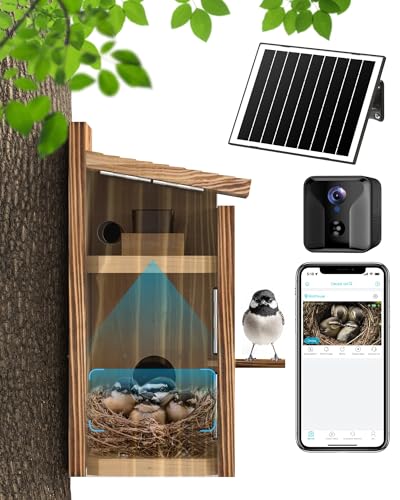
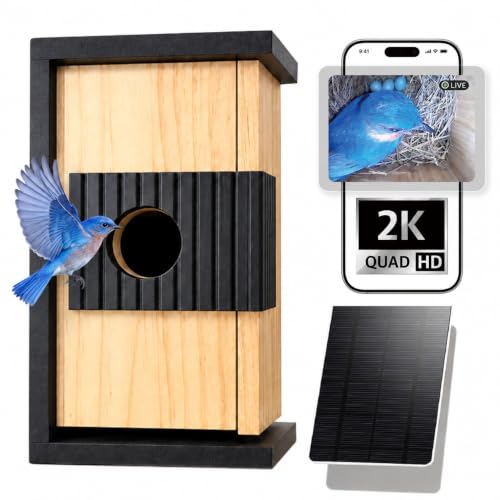
A bird box camera is a small camera that mounts inside a nest box, usually high in one corner, and points down at the nest below. Its whole job is to let you watch nesting activity without opening the box and disturbing the birds. Most models send the picture to a phone app over WiFi, or to a TV or monitor through a long cable. When people compare the best bird box cameras, they are really comparing how clearly and reliably a tiny camera can watch a dark and tight space for weeks at a time.
Because the inside of a box is dim, these cameras carry small infrared lights around the lens. In daylight you get a color picture, and when light drops the camera switches to infrared and shows a clear black and white picture instead. Many models also detect motion and save short clips, so you can catch the moment an egg hatches even if you missed it live. A small microphone adds sound, so you hear chicks calling for food as well as see them.
A feeder camera, by contrast, sits outside and watches birds in open daylight at a feeding station. If your main interest is that open yard view, see our guide to the best bird feeder cameras for cameras built for that job. A box camera trades that wide outdoor view for a close and sheltered one.
Key Specs Explained in Plain English
The spec list on a product page looks technical, but each item answers a simple question about what you will see and how the camera behaves. The product table above groups these specs in one place, so use the notes below to decide which lines deserve your attention and which are safe to skim.
Sensor Size and Image Quality
The sensor captures light and turns it into a picture, and box cameras use small sensors because the camera has to fit inside a compact box. A small sensor gathers less light, so picture quality in a dim box depends on the sensor, the lens, and the infrared lights working together. Megapixels are not the whole story, since a higher pixel count squeezed onto a tiny sensor can add grain in low light. A clean 1080p picture with good infrared usually looks better than a noisy higher resolution one.
Lens and Zoom Range
Almost every box camera uses a fixed wide angle lens, and that is a strength, since from a few inches away it shows the whole nest floor at once. Focus distance matters far more than zoom here, so check that the lens is set for close range and stays sharp on the nest area. Optical zoom moves the lens itself and keeps full quality, while digital zoom simply crops the picture and makes it softer.
Ease of Use for Your Skill Level
A good first camera does the thinking for you, with automatic exposure, automatic switching into night mode, and alerts that arrive in plain language. WiFi models send clips to a phone app, which suits most beginners, while wired models send a steady picture to a TV or recorder with no app setup at all. Pick the routine that fits your comfort level, since you will use it daily. A box camera is set up once and left alone, so simple menus and a clear app matter more than manual controls. Autofocus is rare at this distance, and a fixed focus lens set at the factory is usually the simpler and more reliable choice.
Size, Weight, and Ergonomics
For a camera that never leaves the box, ergonomics means fit rather than grip. The body should be compact enough to leave full room for the nest, and the mount should sit clear of the entrance hole so adult birds pass easily. Weight matters too, since a lighter camera is less likely to work loose from a mount screwed into a thin box wall. A small and light kit also travels without fuss if you move it between boxes or take it to a cabin. Weatherproof construction matters at the edges, since rain can reach cable joins and any parts mounted outside the box.
Video Capabilities
You will watch far more video than stills, so video features deserve real attention. 4K video gives crisp detail and leaves room to crop a clip on your phone, while 1080p uses less storage and streams more smoothly on a weak WiFi signal. Electronic image stabilization helps when wind sways a box mounted on a tree and makes the picture wobble. Skip handheld extras such as log profiles and flip screens, which add cost and do nothing inside a nest box.
Battery Life and Charging
Nesting season runs for weeks, so power planning shapes the whole experience. Many box cameras run on mains power through a long cable, which removes charging from your routine entirely. With battery models, think in days of standby and hours of recording rather than shots per charge, which is a measure meant for handheld cameras. Cold nights and frequent motion clips both drain a battery faster. USB C charging is a genuine convenience when you do recharge, and a spare battery or a small solar panel can keep a remote box running without weekly ladder trips.
Rookie Mistakes to Avoid
Most first season disappointments come from a handful of simple errors, so watch for these before you order.
- Buying on megapixels alone, so you end up with a grainy and dim picture despite the big number printed on the box.
- Mounting the camera after birds have already moved in, so the disturbance risks scaring the pair away from the box.
- Choosing WiFi without testing the signal at the box location, so the live view drops out right when a chick starts to move.
- Forgetting to plan power before mounting, so the camera goes dark during the most interesting week of the whole season.
- Letting the mount or cable block part of the entrance hole, so adult birds struggle to bring food in to the chicks.
Getting Started: Setup and First Use
Start on a table indoors, not on a ladder. Connect the camera to its app or screen, confirm you have a clear picture, set the date and time, and format the memory card if your model uses one. Charge the battery fully, or test the full power cable, while everything is within easy reach. This bench test takes ten minutes and saves you from troubleshooting in the garden.
Mount the camera before nesting season begins, or whenever the box stands empty, and never open an occupied box to adjust it. Fix the camera high in a corner with the lens aimed at the nest floor, then route the cable so it cannot swing across the entrance hole. Wipe the lens with a proper lens cloth, not your shirt, since shirt fabric can smear the small glass and soften every picture. Keep a spare battery charged and ready if your model runs on battery power.
During the first week, check the view from the ground through the app or screen and resist the urge to peek inside. Small angle changes are fine while the box is empty, but once birds show interest, leave everything exactly as it is. When the season ends and the box is fully empty, wipe the lens again, check cables for wear, and store battery models with a partial charge.
Bird Box Cameras: Your Questions Answered
Each answer below adds a detail the main sections only touch on briefly.
Which bird box camera features work better for low light inside a nest box?
Strong infrared lighting and a sensor tuned for dim conditions work better than raw resolution for low light inside a nest box. A small translucent panel in the box itself also helps, since a little natural daylight gives richer color with no change to the camera. The infrared picture at night is always black and white, and color returns when daylight comes back.
Is a smartphone enough instead of a bird box camera?
No, a smartphone is not enough for watching a full nesting season instead of a dedicated camera. A phone cannot stay mounted inside a box for weeks, and it needs light to see in the dark. A phone is still handy for a quick photo of an empty box before the season starts.
How do you power a bird box camera?
Most box cameras use either a mains power cable run to the box or a built in rechargeable battery, and some add a small solar panel. A cable removes recharging from your routine, while a battery or solar model is easier to place in a remote spot. Plan the power before you mount, and keep the cable clear of the entrance hole.
How much should you spend on your first bird box camera?
About $50 to $100 covers a solid wired starter camera with everything you need to begin. Spending about $100 to $250 usually adds WiFi with app clips, higher resolution, and better infrared for a clearer night picture. Set a little money aside beyond the camera price, because a cable extension, a memory card, and a sturdy mount are common extras.
What bird box camera specs matter most for beginners?
Close focus, a wide field of view, and dependable infrared matter most for beginners, in that order. Before you order, measure the inside height of your box, since the camera must fit with room for the lens to cover the whole nest floor. Start simple, learn your setup for one season, and upgrade later only if a real gap shows up.
Final Thoughts
A clear close picture, power that lasts the season, and a connection that reaches your home are the three things that decide whether a first camera delights you or frustrates you. Match the camera to the box you own, test everything indoors, and mount it well before your birds arrive. Check the comparison table above with those three points in mind, and the right choice usually becomes obvious. The best bird box cameras for you are simply the ones that fit your box, your birds, and your routine.


