Redragon
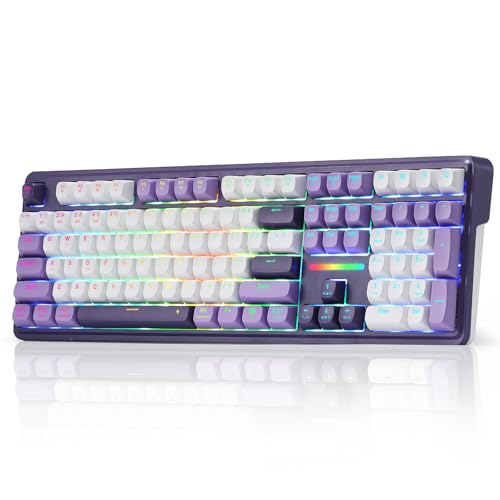
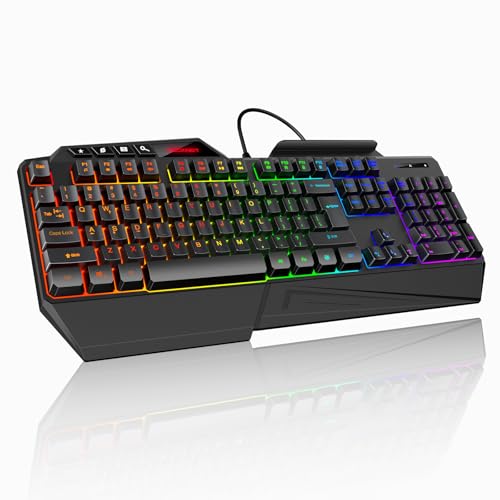
Redragon K552 Mechanical Keyboard, LED Gaming Keyboard with Red Switches
Disclosure: We may earn a commission when you buy through links on this page, at no extra cost to you. As an Amazon Associate I earn from qualifying purchases. Learn more
Highlights
- 🔥𝗧𝗿𝘂𝗲 𝗠𝗲𝗰𝗵𝗮𝗻𝗶𝗰𝗮𝗹 𝗙𝗲𝗲𝗹 𝘄𝗶𝘁𝗵 𝗟𝗶𝗻𝗲𝗮𝗿 𝗥𝗲𝗱 𝗦𝘄𝗶𝘁𝗰𝗵𝗲𝘀 - Experience smooth, consistent keystrokes with linear red mechanical switches designed for rapid actuation and quiet operation. Perfect for both gaming marathons and extended typing sessions without the tactile bump of blue or brown switches.
- 🔥𝗩𝗶𝗯𝗿𝗮𝗻𝘁 𝗥𝗮𝗶𝗻𝗯𝗼𝘄 𝗟𝗘𝗗 𝗕𝗮𝗰𝗸𝗹𝗶𝗴𝗵𝘁𝗶𝗻𝗴 𝘄𝗶𝘁𝗵 𝟲 𝗗𝘆𝗻𝗮𝗺𝗶𝗰 𝗠𝗼𝗱𝗲𝘀 - Enjoy eye-catching rainbow backlighting with 6 preset lighting modes, including breathing, wave, ripple, and reactive effects. Note: This Rainbow LED version features fixed color patterns and does not support software customization. Brightness is adjustable via keyboard shortcuts for optimal visibility in any lighting.
- 🔥𝗦𝗼𝗳𝘁𝘄𝗮𝗿𝗲 𝗗𝗿𝗶𝘃𝗲𝗿 𝗦𝘂𝗽𝗽𝗼𝗿𝘁 𝗳𝗼𝗿 𝗙𝘂𝗹𝗹 𝗖𝘂𝘀𝘁𝗼𝗺𝗶𝘇𝗮𝘁𝗶𝗼𝗻 𝗖𝗼𝗻𝘁𝗿𝗼𝗹 - Take control of your K552-KR with dedicated software drivers, remap each key, assign complex macro commands, and tailor it perfectly to your personal workflow or gaming style.
- 🔥𝗖𝗼𝗺𝗽𝗮𝗰𝘁 & 𝗗𝘂𝗿𝗮𝗯𝗹𝗲 𝟴𝟳-𝗞𝗲𝘆 𝗗𝗲𝘀𝗶𝗴𝗻 𝘄𝗶𝘁𝗵 𝗠𝗲𝘁𝗮𝗹 𝗙𝗿𝗮𝗺𝗲 - The tenkeyless layout saves valuable desk space while maintaining full gaming functionality. Built with a sturdy metal top plate and anti-slip feet, this keyboard stays firmly in place during intense sessions and is ideal for smaller setups or portable use.
- 🔥𝗙𝘂𝗹𝗹 𝗔𝗻𝘁𝗶-𝗚𝗵𝗼𝘀𝘁𝗶𝗻𝗴 & 𝗡-𝗞𝗲𝘆 𝗥𝗼𝗹𝗹𝗼𝘃𝗲𝗿 𝗳𝗼𝗿 𝗙𝗹𝗮𝘄𝗹𝗲𝘀𝘀 𝗜𝗻𝗽𝘂𝘁 - Every key press registers accurately with full anti-ghosting technology, ensuring simultaneous commands are executed correctly during competitive gameplay. All 87 keys support N-key rollover for reliable performance when pressing multiple keys at once.
- 🔥𝗣𝗹𝘂𝗴 & 𝗣𝗹𝗮𝘆 𝗖𝗼𝗻𝗻𝗲𝗰𝘁𝗶𝘃𝗶𝘁𝘆 𝘄𝗶𝘁𝗵 𝗪𝗶𝗱𝗲 𝗖𝗼𝗺𝗽𝗮𝘁𝗶𝗯𝗶𝗹𝗶𝘁𝘆 - No drivers or software needed – simply connect via the braided USB cable and start typing. Compatible with Windows, macOS, Linux, and most gaming systems, making it a versatile choice for home, office, or school use. Backed by a 1-year warranty for peace of mind.
Why You'll Love It
- Linear red switches provide smooth key presses for gaming and longer typing sessions
- Compact 87-key layout saves desk space while keeping full gaming functions
- Rainbow LED modes add adjustable backlighting for different desktop setups
- Metal frame and anti-slip feet help keep the keyboard positioned securely
- Anti-ghosting and N-key rollover support accurate multi-key input during play
Pros
- +Smooth linear red switches
- +Compact tenkeyless layout
- +Adjustable rainbow lighting
- +Full anti-ghosting support
- +Braided USB connection
Cons
- -Fixed rainbow lighting patterns
- -No software lighting customization
- -Smaller layout without number pad
Detailed Review
Redragon K552 is a mechanical keyboard built for buyers who want a compact gaming setup with smooth red switches and reliable key input. Its 87-key design removes the number pad to save desk space while keeping the functions needed for gaming, typing, and everyday computer use.
The main feature is the linear red mechanical switches, which are designed for smooth, consistent keystrokes without the tactile bump found on blue or brown switches. This makes the K552 a fit for shoppers who prefer a straightforward key feel for gaming sessions or extended typing. The keyboard also supports full anti-ghosting and N-key rollover across all 87 keys, helping simultaneous key presses register correctly when multiple commands are used together.
The design focuses on a practical desktop setup. The metal frame and anti-slip feet give the keyboard a sturdy structure and help it stay in place during use. The braided USB cable provides plug and play connectivity, and the keyboard works with Windows, macOS, Linux, and most gaming systems. For buyers who want to adjust their setup, dedicated software drivers support key remapping, macro commands, and other customization options.
The lighting is another part of the experience, with rainbow LED backlighting and six preset modes including breathing, wave, ripple, and reactive effects. Brightness can be adjusted through keyboard shortcuts. The trade-off is that this Rainbow LED version uses fixed color patterns rather than software controlled lighting customization, so shoppers wanting full lighting control may prefer a different style of keyboard.
Verdict: Redragon K552 is a good choice for shoppers who want a compact mechanical keyboard with red switches, reliable multi-key input, and built-in lighting. It suits gaming and typing needs well, while buyers focused on fully customizable lighting should consider another option.
Who Should Buy It
A great fit if you:
- Want a compact keyboard that leaves more room on a smaller desk setup.
- Prefer smooth linear switches for gaming and longer typing sessions.
- Need a keyboard with reliable input for pressing multiple keys together.
- Like preset lighting effects without needing to create custom color patterns.
Consider something else if you:
- Need a keyboard with a number pad for frequent numeric entry and larger layouts.
- Want a keyboard with fully customizable lighting through software controls.
Before You Buy
Confirm on the listing:
- Check whether the 87-key layout fits your workspace and your usual keyboard needs.
- Check compatibility with your specific computer or gaming system before connecting it.
- Check what is included in the box if you need any additional accessories.
- Check the software driver details if you plan to remap keys or create macros.
How to compare your options: Compare mechanical keyboards by switch style, layout, lighting controls, and customization features. The K552 focuses on linear red switches, a compact 87-key design, preset rainbow lighting, and key customization through dedicated software drivers.
Getting the Most From It
- Connect the USB cable and use the plug and play setup for basic keyboard operation.
- Adjust the brightness settings through keyboard shortcuts to match your preferred workspace lighting.
- Explore the available lighting modes to choose a preset effect that fits your setup.
- If you use customization features, review the software driver options for key remapping and macros.
- Keep the keyboard clean according to any care guidance provided with the product.
FAQ
Is the Redragon K552 a mechanical keyboard?
Yes, it uses linear red mechanical switches. The design provides smooth, consistent keystrokes for gaming and typing.
Does the K552 have customizable lighting?
No, this Rainbow LED version uses fixed color patterns. It has six preset lighting modes and adjustable brightness, while the listing says dedicated software drivers support other customization controls.
Will this keyboard work with my computer?
Yes, it is compatible with Windows, macOS, Linux, and most gaming systems. Check your specific setup before purchase to confirm compatibility.
Does it support multiple key presses?
Yes, all 87 keys support N-key rollover with full anti-ghosting. This helps register simultaneous commands during use.
Can I change the keys or create macros?
Yes, dedicated software drivers support key remapping and assigning complex macro commands. Check the software details on the listing for setup information.
Product Details
| Brand | Redragon |
| ASIN | B016MAK38U |