Motorola
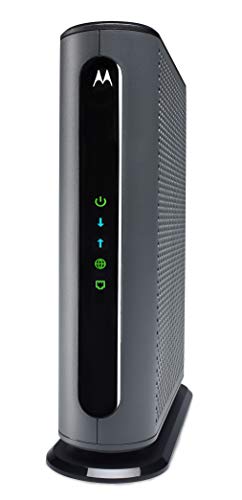
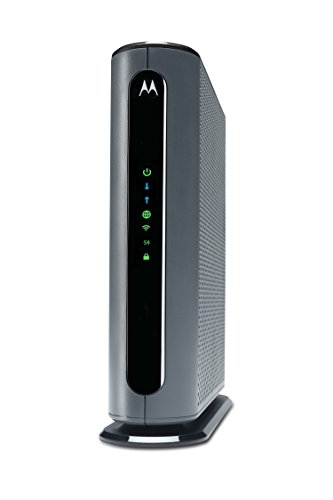
Motorola MG7700 Modem WiFi Router Combo with Power Boost | Approved by Comcast Xfinity, Cox and Spectrum | for Cable Plans Up to 800 Mbps | DOCSIS 3.0 + Gigabit Router
Disclosure: We may earn a commission when you buy through links on this page, at no extra cost to you. As an Amazon Associate I earn from qualifying purchases. Learn more
Highlights
- Fast 24x8 DOCSIS 3.0 cable Modem Plus a built-in AC1900 Dual band (2.4GHz and 5GHz) Wi-Fi Gigabit Router with four Gigabit (GigE) Ethernet ports, power boost Wi-Fi amplifiers, firewall security, and more. The maximum modem speed is 1000 Mbps, supporting service speeds up to 650.
- Eliminate up to 156 dollars per year in cable Modem rental fees. (Savings are shown for Comcast Xfinity and vary by cable service provider.) certified by all leading cable service providers including Comcast Xfinity, Cox, Charter spectrum (no cable Modem is compatible with fiber optic, DSL, or satellite services, available from Verizon, AT&T, CenturyLink, Frontier, and others.)
- Built-in high-speed router with AC1900 wireless and Power boost - Provides internet access for Wi-Fi devices including smartphones, notebooks, tablets, and more. 4 10/100/1000 Gigabit Ethernet LAN ports provide wired connections to Windows and Mac computers and other Ethernet-capable devices. A Broadcom cable Modem Chipset provides security from denial of service attacks.
- Wireless power boost for better speed and range - Adds high-performance Wi-Fi power amplifiers to boost the wireless signals to the legal limit, giving a significant Boost in speed and range. In addition, anybeam Performing at both 2.4 GHz and 5 GHz frequencies focuses the signal on wireless clients to further enhance performance and range
Why You'll Love It
- Combines a cable modem and dual band WiFi router in one device for a consolidated home network
- Supports cable internet service, with compatibility listed for Comcast Xfinity, Cox and Spectrum
- Uses 2.4GHz and 5GHz WiFi bands to connect wireless devices according to their network needs
- Power Boost amplifiers and AnyBeam signal focusing are designed to improve wireless range and connection performance
- Four Gigabit Ethernet ports provide wired connections for computers and other Ethernet capable devices
- Built in firewall security and a Broadcom modem chipset provide protection features for a home network
Pros
- +Cable modem and WiFi router in one unit
- +Dual band AC1900 wireless networking
- +Four Gigabit Ethernet ports
- +Power Boost and AnyBeam wireless features
- +Compatibility with three named cable providers
Cons
- -DOCSIS 3.0 rather than a newer listed modem standard
- -Not compatible with fiber, DSL or satellite service
- -Advertised speed limits require careful plan compatibility checks
Detailed Review
The Motorola MG7700 cable modem router combo is designed for households that want cable internet access and WiFi networking in one device. Instead of choosing a separate cable modem and wireless router, buyers get both functions together, along with wired networking ports and built in security features. It is listed for use with Comcast Xfinity, Cox and Spectrum, making provider compatibility an important starting point for anyone considering this setup.
Its modem uses DOCSIS 3.0 technology and a 24x8 channel configuration. The product name positions it for cable plans up to 800 Mbps, while the feature description says it supports service speeds up to 650 Mbps and separately gives a maximum modem speed of 1000 Mbps. Those figures describe different stated limits and should not be treated as interchangeable. Before choosing this unit, compare the speed tier offered by your provider with the applicable support information for your specific plan.
The integrated router provides AC1900 dual band WiFi across 2.4GHz and 5GHz frequencies. This gives compatible phones, tablets, notebooks and other wireless devices access to the home network without requiring a separate router. Power Boost amplifiers are intended to strengthen wireless signals, while AnyBeam focuses the signal toward wireless clients on both listed frequencies. These features make wireless coverage a central part of the product's appeal, although the actual benefit for a particular home will depend on its circumstances.
For devices that benefit from a wired connection, four Gigabit Ethernet LAN ports accommodate Windows and Mac computers and other Ethernet capable equipment. The built in firewall and Broadcom modem chipset add security related features, with the chipset specifically described as providing protection from denial of service attacks. Combining networking functions may appeal to shoppers who prefer one device to manage rather than separate modem and router units.
The main trade off is compatibility and speed suitability. This is a cable modem, not a general purpose modem for fiber optic, DSL or satellite connections, and the listed DOCSIS 3.0 standard is part of its design. Verdict: Choose this cable modem router combo if your internet comes through a compatible cable provider, your plan falls within its supported speed limits, and you want both WiFi and wired networking in one device. Consider another type of modem or a separate networking setup if your service uses fiber, DSL or satellite, or if your provider's requirements do not match this model.
Who Should Buy It
A great fit if you:
- Have cable internet through Comcast Xfinity, Cox or Spectrum and want one device to handle modem and router functions.
- Use a mix of wireless phones, tablets and notebooks alongside computers or other devices that connect through Ethernet.
- Want dual band WiFi and prefer having both 2.4GHz and 5GHz networking available from the same unit.
- Would value built in wireless amplifiers and signal focusing features as part of your home network setup.
- Are comparing ownership with ongoing modem rental fees and want to consider the seller's stated potential savings.
Consider something else if you:
- Use fiber optic, DSL or satellite internet and need a modem designed for that type of service instead.
- Need a newer modem standard or a configuration tailored to requirements that this DOCSIS 3.0 combo cannot meet.
Before You Buy
Confirm on the listing:
- Check that your exact cable provider and service plan support the MG7700, including any requirements that apply to your account.
- Confirm the speed limit relevant to your plan. The product name mentions plans up to 800 Mbps, while the feature description states support for service speeds up to 650 Mbps.
- Check what is included in the package and whether the supplied items meet your setup needs before ordering.
- Confirm that a combined modem and router suits your intended network arrangement and the devices you want to connect.
How to compare your options: Start with service compatibility and the supported internet speed, because a cable modem must match your provider and plan. Next, compare the wireless features, including dual band AC1900 WiFi, Power Boost and AnyBeam, against the connections you need around your home. Finally, consider whether four Gigabit Ethernet ports cover your wired devices and whether combining modem and router functions fits your preferred setup. The right choice depends on these practical requirements rather than a headline speed alone.
Getting the Most From It
Start by confirming compatibility with your cable provider and service plan before making the MG7700 the center of your network. If the provider gives model specific setup instructions, follow those directions so the modem and service are matched correctly.
Make use of the two WiFi bands according to the needs of your connected devices. Phones, tablets and notebooks can connect wirelessly, while compatible computers and other Ethernet capable devices can use the four Gigabit LAN ports when a wired connection suits your setup.
Keep the Power Boost and AnyBeam features in mind when considering wireless coverage. Their purpose is to amplify wireless signals and focus them toward connected clients, but you should assess the connection in the locations where you actually use your devices rather than assuming every area will perform identically.
Review the built in firewall and the provider's guidance for managing your network. If the product comes with setup or care instructions, refer to them for the recommended handling and maintenance practices. When changing your internet plan, check compatibility and supported speeds again instead of assuming the existing setup will suit every service tier.
FAQ
Does the Motorola MG7700 include a WiFi router?
Yes, it combines a DOCSIS 3.0 cable modem with an AC1900 dual band WiFi router. It also provides four Gigabit Ethernet ports for wired devices.
Will it work with Comcast Xfinity, Cox or Spectrum?
Yes, those three cable providers are specifically named as compatible. Confirm that the exact model and your current service plan meet your provider's requirements before purchasing.
Can I use it with fiber, DSL or satellite internet?
No, the product information excludes fiber optic, DSL and satellite services. It is intended for compatible cable internet connections, so check your service type first.
What internet speed does the MG7700 support?
The product name describes support for plans up to 800 Mbps, while the feature description states service speeds up to 650 Mbps and a maximum modem speed of 1000 Mbps. Check the applicable supported speed with your provider before relying on a particular plan figure.
What comes with it, and how should I set it up?
The product combines the modem, router, dual band WiFi and wired networking ports in one unit. The listing does not state the complete package contents or detailed setup steps, so confirm those details on the listing and follow the provider's instructions.
Product Details
| Brand | Motorola |
| ASIN | B07BRZ2KW5 |