Lenovo
Lenovo Chromebook Plus 2-in-1 - Lightweight Laptop - Google Gemini - Intel® N355 CPU - 14" WUXGA IPS Touchscreen Display - 8GB RAM - 256GB UFS Storage - Integrated Graphics - Fingerprint Reader
Disclosure: We may earn a commission when you buy through links on this page, at no extra cost to you. As an Amazon Associate I earn from qualifying purchases. Learn more
Highlights
- THE BETTER WAY TO LAPTOP – Imagine a Chromebook that’s as flexible as your day: thin and lightweight with built-in Google apps and stress-free security.
- TAKE HITS KEEP MOVING – Sleek, light, and built to last- the Chromebook Plus 2-in-1 14" is just 0.69” thick and 3.3lbs. Enjoy long-lasting battery life, fast charging, and military-grade durability for nonstop productivity wherever life takes you.
- PERFORMANCE THAT MATCHES YOUR HUSTLE – Fuel your ideas with an Intel Core processor and 8GB memory. Boot up in under 10 seconds to start the day powerfully efficient.
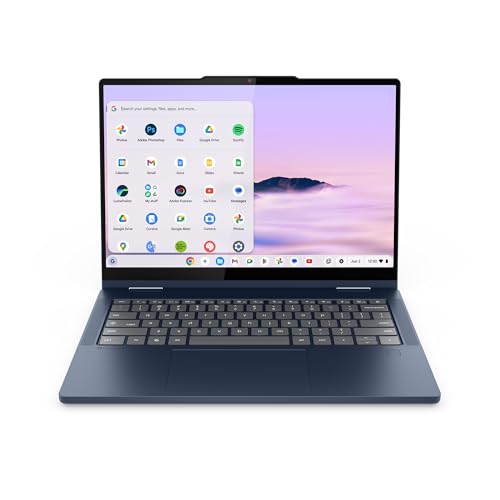
- FLEX YOUR CREATIVITY ANYWHERE, ANYTIME – Create, work, or unwind your way with a versatile 2-in-1 design. Flip easily between laptop, tent, and tablet modes with a responsive touchscreen built for flexibility.
- BRILLIANT VIEWS AND IMMERSIVE AUDIO – See, hear, and create with awesome clarity. The WUXGA display brings rich detail to your work and play, while audio tuned by Waves MaxxAudio provides immersive, balanced sound.
- MORE WAYS TO CONNECT AND CREATE – Stay connected and ready for just about anything. With two USB-C ports, two USB-A ports, and an HDMI port, the Chromebook Plus 2-in-1 14" makes it easy to plug in, share, and expand your setup wherever, whenever.
- LOOK SHARP AND STAY SECURE – Take control of your privacy anywhere with a physical shutter on the crisp FHD webcam and fingerprint reader. Open your Chromebook with the touch of a finger for video calls, meetings, or live streams, and slide the webcam shutter securely closed whenever you need complete peace of mind.
- BUILT-IN GOOGLE AI, WITH GEMINI – Chat with Google Gemini to supercharge your ideas, right from your home screen. Get help planning, writing, learning, and more.
Why You'll Love It
- Switch between laptop, tent, and tablet modes to match your work, browsing, and creative activities
- Use the 14-inch WUXGA touchscreen to interact directly with content while keeping a laptop-style workspace available
- Connect accessories and external displays through two USB-C ports, two USB-A ports, and an HDMI port
- Open the Chromebook with the fingerprint reader and close the physical webcam shutter when privacy matters
- Get help with planning, writing, and learning through Google Gemini built into the Chromebook experience
- Carry a 3.3-pound design with a claimed long-lasting battery and fast charging for work beyond your desk
Pros
- +Flexible laptop, tent, and tablet modes
- +14-inch WUXGA IPS touchscreen
- +Four USB ports plus HDMI
- +Fingerprint reader and webcam shutter
- +Google Gemini integration
Cons
- -Integrated graphics may not suit graphics intensive workloads
- -One 14-inch screen size to accommodate
Detailed Review
The Lenovo Chromebook Plus 2-in-1 is a touchscreen Chromebook for people who want one device to handle everyday computing in several positions. Its folding design switches between laptop, tent, and tablet modes, giving students, home users, and professionals different ways to work with the same screen. The combination of an Intel N355 processor, 8GB of RAM, and 256GB of UFS storage provides the core hardware, while built-in Google apps and Gemini make this an option for shoppers who want Google's software experience alongside a convertible design.
The 14-inch WUXGA IPS touchscreen is central to its appeal. You can use the screen directly when tapping through content or position the device in tent mode when that arrangement better suits your activity. In laptop mode, it provides a conventional workspace for writing, planning, and other productivity tasks. Waves MaxxAudio tuned audio adds another part of the multimedia package, while the seller also describes long-lasting battery life and fast charging. The claimed startup time is under 10 seconds, which is useful for buyers who value getting to their work quickly.
Connectivity is another practical strength. Two USB-C ports, two USB-A ports, and an HDMI port give you several ways to connect accessories or expand your setup. That selection is worth considering if your routine involves multiple connected devices or sharing content on an external display. The FHD webcam includes a physical privacy shutter, and the fingerprint reader provides a convenient way to open the Chromebook. Together, these features make privacy and access part of the everyday design rather than separate tasks to remember.
The trade-offs are tied to the configuration and its intended role. The 8GB memory and integrated graphics may be less suitable for people whose priorities include graphics intensive work or particularly demanding multitasking. The 14-inch screen also establishes a fixed size for both laptop and tablet use, so shoppers should consider whether that format suits their workspace and preferred way of holding a device. The convertible design offers flexibility, but the main advantage is versatility rather than a specialized focus on one particular task.
Verdict: Choose this 2-in-1 Chromebook if you want a touchscreen laptop that can change modes, offers several physical connections, and includes Gemini, a fingerprint reader, and a webcam shutter. A shopper focused on graphics intensive workloads or a different screen size should compare configurations designed around those priorities before deciding.
Specifications
- Brand: Lenovo
- Product type: Chromebook 2-in-1 laptop
- Processor: Intel N355 CPU
- Memory: 8GB RAM
- Storage: 256GB UFS
- Display: 14-inch WUXGA IPS touchscreen
- Graphics: Integrated graphics
- Weight: 3.3 pounds
- Thickness: 0.69 inches
- Convertible modes: Laptop, tent, and tablet
- USB connectivity: Two USB-C ports and two USB-A ports
- Video connection: HDMI port
- Webcam: FHD webcam with physical shutter
- Security: Fingerprint reader
- Software features: Built-in Google apps and Google Gemini
- Audio: Waves MaxxAudio tuning
- Battery features: Long-lasting battery life and fast charging, as described by the seller
Who Should Buy It
A great fit if you:
- Want one computer that can switch between conventional laptop use, tent positioning, and tablet mode throughout your day.
- Prefer a touchscreen for interacting with content instead of relying exclusively on the keyboard and touchpad.
- Need a Chromebook for writing, planning, learning, and other everyday productivity activities using built-in Google apps.
- Regularly connect accessories or an external display and want USB-C, USB-A, and HDMI ports available on the device.
- Value a fingerprint reader and a physical webcam shutter as part of your usual sign-in and privacy routine.
Consider something else if you:
- Spend much of your time on graphics intensive work and would benefit from a computer configured specifically for those workloads.
- Prefer a different screen size or need a computer designed primarily around a specialized computing task rather than convertible flexibility.
Before You Buy
Confirm on the listing:
- Check that the 14-inch touchscreen and the stated 3.3-pound weight fit your intended workspace and how you plan to carry or position the device.
- Review the exact processor and memory configuration to ensure the Intel N355 CPU and 8GB RAM suit your intended applications.
- Check whether your existing accessories use USB-C, USB-A, or HDMI, and confirm any additional compatibility requirements before relying on them.
- Verify what is included in the box, including any accessories you expect to use with the convertible design.
How to compare your options: Start with the work you intend to do, then weigh memory, storage, graphics, display size, and convertible functionality against those needs. This configuration combines 256GB UFS storage with 8GB RAM, integrated graphics, a touchscreen, and three ways to position the display. Also compare the physical ports, privacy features, and battery claims so your choice reflects your everyday setup rather than a single headline specification.
Getting the Most From It
Choose the convertible position that suits the task at hand. Use laptop mode for keyboard based work, tent mode when you want the screen positioned differently, and tablet mode when direct touchscreen interaction makes more sense. Adjusting the position to match your activity helps you make use of the design instead of treating it as a conventional laptop alone.
Make a connection plan before building your workspace around the device. Identify which accessories need USB-C or USB-A and whether an HDMI connection is useful for your display setup. Keeping those needs in mind helps you use the available ports deliberately.
Explore the built-in Google apps and Gemini for the planning, writing, and learning tasks described by the seller. Treat AI assistance as a tool for developing ideas and organizing work, then review the results against your actual needs.
Use the fingerprint reader as part of your sign-in routine and close the physical webcam shutter when you want the camera covered. Follow the manufacturer's care guidance for the touchscreen, keyboard, and exterior, and check the supplied instructions before cleaning or adjusting the device. If battery life and charging are important to your routine, review the relevant guidance so your habits align with the manufacturer's recommendations.
FAQ
Can this Chromebook be used as a tablet?
Yes, it supports laptop, tent, and tablet modes through its convertible design. The 14-inch touchscreen lets you interact with content directly.
What ports does the Lenovo Chromebook Plus 2-in-1 have?
It has two USB-C ports, two USB-A ports, and an HDMI port. Check the connectors on your existing accessories before choosing how to connect them.
Does it have a webcam privacy cover?
Yes, the FHD webcam has a physical shutter that you can slide closed when you want the camera covered. A fingerprint reader is also included for signing in.
Can I use Google Gemini on this Chromebook?
Yes, Google Gemini is built into the Chromebook experience. The seller describes using it for help with planning, writing, learning, and related tasks.
What comes in the box, and can I connect my current accessories?
The listing describes the Chromebook and its built-in features, but it does not establish the full box contents or compatibility with every accessory. Confirm included items and check your accessories' connection requirements on the product listing before purchasing.
Product Details
| Brand | Lenovo |
| ASIN | B0GQ152BZB |