Strikonx
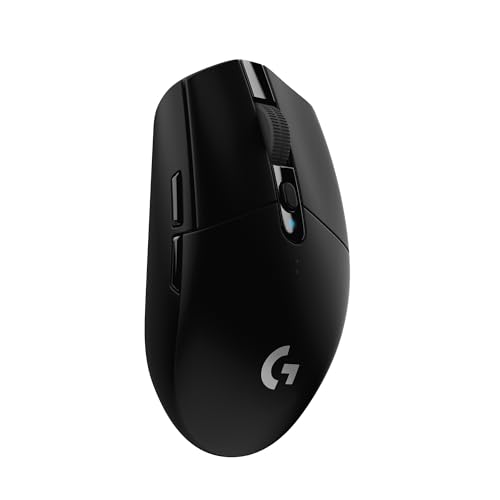
Aula SC620 Wireless Gaming Mouse, Tri-Mode 2.4GHz/USB-C/BT5.3 Computer Mouse with 12000 DPI, Programmable Macro Gamer Mouse with Rapid Fire Key, RGB Light Gaming Mice for PC/Laptop/Mac
Disclosure: We may earn a commission when you buy through links on this page, at no extra cost to you. As an Amazon Associate I earn from qualifying purchases. Learn more
Highlights
- Triple Mode Connection: Seamlessly switch between 2.4GHz wireless, BT5.3, and wired USB modes—this gaming mouse can store up to 4 devices for quick switching between gaming and office scenarios. As a wireless gaming mouse, it offers broad compatibility with Windows, Mac OS, Linux, and Android systems, suitable for desktops, laptops, Macs, and more
- Macro Programming & Fire Button: This Aula gaming mouse wireless features 7 programmable buttons, supporting remapping, macro recording, DPI adjustment, polling rate, sleep time, and lighting mode settings via the AULA driver (soaidriver.com). Dedicated Fire Button for One-Click Critical Commands: Map game burst fire, MMO skill combos, or office app shortcuts—eliminating repetitive clicks and complex keybinds. Whether eliminating enemies or optimizing workflows, it transforms complex actions into single-click execution, elevating your wireless mouse gaming experience. Note: Supports Windows systems in 2.4GHz wireless and wired modes; BT mode is unavailable
- Adjustable 12,000 DPI: The AULA SC620 wireless mouse features 6 adjustable DPI levels—800, 1600, 3200, 4800, 8000, and 12000—perfectly suited for FPS sniping or spreadsheet operations. Paired with a 1000Hz polling rate, it delivers low latency and high fluidity. This programmable mouse ensures instant response with every movement, making it the ultimate computer mouse for competitive play and precision tasks
- Dynamic RGB Backlighting: Elevate your setup with dynamic RGB custom lighting modes—this mouse gamer features a hollowed-out structure that highlights vibrant RGB effects, instantly creating an immersive atmosphere. Use the AULA driver(soaidriver.com) to customize brightness, speed, or sync with your gaming/work environment for a personalized style. Energy-efficient design keeps the vibrant colors shining while maintaining long-lasting battery life for rechargeable wireless mouse—whether you're gaming all night or crafting a unique desktop aesthetic, it handles it all with ease
- Ergonomic and Lightweight Design: Weighing just 67g, this wireless mouse for laptop delivers fatigue-free gaming and work sessions—perfectly suited for claw, palm, or fingertip grips. The black mouse's streamlined shape naturally conforms to your palm, effectively reducing wrist strain during marathon gaming sessions or all-day office tasks. An essential choice for gamers and professionals seeking comfort without compromising performance
Why You'll Love It
- Connects across three modes and switches between up to four stored devices
- Lightweight 67-gram build supports palm, claw, and fingertip grip styles
- Adjustable sensor offers six sensitivity levels from 800 up to 12000 DPI
- Dedicated rapid fire key executes multi-click actions and complex shortcuts instantly
- Seven remappable buttons let you adjust polling rate, macros, and sleep timers
- Hollow shell structure highlights customizable dynamic RGB backlighting effects
Pros
- +Lightweight 67-gram frame
- +Stores up to four separate devices
- +Responsive 1000Hz polling rate
- +Dedicated hardware fire button
- +Six distinct sensitivity presets
Cons
- -Software programming requires a Windows system
- -Button customization unavailable over Bluetooth
- -Driver download required from an external website
Detailed Review
A versatile wireless gaming mouse needs to jump effortlessly between fast-paced evening matches and daily office productivity. The Strikonx Aula SC620 solves this balance by pairing tri-mode connectivity with a nimble 67-gram shell, making it a capable companion for users who split their desk time across multiple machines. Its black streamlined body conforms naturally to your hand whether you use a palm, claw, or fingertip grip, keeping wrist fatigue in check during prolonged computer sessions.
Multi-device flexibility stands out as one of its strongest daily assets. The unit operates over 2.4GHz wireless, Bluetooth 5.3, or a standard wired USB connection, storing up to four separate hardware profiles for quick toggling. Broad operating system support covers Windows, Mac OS, Linux, and Android across both desktops and laptops. When shifting into gaming mode, the sensor handles quick tracking changes with six preset stages: 800, 1600, 3200, 4800, 8000, and 12000 DPI. A 1000Hz polling rate minimizes input delay, keeping cursor movement fluid whether you are lining up a shot or navigating large spreadsheets.
Custom control is managed through seven programmable buttons and a dedicated rapid fire key. Designed to eliminate repetitive clicking, the fire button can execute burst fire commands, chained MMO combinations, or routine office shortcuts with a single press. The hollowed-out body design emphasizes dynamic RGB lighting effects, which you can personalize alongside sleep timers, polling rates, and custom macros using the AULA configuration software.
The main trade-off lies in the configuration software accessibility. The downloadable driver is strictly designed for Windows computers and only functions when connected through the 2.4GHz wireless dongle or the wired USB cable. Users relying on Bluetooth mode or working entirely on Mac, Linux, or Android machines will not have access to button remapping, macro recording, or internal lighting adjustments.
Verdict: The Strikonx Aula SC620 is a practical, lightweight wireless gaming mouse for multi-device owners and Windows gamers who want versatile connectivity and quick macro shortcuts. Those who work purely on non-Windows platforms or rely exclusively on Bluetooth for custom configurations should consider an alternative with broader cross-platform software support.
Specifications
- Weight: 67g
- Connection Modes: 2.4GHz wireless, Bluetooth 5.3, wired USB
- Device Memory: Up to 4 devices
- Sensor Resolution: 800, 1600, 3200, 4800, 8000, 12000 DPI
- Polling Rate: 1000Hz
- Buttons: 7 programmable buttons including dedicated Fire Button
- Lighting: Dynamic RGB backlighting
- Platform Compatibility: Windows, Mac OS, Linux, Android
Who Should Buy It
A great fit if you:
- Use multiple computers or mobile devices and want to switch between four paired connections without constantly re-pairing.
- Prefer an ultralight 67-gram frame that supports palm, claw, or fingertip grip styles without causing hand fatigue.
- Play fast-action games on a Windows computer and want a dedicated hardware fire key for burst commands.
- Need wide DPI adjustments ranging from 800 for precision targeting up to 12000 for rapid display coverage.
Consider something else if you:
- Rely on a Mac or Linux computer as your primary machine and require deep driver software customization.
- Plan to use Bluetooth as your main connection while still expecting active button remapping and macro profiles.
Before You Buy
Confirm on the listing:
- Check the included package contents to confirm whether a USB-C charging cable and a 2.4GHz receiver dongle are supplied.
- Check the exact battery capacity and expected run time between charges for your typical lighting settings.
- Confirm that your primary computer has an available USB port for 2.4GHz or wired driver configuration.
How to compare your options: When evaluating wireless gaming mice, focus on connection versatility, physical weight, and software compatibility. This model pairs a lightweight 67g chassis with triple-mode connectivity and 1000Hz responsiveness, making it nimble on paper. However, compare the software requirements carefully: if you require on-the-fly macro changes over Bluetooth or across non-Windows operating systems, you may want to compare this with mice offering universal web-based or cross-platform utilities.
Getting the Most From It
Connect the mouse with the USB cable or 2.4GHz receiver to a Windows PC initially to install the official AULA driver from soaidriver.com. Take time to configure your primary DPI steps, adjust the sleep timer to protect battery reserves, and assign your fire button shortcuts before taking it on the go.
When switching between desktop and laptop work, pair the Bluetooth channel to your secondary machines so you can reserve the low-latency 2.4GHz dongle for your main gaming computer. To keep tracking smooth and accurate, regularly wipe down the sensor area on the underside of the mouse with a dry, lint-free cloth, avoiding abrasive cleaners or harsh liquids.
FAQ
Can I program macros and button shortcuts on a Mac?
No. The AULA configuration driver is designed for Windows systems and only operates when the mouse is connected via the 2.4GHz wireless dongle or a wired USB connection.
Does the macro software work while connected via Bluetooth?
No, driver features including macro recording, button remapping, and lighting controls are unavailable when using Bluetooth mode.
What sensitivity settings are available on the sensor?
The sensor features six preset DPI stages: 800, 1600, 3200, 4800, 8000, and 12000, paired with a 1000Hz polling rate.
How many devices can this mouse remember at once?
It can store connection profiles for up to 4 devices across its 2.4GHz wireless, Bluetooth 5.3, and wired USB modes.
What is the purpose of the dedicated fire button?
The fire button allows you to map rapid burst clicks for shooting games, action skill rotations for MMOs, or repetitive shortcut keys for desktop productivity into a single press.
Product Details
| Brand | Strikonx |
| ASIN | B0G4V76JFT |