Apple
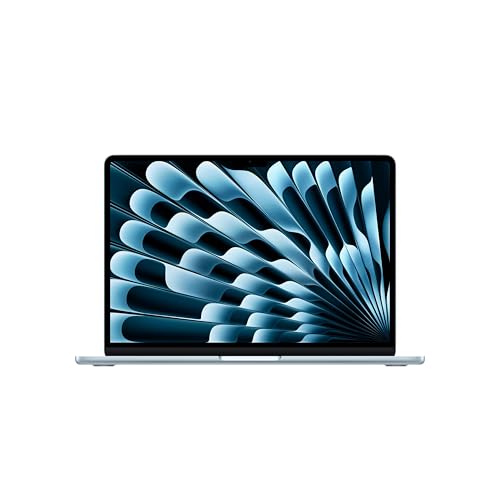
Apple 2026 MacBook Neo 13-inch Laptop with A18 Pro chip: Built for AI and Apple Intelligence, Liquid Retina Display, 8GB Unified Memory, 256GB SSD Storage, 1080p FaceTime HD Camera; Indigo
Disclosure: We may earn a commission when you buy through links on this page, at no extra cost to you. As an Amazon Associate I earn from qualifying purchases. Learn more
Highlights
- AN AMAZING MAC AT A SURPRISING PRICE — With an incredibly portable and durable aluminum design, up to 16 hours of battery life,* and the A18 Pro chip, MacBook Neo is ready to go wherever school takes you.
- FOUR STUNNING COLORS. ONE DURABLE DESIGN — Choose from four beautiful colors — Silver, Blush, Citrus, or Indigo — each with a color-coordinated keyboard. And MacBook Neo is made with a durable recycled aluminum enclosure that helps it reach 60 percent recycled content by weight — the most ever in any Apple product.*
- FLY THROUGH EVERYDAY ASSIGNMENTS — Whether you’re cramming for finals, using Apple Intelligence* to summarize class notes, creating presentations, or even playing the latest Apple Arcade game,* MacBook Neo delivers the performance and AI capabilities you need to get things done.
- UP TO 16 HOURS OF BATTERY LIFE — MacBook Neo delivers all day battery life, so you can power through from early morning classes to late night study sessions without worrying about plugging in.
- A VIBRANT 13-INCH DISPLAY* — The gorgeous Liquid Retina display on MacBook Neo supports 1 billion colors, so photos and videos pop and text is crisp for easy reading.
- A FEAST FOR YOUR SENSES — MacBook Neo comes with a 1080p FaceTime HD camera, a dual-mic array so your voice sounds focused and clear, and two side-firing speakers to deliver immersive sound. Perfect for video calls with classmates, presenting projects, or streaming your favorite shows.
- BUILT FOR AI — The AI apps and tools that help you tackle everyday assignments run seamlessly on MacBook Neo. And Apple Intelligence helps you write, express yourself, and get things done effortlessly with groundbreaking privacy protections at every step.
- MACOS RUNS APPS FAST — All your go-to apps run lightning fast in macOS, including built-in apps like FaceTime and Message
- MAC AND IPHONE. EVEN BETTER TOGETHER — Mac and iPhone are amazing on their own. And they’re even more amazing when used together. See and control what’s on your iPhone right from your Mac.* Start an email on one device and finish it on the other. Snap a photo on your iPhone and see it appear on your Mac. Or make a call without ever reaching for your iPhone.*
- * LEGAL DISCLAIMERS — This is a summary of the main product features. See below to learn more.
Why You'll Love It
- Up to 16 hours of battery life supports a full schedule of classes, assignments, and study sessions
- The A18 Pro chip supports everyday schoolwork, presentations, Apple Intelligence features, and Apple Arcade games
- The 13 inch Liquid Retina display supports 1 billion colors for colorful photos, videos, and crisp text
- The 1080p FaceTime HD camera, dual microphones, and two speakers support video calls and multimedia
- A recycled aluminum enclosure combines a portable design with 60 percent recycled content by weight
- Mac and iPhone features let you continue emails, view phone photos, and make calls from your Mac
Pros
- +A18 Pro chip with Apple Intelligence support
- +Up to 16 hours of battery life
- +13 inch Liquid Retina display
- +1080p camera and dual microphones
- +Color coordinated keyboard in Indigo
Cons
- -8GB of unified memory
- -256GB of SSD storage
- -One 13 inch display size
Detailed Review
The Apple MacBook Neo is a 13 inch laptop aimed at students and everyday users who want a portable computer for coursework, communication, and entertainment. Its A18 Pro chip supports everyday assignments and Apple Intelligence features, while the compact display and aluminum enclosure make portability central to the design. For someone moving between classes, working on presentations, organizing notes, and joining video calls, this combination offers a straightforward approach to daily computing without focusing on specialized professional workloads.
Battery life is one of its most useful features for a busy schedule. Apple lists up to 16 hours, giving students a stated endurance target for days that move from morning classes into evening study. Actual battery life can depend on how the computer is used, so the maximum should be treated as a guide rather than a guarantee for every workload. The A18 Pro chip also supports Apple Intelligence, including help with summarizing class notes and writing. These tools may be useful when organizing information or preparing assignments, while the listed privacy protections are another consideration for people interested in Apple's AI features.
The 13 inch Liquid Retina display supports 1 billion colors, with text designed to remain crisp and photos and videos appearing colorful. That makes the screen relevant to reading course material, preparing presentations, viewing photos, and streaming shows. For communication, the 1080p FaceTime HD camera is paired with a dual microphone array and two side firing speakers. Together, these features address the main parts of a video call: showing your face, capturing your voice, and playing back sound. Built in FaceTime and Messages also provide familiar communication options within macOS.
The physical design adds a personal touch through the Indigo finish and matching keyboard. The aluminum enclosure uses recycled material, with recycled content accounting for 60 percent of the product's weight. Integration with iPhone is another practical advantage for people already using Apple's devices. The listed features include viewing and controlling an iPhone from the Mac, continuing an email between devices, viewing iPhone photos on the Mac, and making calls without reaching for the phone. The main trade offs are the specified 8GB of unified memory and 256GB SSD storage, which shoppers should consider against the applications and files they expect to keep on the computer.
Verdict: Choose this laptop if you want a portable Mac for schoolwork, everyday productivity, video calls, entertainment, and Apple Intelligence features. If your regular work requires more memory or storage than the listed configuration offers, compare options with higher capacities before deciding.
Who Should Buy It
A great fit if you:
- Need a computer for class notes, assignments, presentations, messaging, and other everyday student responsibilities.
- Want a portable laptop with a stated battery life of up to 16 hours for a full study schedule.
- Already use an iPhone and want to continue emails, access photos, or make calls from your computer.
- Frequently join online discussions and value a 1080p camera, dual microphones, and built in speakers.
Consider something else if you:
- Regularly work with demanding applications and believe your workload calls for a laptop with more than 8GB of unified memory.
- Keep extensive files or large projects locally and would benefit from a laptop offering more than 256GB of SSD storage.
Before You Buy
Confirm on the listing:
- Check that the selected configuration is the Indigo version with 8GB of unified memory and 256GB of SSD storage.
- Consider whether the 13 inch display provides enough viewing space for your assignments, presentations, and everyday applications.
- Check the included items and any setup requirements before purchase, particularly if you need additional equipment for your intended workspace.
- If you plan to use the computer with an existing iPhone or other devices, confirm that the specific features you want are compatible with your setup.
How to compare your options: Start with memory and storage, since those capacities affect how well the configuration matches your applications and file needs. Next, weigh battery life, display size, camera quality, and sound against your daily routine. This model lists up to 16 hours of battery life, a 13 inch Liquid Retina display, a 1080p camera, and two speakers. If Apple Intelligence or iPhone integration matters to you, include those capabilities in your comparison rather than choosing on appearance alone.
Getting the Most From It
Begin by setting up the applications and communication tools you expect to use most often. macOS includes FaceTime and Messages, and the computer supports Apple Intelligence features that can help with writing and summarizing class notes. Explore the available tools and choose the ones that genuinely fit your schoolwork or everyday routine.
For coursework, organize notes and presentation files in a way that makes them easy to find when deadlines approach. Keep the 256GB SSD capacity in mind when deciding which files and projects to retain locally. If your work grows, review your storage needs periodically rather than waiting until space becomes a concern.
Make the most of the camera, microphones, and speakers when joining calls or presenting projects. Choose an appropriate setting for conversations, check that your intended audio and video options are selected, and adjust your setup to suit the task. The 1080p camera and dual microphone array provide the listed equipment for communicating with classmates and colleagues.
If you also use an iPhone, explore the supported ways to continue emails, access photos, and make calls from your Mac. For everyday care, follow Apple's supplied care guidance and keep your files organized. Treat the stated maximum battery life as an estimate, since your actual routine and applications may affect how long a charge lasts.
FAQ
Is the MacBook Neo suitable for college students?
Yes, it is designed to handle everyday assignments, class notes, presentations, communication, and entertainment. Its A18 Pro chip and Apple Intelligence support are relevant to those activities.
How long does the battery last?
Apple lists up to 16 hours of battery life. Treat this as a maximum rather than a promise that every application or workload will achieve the same result.
Can I use my iPhone with this laptop?
Yes, the listed features include viewing and controlling your iPhone from the Mac, continuing emails between devices, accessing iPhone photos, and making calls from your computer.
Is 8GB of memory and 256GB of storage enough?
It can suit everyday schoolwork and general computing, but the right capacity depends on your applications and files. Consider a higher capacity configuration if your work regularly needs more memory or local storage.
What comes in the box, and how do I clean it?
The listing does not state the complete box contents or detailed cleaning instructions. Check the purchase listing for included items and follow Apple's care guidance for cleaning the laptop.
Product Details
| Brand | Apple |
| ASIN | B0GR6FHGXX |