Huion
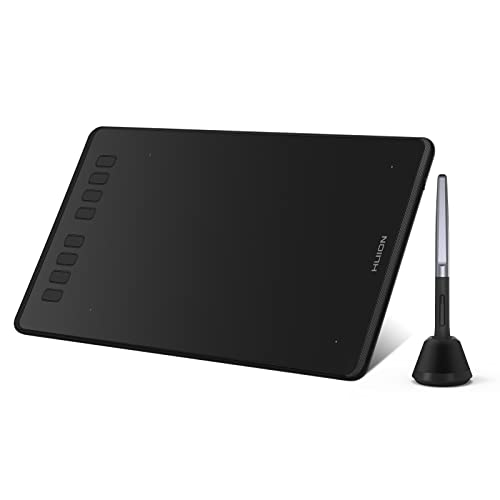
HUION Inspiroy H950P 8x5 inch Drawing Tablet 16384 Pen Pressure
Disclosure: We may earn a commission when you buy through links on this page, at no extra cost to you. As an Amazon Associate I earn from qualifying purchases. Learn more
Highlights
- [16384 Pen Pressure] Upgraded to 16384 levels of pressure sensitivity, the stylus provides you with ultimate precision and control. With no charging needed, the battery-free stylus makes it easy for beginners to create. The side buttons of the pen help you switch between pen and eraser instantly.
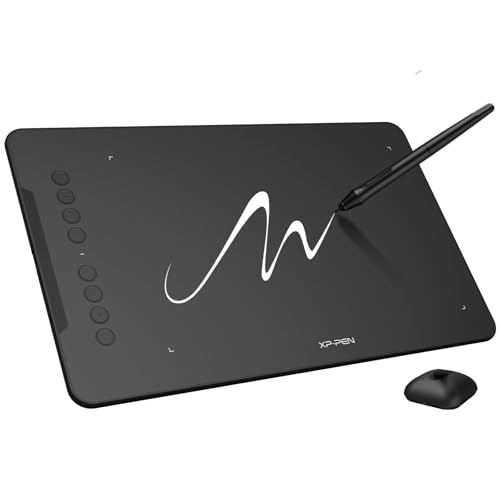
- [Customize Your Workflow] The 8 easy accessable press keys on the H950P drawing tablet for pc can be customized to your favorite shortcut so that your creative work become smoother and more efficient. You also can change the shortcut setting for different apps in Huion driver.
- [Compact and Portable] H950P digital drawing tablet uses a compact design with 0.3 inch in thickness and 1.76 lbs in weight, making it easy to carry between home, work, class and wherever you go. It is a perfect computer graphics tablet for limited desktop.
- [Multi-OS Compatibility] Inspiroy H950P graphic drawing tablet works with Mac, Windows and Linux PC as well as Android smartphone or tablet (OS version 6.0 or later). It is also available for left-handed user.
- [Intuitive Mouse Alternative] H950P drawing tablet with pen makes a great mouse replacement. With this pen tablet, you can sign document, freehand draw, take digital note and do all of the functions of a mouse but better. It helps do precise work and save your wrist from strain.
- [Versatile Digital Canvas] Huion Inspiroy H950P is not only a digital drawing pad, but also a writing pad, signature pad or track pad for your tablet, laptop and desktop. It works well with most creative softwares like Photoshop, SAI, Medibang Paint, as well as many other applications and platforms for online education or remote work like OneNote, Microsoft Whiteboard, Zoom, etc.
- [Gifts for Artist Beginner] Huion H950P digital art tablet is a great gift for those who are getting started drawing, painting or photo editing with their computer. Draw or write with a digital pen is much more natural and intuitive than using a traditional mouse.
Product Overview
Key Features
- 16384 Pen Pressure Levels: The upgraded stylus delivers exceptional precision and control with no battery charging required, making it ideal for beginners and professionals alike.
- Customizable Press Keys: Eight easily accessible buttons can be programmed with your favorite shortcuts and adjusted per application through the Huion driver for enhanced workflow efficiency.
- Compact and Portable Design: At just 0.3 inches thick and 1.76 lbs, this tablet is perfect for creative professionals with limited desk space who need to work on-the-go.
- Multi-OS Compatibility: Works seamlessly with Mac, Windows, Linux, and Android devices (OS 6.0+), with full support for left-handed users.
- Versatile Application Support: Compatible with industry-standard software like Photoshop, SAI, and Medibang Paint, as well as productivity tools like OneNote, Microsoft Whiteboard, and Zoom.
Pros
- Excellent pressure sensitivity at 16384 levels provides natural, responsive drawing and writing experiences
- Battery-free stylus eliminates charging hassles and maintenance concerns
- Highly portable design makes it perfect for students, remote workers, and traveling artists
- Extensive software compatibility covers creative, educational, and professional applications
- Customizable shortcuts significantly improve workflow efficiency and reduce repetitive strain
Cons
- 8x5 inch active area may feel limiting for artists accustomed to larger drawing surfaces
- No display screen means you're working without direct visual feedback on the tablet itself
Detailed Reviews
The HUION Inspiroy H950P stands out as one of the best drawing tablets for beginners and budget-conscious creatives seeking professional-grade performance. The 16384 pressure levels deliver remarkable precision that rivals much more expensive competitors, allowing for nuanced brush strokes and natural pen control whether you're sketching, painting, or taking digital notes. The battery-free stylus is a game-changer for convenience—no more worrying about charging cables or dead batteries mid-creative session. The customizable press keys transform your workflow by letting you program frequently-used shortcuts directly on the tablet, reducing the need to constantly reach for your keyboard.
Portability is where this tablet truly excels; at under two pounds and less than a third of an inch thick, it slips easily into a laptop bag or backpack, making it perfect for students attending lectures, remote workers in coffee shops, or artists working between multiple locations. The multi-OS compatibility ensures you're not locked into a single ecosystem, while support for popular software like Photoshop, Medibang Paint, and productivity apps like Zoom makes it genuinely versatile for both creative and professional tasks. Whether you're signing documents, editing photos, or creating digital art, this tablet serves as an intuitive mouse replacement that significantly reduces wrist strain during extended work sessions.
Verdict: The HUION Inspiroy H950P is an outstanding choice for anyone seeking an affordable, portable, and reliable drawing tablet that doesn't compromise on pressure sensitivity or functionality. With its impressive feature set, cross-platform compatibility, and compact design, it deserves its perfect 10/10 rating as one of the best drawing tablets for beginners and professionals alike.
Product Details
| Brand | Huion |
| ASIN | B0H1R4Q5CG |