YUAN
Digital Planner Notebook Real-Time & Offline Sync with Digitize Smart Pen
Disclosure: We may earn a commission when you buy through links on this page, at no extra cost to you. As an Amazon Associate I earn from qualifying purchases. Learn more
Highlights
- 【Important Note】 Before using the YUAN Smart Pen for the first time, fully charge it via USB. The first full charge may take several hours – we recommend charging it overnight.
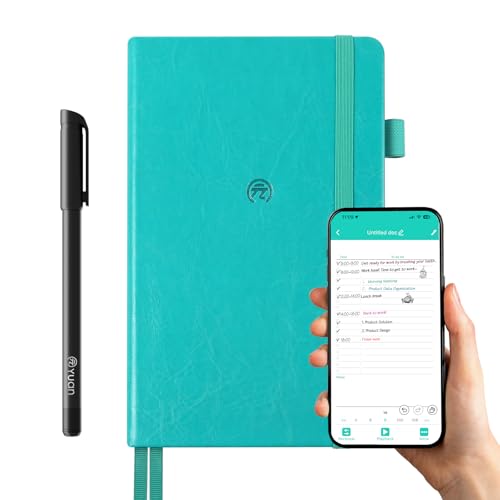
- 【Yuan Smart Notebook】the handwriting of the smart notebook can not be erased! our smart notebook with the special code for the smart pen to recognize, so the Yuan smart pen only work with our Yuan smart notebook. Replacement smart notebooks and the refill of the smart pen are available in our store.
- 【Pen-and-Paper Texture & Real-Time Digital Sync】Enjoy smooth, natural handwriting with real-time sync to your mobile device via the smart pen—no scanning or photo-taking required. Offline notes automatically upload when reconnected, balancing the traditional writing experience with modern digital convenience.
- 【4 Versatile Page Templates & All-in-One Planner】 Features daily/weekly planners smart notebook, to-do lists, grid and lined pages, ideal for project management, fitness tracking, family scheduling, budgeting, task lists and more. One notebook replaces multiple planners for work and daily life.
- 【Smooth Smart Pen & Complete Set】The Yuan smart pen with smart notebook planner delivers consistent, skip-free writing. Package includes: 1×Smart Pen, 1×Digital Notebook (187 pages), 4×D1 ink refills, 1×USB charging cable, 1×user manual—ready to use out of the box.
- 【Local Data Privacy & Wide Compatibility】Server-free local storage keeps your data private and secure on your phone/tablet with no breaches or subscription fees. The app supports iOS & Android, with one-click import/export, sharing, printing, and handwriting replay.
- 【Customizable & Portable Design】Supports custom month/week start dates to fit your habits. The 5.2"×8.3" portable leather hardcover fits easily in bags, with spill-resistant peacock blue cover and ink-proof paper optimized for smart pens.
Why You'll Love It
- Digitizes handwriting in real time or syncs offline notes later without manual photo scanning
- Stores planner data locally on your device with no monthly subscription fees required
- Includes 187 pages across daily, weekly, grid, lined, and to-do templates
- Lets you review handwriting playback and export, print, or share notes in one click
- Features a compact 5.2 by 8.3 inch spill-resistant peacock blue leather hardcover
- Comes complete with four D1 ink refills and a dedicated USB charging cable
Pros
- +Automatic real-time and offline digital syncing
- +No cloud subscription fees or account required
- +Includes four versatile page layout templates
- +Comes with four replacement D1 ink refills
- +Compact spill-resistant hardcover build
Cons
- -Smart pen only works with proprietary coded notebook
- -Physical ink on pages cannot be erased
- -Initial USB charging can take several hours
Detailed Review
The YUAN Digital Planner Notebook pairs a traditional writing feel with automatic digital archiving. It suits planners, students, and professionals who prefer physical pen and paper but need their schedules and notes backed up to an iOS or Android device. Rather than requiring you to scan pages with a phone camera, the included smart pen digitizes strokes in real time or stores them offline to upload automatically once reconnected.
Inside the 187-page book, you get four distinct layouts: daily and weekly planners, to-do lists, grid pages, and lined sheets. This lets you organize task lists, project tracking, fitness routines, and family schedules in one place. The companion app supports customizable start dates for weeks and months, and it includes features like handwriting replay, one-click document export, easy sharing, and printing options.
Data privacy is handled through local device storage instead of remote servers, eliminating subscription fees. The hardware itself is built for portability, measuring 5.2 by 8.3 inches with a spill-resistant peacock blue leather hardcover and ink-proof paper. The set is fully equipped out of the box with the notebook, smart pen, four standard D1 ink refills, a USB charging cable, and a user manual.
There are specific operational boundaries to keep in mind. The physical ink written on these pages cannot be erased, and the smart pen relies on special coded patterns, meaning it only works with YUAN brand replacement notebooks. Additionally, the smart pen requires a long initial charge via USB before its first use, which may take several hours.
Verdict: The YUAN Smart Planner is a reliable choice for anyone wanting automated digital backups without losing the tactile feel of standard ink on paper. It is especially suitable for privacy-minded users looking for local file storage without ongoing subscription costs.
Specifications
- Dimensions: 5.2 x 8.3 inches
- Cover Material: Spill-resistant leather hardcover
- Cover Color: Peacock blue
- Page Count: 187 pages
- Page Layouts: Daily/weekly planner, to-do lists, grid, lined
- Ink Refills: 4 x D1 refills included
- Charging Interface: USB
- Compatibility: iOS and Android
Who Should Buy It
A great fit if you:
- Want your paper notes backed up to a phone or tablet without taking photos manually
- Prefer organizing tasks across daily, weekly, grid, and lined formats in one book
- Value local data security and want to avoid ongoing app subscription charges
- Need a compact, spill-resistant planner to carry in everyday bags
Consider something else if you:
- Need reusable notebook pages that can be wiped clean or erased
- Want a smart pen that functions on regular, non-coded stationary
FAQ
Can I erase and reuse the pages in this notebook?
No. The physical handwriting in this smart notebook cannot be erased, though replacement notebooks are available.
Does the smart pen work on any standard paper?
No. The smart pen requires the special pattern code printed on YUAN smart notebooks to recognize and digitize your writing.
Do I need an internet connection while writing?
No. The pen supports offline writing and will automatically upload your notes to the mobile app once the connection is restored.
How do I prepare the pen for its first use?
You need to fully charge the pen via the included USB cable prior to first use. The initial charge may take several hours, and overnight charging is recommended.
Product Details
| Brand | YUAN |
| ASIN | B0GJRYT7LF |