ApoloSign
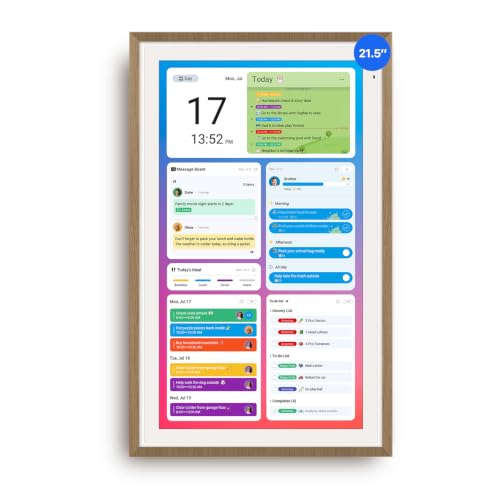
Apolosign 21.5-inch Digital Calendar, No-Subscription, Smart Wall Planner with Calendar Sync, Chore
Disclosure: We may earn a commission when you buy through links on this page, at no extra cost to you. As an Amazon Associate I earn from qualifying purchases. Learn more
Highlights
- Smart Family Smart Calendar– No Subscription Required: Keep your entire family organized in one place with the Apolosign Digital Calendar & Smart Wall Planner. Sync schedules, events, chores, reminders, and shared calendars from Google Calendar, iCloud, Outlook, and more. Designed to bring daily family life into better organization — all without any monthly subscription fees.
- Dual Mode: Calendar & Android: Switch easily between Calendar Mode for simple family scheduling, and Android Mode for a fully customizable dashboard. One touch lets you personalize your screen with apps and widgets or keep it clean and focused.
- Interactive Chore Chart, Routine & Family Planner: Make daily routines easier and more engaging with reward-based chore tracking. Help kids stay motivated by completing tasks, building habits, and earning rewards. Families can manage grocery lists, shopping lists, wish lists, and weekly meal planning all in one shared digital space through the Apolosign Calendar App.
- Smart Dashboard with Widgets, Apps & Custom Layouts: Personalize your electronic calendar with widgets for weather, clocks, meals, music, smart home controls, and more. Download additional apps from Google Play to expand functionality and create a fully connected family dashboard that fits your daily needs and routines.
- Smart Photo Frame & Family Memory Display: More than a calendar — turn your wall into a living family display. Show photos and videos from Google Photos with beautiful slideshow screensavers. Enjoy anti-glare HD touchscreen clarity, auto-brightness adjustment, and sleep mode for comfortable viewing.
- Smart Voice Assistant & Connected Home Control: Use the built-in Google Gemini voice assistant to check schedules, set reminders, view weather updates, manage tasks, and control compatible smart home devices like lights, cameras, and doorbells — all directly from your Smart Family Calendar.
- Easy Setup, Simple Experience & Ongoing Support: Get started in minutes — just plug in, connect to Wi-Fi, and sync your calendars. Whether using Calendar Mode or Android Mode, the experience is designed to stay simple and intuitive. Our Help Center, step-by-step guides, and smart assistant ensure easy setup and daily use for the whole family.
Why You'll Love It
- Syncs your family events from Google Calendar, iCloud, and Outlook without recurring subscription fees
- Switch between a clean schedule layout and an open Android interface with Google Play apps
- Track daily habits and chores with built-in reward features to keep children engaged
- Manage household meals, grocery lists, and shopping tasks in one shared digital dashboard
- Displays Google Photos slideshows on an anti-glare HD touchscreen with auto-brightness adjustment
- Built-in Google Gemini voice assistant lets you manage tasks and control compatible smart home gear
Pros
- +No monthly subscription fees required
- +Large 21.5-inch anti-glare HD touchscreen
- +Dual mode for schedule or Android apps
- +Syncs with Google, iCloud, and Outlook
- +Built-in Google Gemini voice assistant
Cons
- -Must be plugged into a power source
- -Requires Wi-Fi for syncing and smart features
- -Large 21.5-inch footprint requires ample wall space
Detailed Review
The Apolosign 21.5-inch Digital Calendar serves as a centralized hub to replace paper planners, whiteboards, and scattered schedules. It is designed for busy households looking to consolidate appointments, chores, and meal planning onto a single shared display without paying monthly subscription fees.
A core strength is its dual-mode operating system. In Calendar Mode, it presents a streamlined family schedule that syncs with Google Calendar, iCloud, and Outlook. Switching to Android Mode opens up a customizable dashboard where you can add widgets for weather, clocks, and music, or download additional apps via Google Play. The Apolosign Calendar App also includes an interactive chore chart that uses reward-based tracking to motivate kids, alongside tools for shared grocery lists and weekly meal plans.
Beyond scheduling, the display functions as a smart home command center and digital photo frame. The built-in Google Gemini voice assistant lets you set reminders, ask for weather updates, and manage compatible connected devices like lights, doorbells, and cameras. When not actively in use, the anti-glare HD touchscreen can run Google Photos slideshows with auto-brightness adjustment and an integrated sleep mode for comfortable viewing day and night.
As a trade-off, this 21.5-inch display needs dedicated wall space and an accessible power outlet, as it requires a plug-in connection to run. Its smart assistant, photo sync, and calendar updates also rely entirely on an active Wi-Fi connection to function properly.
Verdict: The Apolosign Smart Wall Planner is a solid fit for busy families wanting a large, multi-user schedule display with smart home integration and no recurring software fees.
Who Should Buy It
A great fit if you:
- Need to sync multiple family calendars across Google, iCloud, or Outlook in one visible place
- Want an interactive chore and routine chart with reward tracking for kids
- Prefer a smart family planner without recurring monthly subscription costs
- Want to stream Google Photos albums on an anti-glare wall display
Consider something else if you:
- Lack the wall space or nearby power outlet for a 21.5-inch plug-in display
- Prefer a compact, battery-powered desk organizer rather than a large wall-mounted screen
FAQ
Are there monthly subscription fees to use this calendar?
No, the device is designed to organize schedules, chores, and lists without any subscription fees.
Which calendar services can sync with the display?
It syncs with Google Calendar, iCloud, and Outlook, among others, to manage shared family events.
Can you install other apps on this device?
Yes, switching to Android Mode gives you access to Google Play, allowing you to download apps and add widgets for weather, music, and smart home controls.
What voice assistant is built into the unit?
The calendar includes Google Gemini, which allows you to check schedules, set reminders, and control compatible smart home gear by voice.
Product Details
| Brand | ApoloSign |
| ASIN | B0FDGG67ZJ |