Autel
Autel J2534 Pass-Thru Programmer, 2026 OEM Reprogramming Diagnostic Tool
Disclosure: We may earn a commission when you buy through links on this page, at no extra cost to you. As an Amazon Associate I earn from qualifying purchases. Learn more
Highlights
- 💯【Conta.ct us for Support Directly】For any issues experienced after purchase, please reach out to: 📞autelsupply@ outlook. com🛣️. Our team will provide perfect solution for you. For tech support or [explore additional accessory], please cont.act our team: 📞autelsupply@ outlook. com🛣️.
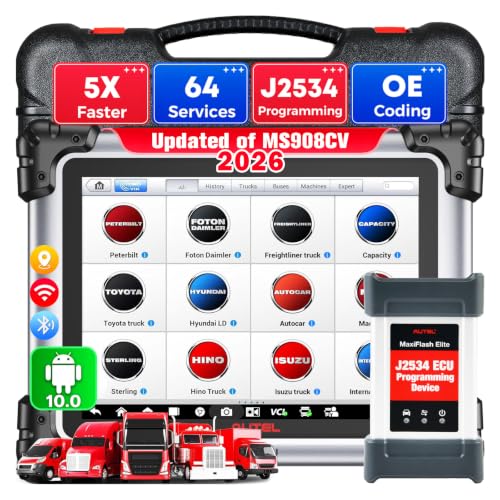
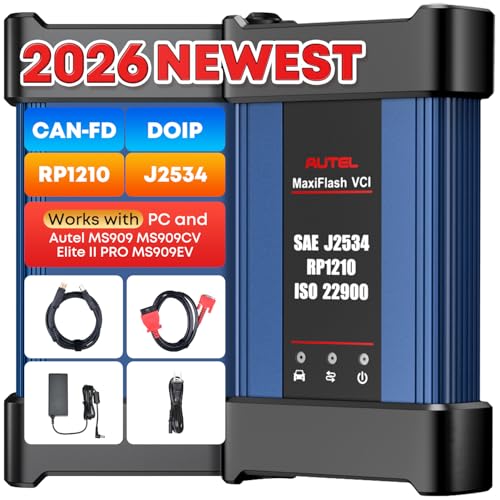
- 🌎【Autel J2534 Pass-Thru Progra.mmer】As an OEM Pass-Thru Progra.mmer Vehicle interface for multiple makes, Autel MaxiFlash J2534 support all J2534 protocols, D-PDU, CAN-FD and DoIP protocols. 2026 newer Autel MaxiFlash J2534 VCI can works with P-C and download OEM vehicle software, seamlessly conduct OE-level diagnostic-progra.mming-c0ding. Also, Work with Elite II Pro/ Ultra Lite/ MS909/ MS909CV/ MS909EV to directly pro.gram on Merce.des-Be.nz & BM.W. Autel J2534 Progr.ammer is a multi-functional device and supports 10+ major brands, including for Hond.a, G.M, LandRo.ver, BM.W, Chrysl.er, For.d, Hyun.dai, Ki.a, Merc.edes B.enz, Toyot.a, Volksw.agen etc.
- 🌎【Enhanced Protocol: J2534/D-PDU/RP1210/CAN FD/DoIP】Autel MaxiFlash JVCI is a blueto.oth communicate device, it supports latest CAN FD DoIP CAN protocols, compliant with automotive D-PDU/ J2534/ RP1210 standards. It can perform standard PassThru J2534 functions: compatible with Toyota Techstream, Volvo VIDA, Honda HDS, Jaguar Land Rover IDS and BM.W 3G for OEM diagnostics. CAN FD protocol is mainly for GM 2019+, DoIP protocol is mainly for Volvo 2018+, for L-and Rover/for Jaguar 2017+, for BM.W F chassis and G chassis.
- 🌎【Compatible with P-C/ WIND.OWS 】The Autel J2534 VCI can be connected to a compu.ter via a data cable; once the corresponding OEM software is installed, it enables do advanced progr.amming and c0ding on your vehicles. Easy Steps: 1) Connect to P-C via a USB cable 2) download OEM vehicle software 3) Start Diagnose. Take For.d for example, you can download OEM software on mot.orcraft.erservi.ce website, such as: For.d Diagnostic Software downloads, As B.uilt Data, Updated Cali.bration information, then use different software do relevant features.
- 🌎【Work with Autel Elite II Pro/ Ultra Lite/ MS909/ MS909CV/ MS909EV】This 2026 latest Autel J2534 Pass-Thru VCI is 100% compatible with Autel Elite II Pro Ultra Lite MS909 MS909CV MS909EV to perform advanced functions from diagnose to progra.mming.
- 🌎【SAE J2534-1 & J2534-2 Pr0gramming】Tailored to ECU progra.mming & c0ding, Autel J2534 Pass-Thru VCI can communicate effectively with the ECU across different vehicle makes and models. After you purchased OEM software, J2534 pass thru progra.mmer can work with P-C: Update vehicle software to the latest version, optimize the histo.rical le.gacy of the car's old version, Replace existing software/ firmware, reprogr.am component after replacement.
- 🌎【Extensive Compatibility】Autel MaxiFlash J2534 reprog.ramming tool is compatible with Toyot.a Techstream, Volv.o VIDA, Hon.da HDS, Jaguar-Lan.d Rover IDS and BM.W 3G for OEM diagnostics. To check compatibility, please cont.act 🚘autelsupply @ outlook . com🚘 directly for guara.nteed support!
- 🌎【High-speed Transmission Speed, High Quality】Autel J2534 has premium hardware to keep fast transmission speed. It comes with Blueto.oth & USB two communication ways, 5G WIFI frequency band. The transmission speed is 5X faster than other brands. Updated from old J2534, this newer J2534 reprog.ramming tool never need send J2534 SN and scanner SN to us to bind the two device together. Just purchase, you can use directly.
- 📢【Kind Tips】After purchasing the J2534, you need to update the firmware first. Steps: ✅𝟭. Access to Autel official website > click "Support" - "Download" > download "Maxi P-C Suite" APP ✅𝟮. connect J2534 and compu-ter via USB Cable ✅𝟯. Install "Maxi P-C Suite" APP on the compu-ter and update to the latest version > go to the vehicle website to purchase the corresponding OEM software for use. 📢Note: J2534 is only compatible with Windows compu-ters, and OEM software needs to be purchased.
- 🌎【1 Year War.ranty】This Autel MaxiFlash Reprog.ramming Device J2534 comes with 12 Months, 30 Days no-reason return & replacement policy. If you need tech support about compatibility, please cont.act 🚘autelsupply @ outlook . com🚘
Why You'll Love It
- Supports multiple automotive communication protocols including J2534, D-PDU, RP1210, CAN FD, and DoIP
- Enables factory-level ECU programming and diagnostics when paired with a Windows computer
- Works directly with Autel tablets like Elite II Pro, Ultra Lite, and MS909 series
- Offers fast data transfer using both wired USB and wireless Bluetooth with 5G Wi-Fi
- Works across more than ten major vehicle brands without requiring serial number binding
Pros
- +Supports CAN FD and DoIP protocols
- +Dual connection via USB and Bluetooth
- +Compatible with select Autel scan tablets
- +No manual serial number binding needed
- +Backed by a 1-year warranty
Cons
- -Requires separate OEM software purchases
- -Only works with Windows computers
- -Needs firmware setup before first use
Detailed Review
The Autel J2534 Pass-Thru Programmer is a vehicle communication interface designed for technicians and advanced DIYers who need to perform dealership-level diagnostics, module coding, and ECU reprogramming. Connecting between a vehicle and a Windows computer or compatible diagnostic tablet, it allows you to update control software, replace firmware, and reprogram components across a wide range of vehicle brands.
Broad protocol support is the main strength of this interface. In addition to standard SAE J2534-1 and J2534-2 compliance, it handles D-PDU, RP1210, CAN FD, and DoIP standards. This makes it compatible with modern vehicle networks, including GM models from 2019 onward for CAN FD, as well as newer Volvo, Jaguar, Land Rover, and BMW chassis using DoIP. It connects via wired USB or wireless Bluetooth over a 5G Wi-Fi band for fast data transmission.
The device operates as a standalone pass-thru unit with factory software such as Toyota Techstream, Honda HDS, Volvo VIDA, and Jaguar Land Rover IDS. It also links directly with high-end Autel scan tools, including the Elite II Pro, Ultra Lite, MS909, MS909CV, and MS909EV, allowing direct programming for brands like BMW and Mercedes-Benz without manual serial number binding.
A few practical requirements are worth noting before setting it up. The programmer only works on Windows-based PCs and requires an initial firmware update through the Maxi PC Suite application before use. Furthermore, it does not include factory diagnostic software, which must be purchased separately from each automaker's service website.
Verdict: The Autel J2534 Pass-Thru Programmer is an excellent choice for repair shops and serious technicians who need modern protocol support for factory-level coding and flashing. If you have a Windows PC and are ready to manage individual OEM software subscriptions, this VCI provides a reliable bridge to dealer-level capabilities.
Who Should Buy It
A great fit if you:
- Need to perform OEM-level ECU programming on newer CAN FD or DoIP vehicles
- Already own a compatible Autel diagnostic tablet such as the MS909 or Elite II Pro
- Work on multiple makes including Ford, GM, Toyota, Honda, BMW, and Mercedes-Benz
- Prefer flexible connectivity with both wired USB and wireless Bluetooth options
Consider something else if you:
- Do not have access to a Windows computer for PC-based diagnostics
- Want an all-in-one handheld scanner that includes factory software subscriptions
FAQ
Which operating systems are compatible with this tool?
The Autel J2534 interface is compatible exclusively with Windows-based computers.
Does this device come with automaker diagnostic software included?
No, OEM vehicle software is not included and must be purchased directly from the respective vehicle manufacturer websites.
Which Autel diagnostic tablets can be used with this programmer?
It works directly with the Autel Elite II Pro, Ultra Lite, MS909, MS909CV, and MS909EV tablets.
What setup is required before using the device for the first time?
You need to download the Maxi PC Suite app from the Autel website onto a Windows PC, connect the device via USB, and complete the firmware update before use.
Product Details
| Brand | Autel |
| ASIN | B0D5MDKFCF |