XPPen
XPPen Updated Deco 01 V3 Drawing Tablet, 16384 Pressure Sensitivity, 8 Custom
Disclosure: We may earn a commission when you buy through links on this page, at no extra cost to you. As an Amazon Associate I earn from qualifying purchases. Learn more
Highlights
- Industry-leading: The upgraded X3 Smart Chip stylus (industry-leading innovation) delivers 16,384 pressure levels and 60° tilt support, solving traditional tablet lag and stroke distortion. Perfect for digital artists transitioning from paper to digital, allowing natural shading like charcoal/pencil without tech barriers
- Beginner-Friendly Design: Ambidextrous layout with programmable keys reduces 40% menu navigation timen, ideal for students and hobbyists juggling multiple design apps
- Optimized for Android Devices: Seamlessly connects to Android Phone/Android tablets via USB-C (includes aspect ratio adjustment). We recommend downloading the XPPen Tools app to adjust your smartphone's screen aspect ratio for precise mapping, accommodating various screen sizes in portrait mode
- 10" Active Area – 20% Larger Than Entry-Level drawing tablet: Generous 6.25x10" workspace eliminates hand-cramping for manga/anime creators, with edge-backlit surface enabling nighttime sketching sessions
- Zero Charging Hassles & On-the-Go Portability: Battery-free pen + 8mm ultra-slim body (lighter than iPad) solves beginners' "forgot to charge" anxiety. Fits in school backpacks for dorm-to-studio mobility
- Versatile Compatibility: The Deco 01 V3 is compatible with a wide range of operating systems, including Windows 7 and later, Android 10.0 and above, macOS 10.13 and newer, Chrome OS 88 and later, as well as Linux. It also works with popular design software such as Photoshop, Corel Painter, Illustrator, and Clip Studio. *Ensure your Windows is updated to version 11 or your Mac to version 12 for optimal performance
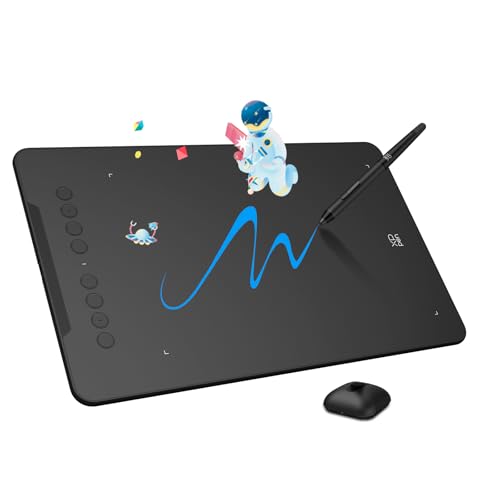
- Included Accessories: Your purchase includes: 1 x Deco 01 V3 Drawing Tablet, 1 x Stylus, 10 x Nibs, 1 x Stylus Stand, 1 x Glove, 1 x Protective Film, 1 x USB-C to USB-A Cable, 1 x USB to USB-C Adapter
Why You'll Love It
- Battery-free X3 Smart Chip stylus delivers 16,384 pressure levels and 60-degree tilt support
- Spacious 6.25 by 10-inch active area provides room for sketching and illustration
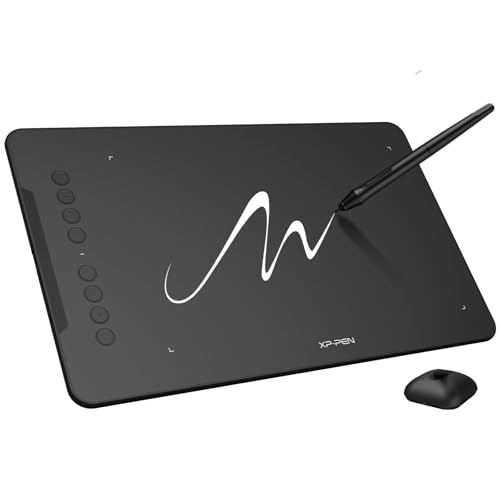
- Eight programmable shortcut keys and an ambidextrous layout speed up software navigation
- Slim 8mm profile fits easily into backpacks for convenient travel between home and studio
- Edge-backlit drawing surface assists visibility during late-night creative sessions
- Works across Windows, macOS, Android, Chrome OS, and Linux platforms
Pros
- +High 16,384 pressure sensitivity levels
- +Battery-free stylus needs no recharging
- +Generous 6.25x10 inch drawing area
- +Includes drawing glove and 10 extra nibs
- +Broad OS and design software compatibility
Cons
- -Optimal use requires updated Windows 11 or macOS 12
- -Phone aspect ratio adjustment requires a separate app
Detailed Review
The XPPen Deco 01 V3 is an ultra-slim digital graphics tablet designed for students, hobbyists, and artists making the transition from paper to digital illustration. It combines an expansive active workspace with responsive stylus technology, giving creators a portable way to sketch, edit, and navigate design software across multiple operating systems.
At the core of the tablet is the X3 Smart Chip stylus, which offers 16,384 levels of pressure sensitivity alongside 60 degrees of tilt support. This allows for fine line control and natural shading techniques similar to traditional charcoal or pencil. Because the stylus is entirely battery-free, you never have to pause work to recharge it. The drawing surface measures 6.25 by 10 inches and features edge backlighting for low-light environments, while eight customizable shortcut keys assist with quick tool switching.
Setting up the tablet is straightforward whether you use a computer or a mobile device. It connects via USB-C to Android phones and tablets, and users can adjust screen aspect ratios in portrait mode using the companion app. The hardware works with major creative programs like Photoshop, Illustrator, Corel Painter, and Clip Studio, and it includes essential extras such as a drawing glove, protective film, and ten replacement nibs.
Keep in mind that while the Deco 01 V3 supports older operating systems back to Windows 7 and macOS 10.13, optimal performance calls for Windows 11 or macOS 12. Additionally, mobile users need to download the dedicated configuration app to map smartphone screen ratios accurately, and the tablet relies entirely on a wired USB connection to function.
Verdict: The XPPen Deco 01 V3 is a solid, feature-rich choice for students, anime creators, and digital art beginners who want high pressure sensitivity and a large workspace without high bulk. It delivers broad platform compatibility and useful bundled accessories right out of the box.
Specifications
- Active Area: 6.25 x 10 inches
- Pressure Sensitivity: 16,384 levels
- Tilt Support: 60 degrees
- Body Thickness: 8mm
- Custom Keys: 8 programmable buttons
- Included Accessories: Stylus, stand, 10 nibs, glove, protective film, USB-C cable, USB adapter
- OS Compatibility: Windows 7+, macOS 10.13+, Android 10.0+, Chrome OS 88+, Linux
Who Should Buy It
A great fit if you:
- Need a large, portable drawing surface for manga, anime, or general digital art.
- Want high pressure sensitivity without ever having to recharge a stylus.
- Switch between desktop systems and Android mobile devices for your artwork.
- Prefer having physical shortcut buttons to quickly access software tools.
Consider something else if you:
- Require a fully wireless Bluetooth drawing setup.
- Are unable to update your computer to current operating systems for peak performance.
FAQ
Does the stylus require batteries or charging?
No, the included X3 Smart Chip stylus is battery-free and does not require charging.
What accessories come included with the tablet?
The package includes the Deco 01 V3 tablet, a stylus, a stylus stand, 10 replacement nibs, an artist glove, a protective film, a USB-C to USB-A cable, and a USB to USB-C adapter.
Can I use this tablet with an Android phone?
Yes, it connects to Android devices running Android 10.0 or above via USB-C. You can use the XPPen Tools app to adjust your phone screen aspect ratio for accurate mapping.
Which art programs are supported?
The tablet supports popular design software including Photoshop, Illustrator, Corel Painter, and Clip Studio.
Product Details
| Brand | XPPen |
| ASIN | B07VKB37HZ |